

Tickloop: To-Do & Checklists
Next App Factory LLC Productivity iPhoneiPadiPod touch
Tickloop: To-Do & Checklists is a free Productivity app for iPhone and iPad by Next App Factory LLC. Rated 5.0/5 from 2 ratings. Requires iOS 16.4.
- Rating
- 5.0
- 2 ratings
- Price
- Free
- on the App Store
- Size
- 53 MB
- Age 4+
- Updated
- Oct 30
- 2026 · v2026.1.2
Screenshots
Save to Pinterest


About Tickloop: To-Do & Checklists
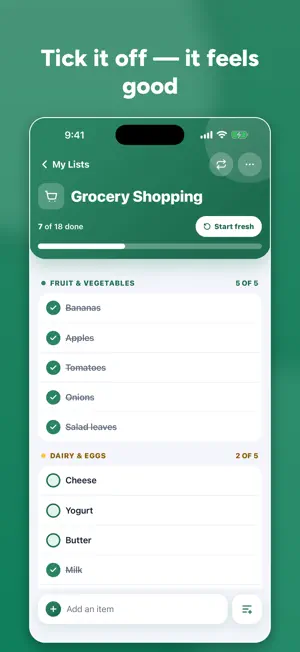
Checklists you use again. Most to-do apps treat a list as a one-time project. Tickloop is built for the lists you run again and again: the morning routine, the weekly shop, the packing list, the Sunday clean. Make a list once, tick it off, and start fresh. Lists that start fresh Every list can start fresh on a schedule (daily, on weekdays, weekly, monthly or every few days) or only when you tap Start fresh. Everything is unticked again, and the run you just finished is saved in Activity. Tick it off from your home screen Checkable home-screen widgets: tick items without opening the app, and start a finished list fresh right from the widget. Today, in one place Today gathers what needs doing now: overdue tasks, tasks due today and your daily routines, from every list. Add a quick to-do with an optional date, time and reminder. Start from a template 12 ready-made templates: Daily To-Do, Morning Routine, Grocery Shopping, Travel Packing, House Cleaning, Moving Checklist and more. Save any of your own lists as a template too. Reminders that know when to stop Reminders for tasks and lists, a gentle daily summary, snooze and quiet hours. A reminder stops once its task or list is done. See what you finished Activity shows what you got done today and this week, with a calendar for each list that starts fresh. Fast and simple One tap opens the keyboard, Return adds the next item, and pasting several lines adds several items. Subtasks, sections, light and dark mode, and 55 languages. Private by design No account and no sign-up. Your lists stay on your phone; back them up to a file whenever you like. Trash keeps deleted lists for 30 days. Free, with Tickloop Pro if you want more Every list and task feature is free, with ads. Tickloop Pro removes the ads and adds all themes and app icons, every widget size including the Today widget, and unlimited history in Activity. Choose monthly or yearly; the yearly plan starts with a free trial. Subscriptions renew automatically unless cancelled at least 24 hours before the end of the period, and you can manage them in your account settings. Terms of use (EULA): https://www.apple.com/legal/internet-services/itunes/dev/stdeula/ Privacy policy: https://tickloop.nextappfactory.com/privacy
What’s new
Version 2026.1.2 · Updated October 30, 2026
• A quick guided tour shows you around on first launch • A notifications bell keeps your reminders in one place • 42 ready-made templates to start a list in one tap • Fixes and polish
App privacy
The developer, Next App Factory LLC, reported these privacy practices to Apple.
Data Used to Track You
The following data may be used to track you across apps and websites owned by other companies:
- Identifiers: Device ID
- Usage Data: Advertising Data
Data Not Linked to You
The following data, which may be collected but is not linked to your identity, may be used for the following purposes:
- Identifiers: Device ID
- Usage Data: Advertising Data, Product Interaction
- Diagnostics: Crash Data, Performance Data
Used for: Third-Party Advertising, Analytics, App Functionality
Alternatives to Tickloop: To-Do & Checklists
Looking for apps like Tickloop: To-Do & Checklists? Here are 6 similar apps on the App Store. The highest rated is TaskMiny: Task Manager (5.0/5), and all 6 are free to download.
-
 StundenApp Zeiterfassung
-
 Repetto: Recurring Tasks
-
 Cleanosaurus: Family chores
-
 TaskMiny: Task Manager
5.0
-
 nntask: Household Chores
-
 To-Do List : Reminders & Notes
| App | Rating | Price | Last updated | Compare |
|---|---|---|---|---|
| Tickloop: To-Do & Checklists | 5.0 / 5 (2 ratings) | Free | October 30, 2026 | |
| StundenApp Zeiterfassung | – | Free | Nov 21, 2026 | Compare |
| Repetto: Recurring Tasks | – | Free | Nov 20, 2026 | Compare |
| Cleanosaurus: Family chores | – | Free | Sep 2, 2026 | Compare |
| TaskMiny: Task Manager | 5.0 / 5 (2) | Free | Oct 28, 2026 | Compare |
| nntask: Household Chores | – | Free | Sep 29, 2026 | Compare |
| To-Do List : Reminders & Notes | – | Free | Apr 10, 2025 | Compare |