

Thinkdown: AI Voice Journal
HONGQUAN XIE Productivity iPhoneiPadiPod touchMacApple Watch
Thinkdown: AI Voice Journal is a free Productivity app for iPhone and iPad by HONGQUAN XIE. Rated 5.0/5 from 2 ratings. Requires iOS 26.0.
- Rating
- 5.0
- 2 ratings
- Price
- Free
- on the App Store
- Size
- 7 MB
- Age 4+
- Updated
- Oct 26
- 2026 · v1.1.1
Screenshots


About Thinkdown: AI Voice Journal
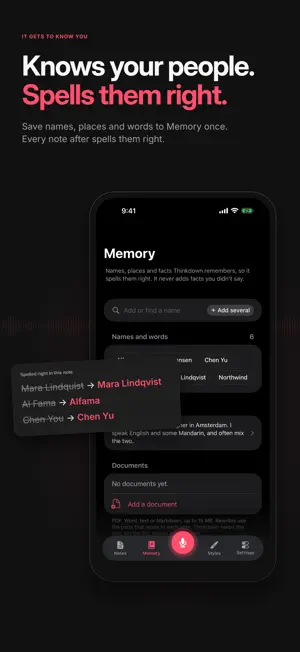
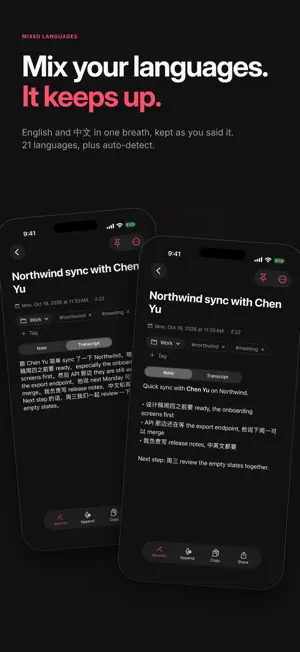
Your AI voice note app and AI journal in one. Talk the way you think, and Thinkdown turns it into a clear note or a journal entry that sounds like you. Tap record and just talk: half sentences, tangents, "wait, no". Thinkdown transcribes it and writes a clean note in the style you pick, with a title and tags. Your recording and transcript stay with the note, so you can always check what you really said. AI JOURNAL • Talk through your day and get a journal entry in your own voice, not a summary. • A daily streak and milestones keep the habit going. • Ask your journal anything, like "what was I worried about last month?", and get an answer from your own entries with the sources it used. • Places on each entry, with Show on map. IT KNOWS YOU • The more you talk, the better it knows you. Every note suggests the people, places and words it heard; one tap saves them to Memory, and from then on they're spelled right. • It fixes itself. Select a word it got wrong, tap Fix and say what you meant. The note updates and Thinkdown remembers how it misheard you, so it doesn't happen again. • It knows where you are. Neighborhood and town names near where you record help it spell local places right. • Add documents as background, so notes about a project get its names and references right. SAY IT YOUR WAY • Record on iPhone from the app, the Lock Screen or Siri, on the Mac with a keyboard shortcut, or on Apple Watch. • Pause and pick up again, or add more to a note later. • 21 voice languages, and you can mix them in one note. READ IT CLEAN • Styles turn the same thought into a clear note, a journal entry, a list, an email or a prompt for an AI assistant. Make your own, too. • Rewrite any note at any time, with every earlier version kept. • Combine several notes into one. • Connect Claude, ChatGPT or another AI app to your notes from Settings > AI apps. • Import notes from other apps on the Mac. MAKE IT YOURS • Choose the colors you like, in light or dark. ON ALL YOUR DEVICES • Notes sync between iPhone, iPad, Mac and the web, and you can read your latest notes on Apple Watch. • Everything works offline and catches up when you're back online. • Tags, pins, search and a 30-day Deleted page. PRIVATE BY DESIGN • Sign in with Apple or a code sent to your email. No passwords. • No ads, no tracking, and your notes are never used to train AI models. • Delete your account and all of its data from Settings at any time. Terms of Use (EULA): https://www.apple.com/legal/internet-services/itunes/dev/stdeula/ Thinkdown Terms of Service: https://thinkdown.app/terms Privacy Policy: https://thinkdown.app/privacy
What’s new
Version 1.1.1 · Updated October 26, 2026
- Ask your notes: type a question and get a short answer from your own notes, with the notes it used. Ask follow-ups in the same chat. - AI apps: connect Claude, ChatGPT or another AI app to your notes from Settings > AI apps, and disconnect it any time. - Settings is easier to find your way around, grouped into clear sections. - Export notes: save your notes as a file to keep or to move to a journal app like Day One. - Shortcuts: a new Get New Notes action, for your own automations. - Markdown shortcuts while you type, like "- " for a list and "# " for a heading. - Every note keeps the exact spot it was recorded, even where there's no place name. - Help in Settings: request a feature or report a problem, with a screenshot if you like, or email us. - 21 voice languages, now including Chinese (Simplified and Traditional). New accounts start in your phone's language. - Record as much as you like: unlimited minutes, recordings up to 30 minutes, and recording on Apple Watch. - Picking a style is smoother, and Fix words has a wand icon in the edit menu. - Import notes from other apps on the Mac: Settings > Notes > Import notes, or drop files on your notes list. - Fixes and polish.
App privacy
The developer, HONGQUAN XIE, reported these privacy practices to Apple.
Data Linked to You
The following data, which may be collected and linked to your identity, may be used for the following purposes:
- Purchases: Purchase History
- Location: Precise Location
- Contact Info: Email Address
- User Content: Audio Data, Customer Support, Other User Content
- Identifiers: User ID, Device ID
Used for: App Functionality
Alternatives to Thinkdown: AI Voice Journal
Looking for apps like Thinkdown: AI Voice Journal? Here are 6 similar apps on the App Store.
-
 Memo — Private Voice Journal
-
 PDFlow
-
 MinDrop: Notes & Reminders
-
 Gapboard: Calendar Openings
-
 Wave: Voice Keyboard
-
 Atelier Libretto
| App | Rating | Price | Last updated | Compare |
|---|---|---|---|---|
| Thinkdown: AI Voice Journal | 5.0 / 5 (2 ratings) | Free | October 26, 2026 | |
| Memo — Private Voice Journal | – | Free | Oct 20, 2026 | Compare |
| PDFlow | – | Free | Jul 16, 2025 | Compare |
| MinDrop: Notes & Reminders | – | Free | Oct 14, 2026 | Compare |
| Gapboard: Calendar Openings | – | 0.99 USD | Aug 6, 2026 | Compare |
| Wave: Voice Keyboard | – | Free | May 27, 2026 | Compare |
| Atelier Libretto | – | Free | Oct 20, 2026 | Compare |