

해담
Jiun Bae Photo & Video iPhoneiPadiPod touch
해담 is a free Photo & Video app for iPhone and iPad by Jiun Bae. Requires iOS 26.0. Updated October 23, 2026.
- Price
- Free
- on the App Store
- Size
- 8 MB
- Age 4+
- Updated
- Oct 23
- 2026 · v1.2
Screenshots
Save to Pinterest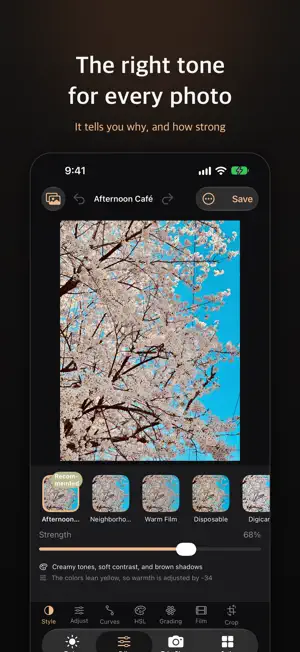


About 해담
Haedam reads when and where a photo was taken and picks a style that fits it first. Every analysis and edit happens on your iPhone — your photos never leave the device. (The app's interface is in Korean.) ■ The right tone for each photo, first Morning window light, an afternoon café, a walk around the block, dinner under warm lamps, a rainy day. Open a photo and Haedam recommends the style that suits the moment. It balances exposure and white balance for each photo before adding the style, so the tone stays consistent across very different shots. ■ Thirteen built-in styles Morning Sun · Afternoon Café · Neighborhood Walk · Dinner Table · Rainy Day · Soft Spring · Old Album · B&W Diary · Han River Sunset Gentle rather than heavy, closer to how the day actually felt. ■ Film styles Warm Film · Night Cinema · Disposable Camera · Digicam Grain you can actually see, lifted blacks and dark corners: today's film-photo look in one tap. ■ Every number, nothing hidden Exposure, highlights, shadows, contrast and warmth, plus curves, HSL, color grading, grain and fade. See exactly how each style is made and change anything you like. ■ Make your own style Pick a few photos you love and Haedam turns their shared tone into numbers you can reuse. Copy and paste edits, or match a whole batch at once. ■ Share styles as cards and links Create a style card with before/after, the key numbers and a QR code. Friends can open the link straight in Haedam. Browse styles made by others in the community. ■ Today's dump Haedam picks your best shots from today, matches their tone and saves them at carousel ratios (4:5, 3:4, 1:1). ■ From the moment you shoot The camera stays out of your way. By default it picks the style and strength for the scene as you shoot; you can also shoot untouched or pin a favourite style. Lens switching, tap to focus and expose, flash, timer and the date stamp are all there. ■ Your original stays Photos saves the original alongside the edit, so you can always revert. When sharing, location and capture details are removed by default. ■ Privacy No account, no ads, no tracking. Photos are never uploaded. Privacy policy: https://haedam.jiun.dev/privacy/
App privacy
The developer, Jiun Bae, reported these privacy practices to Apple.
Data Not Collected
The developer does not collect any data from this app.
Alternatives to 해담
Looking for apps like 해담? Here are 6 similar apps on the App Store.
-
 필터하나 바꿨을 뿐인데 인생샷이 나왔다.
-
 Stray: Street Snap Camera
-
 Pro Shot Coach: Photo Guide
-
 WinkFlick - Film Camera
-
 DARK: Pro Camera, Photo Editor
-
 Frame&Film - Film Camera
| App | Rating | Price | Last updated | Compare |
|---|---|---|---|---|
| 해담 | – | Free | October 23, 2026 | |
| 필터하나 바꿨을 뿐인데 인생샷이 나왔다. | – | Free | Sep 13, 2026 | Compare |
| Stray: Street Snap Camera | – | Free | Nov 12, 2026 | Compare |
| Pro Shot Coach: Photo Guide | – | Free | Nov 10, 2026 | Compare |
| WinkFlick - Film Camera | – | Free | Nov 1, 2026 | Compare |
| DARK: Pro Camera, Photo Editor | – | Free | Nov 15, 2026 | Compare |
| Frame&Film - Film Camera | – | Free | Nov 18, 2026 | Compare |
Compare 해담 with the top alternatives: ratings, updates, ASO score and keyword gaps →