

Profit Signal AI: AI Analyst
Ankita Mohnani Finance iPhoneiPadiPod touch
Profit Signal AI: AI Analyst is a free Finance app for iPhone and iPad by Ankita Mohnani. Requires iOS 15.1. Updated October 28, 2026.
- Price
- Free
- on the App Store
- Size
- 63 MB
- Age 17+
- Updated
- Oct 28
- 2026 · v1.0.0
Screenshots



About Profit Signal AI: AI Analyst
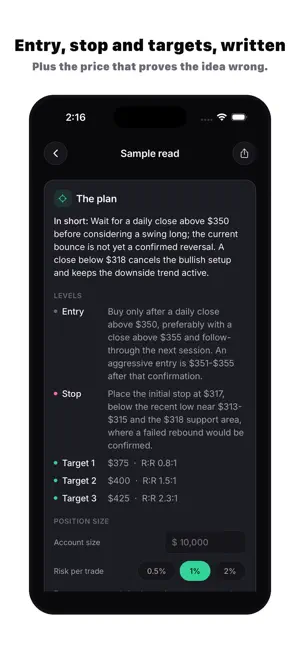
Profit Signal AI reads a trading chart and writes down what it sees. Photograph a chart on your monitor or pick a screenshot from any charting or broker app. In under a minute you get a structured breakdown and a written plan that you can question, adjust or reject. WHAT EACH READ GIVES YOU • At a glance: trend, volatility, volume and sentiment, each with a strength meter • The plan: a one-line summary, an entry zone, a stop, one to three price targets with reward-to-risk, a position-size note, and the level that would make the idea invalid • The reasoning: eight sections on volume and volatility, market phases, key price levels, price action and sentiment, technical indicators, candlestick patterns, momentum, and risk and stop placement • Follow-up chat: ask why the stop sits where it does, what would flip the bias, or what a term means. The conversation stays attached to that chart. UP TO THREE TIMEFRAMES IN ONE READ Add a higher and a lower timeframe of the same asset. The bigger picture sets the bias; the smaller one refines the entry. ASK AI Ask about any stock, coin or currency pair, or about a concept such as RSI, support and resistance, or stop placement. Attach a chart if you want the answer tied to it. SHAPED AROUND HOW YOU TRADE A short setup asks which market you focus on (stocks, crypto, forex, futures and commodities, or options), how experienced you are, how much risk you accept, how long you usually hold, and how much detail you want. Stops, targets and the depth of explanation follow your answers. Change them any time in Settings. Reads can be written in English, Hindi, German, Spanish, French, Portuguese, Japanese or Arabic. ALSO IN THE APP • Momentum leaderboard: a daily ranking of widely traded stocks, ETFs, crypto and commodities by trend, momentum and volume, with a personal watchlist • Past reads: every chart is kept with its plan and its conversation • Track record: streaks, activity over 7, 30 and 90 days, your bullish and bearish mix, and badges PRIVACY Chart images are processed by our AI provider (OpenAI) to produce the read and are not stored on our servers. We never ask for your brokerage login or account details. Sign in with Apple or Google. IMPORTANT: EDUCATIONAL, NOT FINANCIAL ADVICE Profit Signal AI is an educational and informational tool. It is not a broker or an investment adviser, and nothing in the app is financial, investment, legal or tax advice, or a recommendation to buy, sell or hold any asset. Reads are generated by an AI model from what is visible in your image. They can be wrong or incomplete, and the model cannot see news, earnings or order flow. Trading involves substantial risk of loss, and past price patterns do not predict future results. You are responsible for your own decisions; consider speaking to a licensed professional before you trade. SUBSCRIPTION Profit Signal AI requires a subscription. Two auto-renewing plans are available: Pro Weekly (renews every week) and Pro Yearly (renews every year). Current prices for your region are shown in the app before you buy. There is no free trial. Payment is charged to your Apple Account when you confirm the purchase. Your subscription renews automatically at the same price and for the same period unless you cancel it at least 24 hours before the end of the current period; your account is charged for the renewal within the 24 hours before the current period ends. You can manage or cancel your subscription in your App Store account settings (Settings > your name > Subscriptions) at any time after purchase. If you cancel, you keep access until the end of the period you have paid for. Privacy Policy: https://hushly.notion.site/Profit-Signal-AI-Privacy-Policy-3f90f3a0e4c2809f86e0e3c73faba784 Terms of Use: https://hushly.notion.site/Profit-Signal-AI-Terms-of-Use-3f90f3a0e4c280c7ab7ec27b8baf75d0 EULA: https://www.apple.com/legal/internet-services/itunes/dev/stdeula/
App privacy
The developer, Ankita Mohnani, reported these privacy practices to Apple.
Data Used to Track You
The following data may be used to track you across apps and websites owned by other companies:
- Purchases: Purchase History
- Contact Info: Email Address
- Identifiers: Device ID
- Usage Data: Advertising Data
Data Linked to You
The following data, which may be collected and linked to your identity, may be used for the following purposes:
- Purchases: Purchase History
- Contact Info: Email Address, Name
- Identifiers: Device ID, User ID
- Usage Data: Advertising Data, Product Interaction
- User Content: Other User Content, Photos or Videos
Used for: Third-Party Advertising, Developer’s Advertising or Marketing, Analytics, Product Personalization, App Functionality
Alternatives to Profit Signal AI: AI Analyst
Looking for apps like Profit Signal AI: AI Analyst? Here are 6 similar apps on the App Store. The highest rated is ChartScan AI (5.0/5), and all 6 are free to download.
-
 AI Day Trading Analysis
-
 ChartScan AI
5.0
-
 Wickly: Analyze Stock Charts
-
 TRADEGPT - AI Bot for Trading
-
 Swift FX Signals
5.0
-
 Trazo: AI Chart Analyzer
| App | Rating | Price | Last updated | Compare |
|---|---|---|---|---|
| Profit Signal AI: AI Analyst | – | Free | October 28, 2026 | |
| AI Day Trading Analysis | – | Free | Jun 15, 2026 | Compare |
| ChartScan AI | 5.0 / 5 (1) | Free | Oct 11, 2026 | Compare |
| Wickly: Analyze Stock Charts | – | Free | Sep 20, 2026 | Compare |
| TRADEGPT - AI Bot for Trading | – | Free | Oct 19, 2026 | Compare |
| Swift FX Signals | 5.0 / 5 (1) | Free | May 26, 2026 | Compare |
| Trazo: AI Chart Analyzer | – | Free | Oct 29, 2026 | Compare |