

DoFzone: Depth of Field Calc
KAZUYA SEKI Photo & Video iPhoneiPadiPod touch
DoFzone: Depth of Field Calc is a free Photo & Video app for iPhone and iPad by KAZUYA SEKI. Requires iOS 17.0. Updated October 27, 2026.
- Price
- Free
- on the App Store
- Size
- 3 MB
- Age 4+
- Updated
- Oct 27
- 2026 · v1.0.3
Screenshots



About DoFzone: Depth of Field Calc
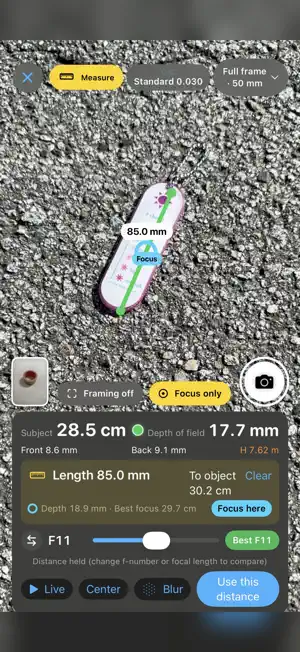
DoFzone is a depth-of-field calculator made by a photographer, for photographers and filmmakers. Choose your camera and lens, set the f-number and distance, and instantly see how much will be in focus — in front of and behind your subject, plus the hyperfocal distance. CALCULATOR - Depth of field, near/far limits and hyperfocal distance - Angle of view, 35mm equivalent, field of view and magnification - Background blur at infinity - Circle of confusion presets (Standard / Strict / High-res) DOF TABLE - See depth of field across f-numbers and distances at a glance - Tap any cell for details and apply it to the calculator FORMAT COMPARISON - Compare full frame, APS-C, Micro Four Thirds, medium format and large format - Find the focal length and f-number that give the same look on another format LENS & CAMERA DATABASE - Over 1,500 lenses and 460 cameras, including older models and cinema cameras - Minimum focus distances for almost every lens - Favorites and My Gear: keep the cameras and lenses you own (or used to own) one tap away - Add your own custom lenses LiDAR MEASURING (in-app purchase) - Tap any subject on the camera view to measure its distance - Adjust the f-number while measuring and check the depth of field on the spot - Set a target depth of field to see the f-number you need - Measure the length and depth of objects, and find the best focus point - Show your lens's angle of view as a frame or zoom - Preview background blur live from LiDAR depth - Capture with depth data and later redo the focus point, f-number, focal length, blur and measurements - Save captures to Photos with shooting information On iPhones without a LiDAR Scanner, distances are estimates based on plane detection. LiDAR Measuring is a one-time purchase. All other features are free.
What’s new
Version 1.0.3 · Updated October 27, 2026
- In LiDAR measuring, touch and drag a placed point to adjust it - Each cell of the depth of field table also shows the depth in front of / behind the focus - Tap a cell to open a detail page with a close-up dimension diagram and a field-of-view and angle-of-view diagram - A compact camera, lens and focal length bar under the table, with focal length presets right next to the value - Shortcuts to LiDAR measuring and the capture library at the top right of the table - Camera and sensor format selection are combined: choose "No camera" to pick a format - Compact cameras added, including the RX100 series, Tough TG-7, PowerShot G7 X, LUMIX LX100 and COOLPIX P1000 - Tap a face in a saved capture to see a small depth of field table around the focus distance and recommended f-stop; tap it to open the full table - In saved captures, the f-stop slider sits right below the focus and depth of field, and the chosen lens is also applied to the Calculator tab
App privacy
The developer, KAZUYA SEKI, reported these privacy practices to Apple.
Data Not Collected
The developer does not collect any data from this app.
Alternatives to DoFzone: Depth of Field Calc
Looking for apps like DoFzone: Depth of Field Calc? Here are 6 similar apps on the App Store. The highest rated is Lighting Recipe (5.0/5), and all 6 are free to download.


| App | Rating | Price | Last updated | Compare |
|---|---|---|---|---|
| DoFzone: Depth of Field Calc | – | Free | October 27, 2026 | |
| Lighting Recipe | 5.0 / 5 (1) | Free | Sep 17, 2026 | Compare |
| PonPost | – | Free | Oct 22, 2026 | Compare |
| DoFCam | – | Free | Oct 21, 2026 | Compare |
| HikariYomi | – | Free | Oct 25, 2026 | Compare |
| TetherDrop | – | Free | Oct 27, 2026 | Compare |
| PonToExif 〜あなたの撮影傾向を分析〜 | – | Free | Oct 21, 2026 | Compare |