

eSign: Smart PDF Signature
MUHAMMAD FAHAD Productivity iPhoneiPadiPod touch
eSign: Smart PDF Signature is a free Productivity app for iPhone and iPad by MUHAMMAD FAHAD. Requires iOS 15.0. Updated November 5, 2026.
- Price
- Free
- on the App Store
- Size
- 37 MB
- Age 4+
- Updated
- Nov 5
- 2026 · v1.0
Screenshots
Save to Pinterest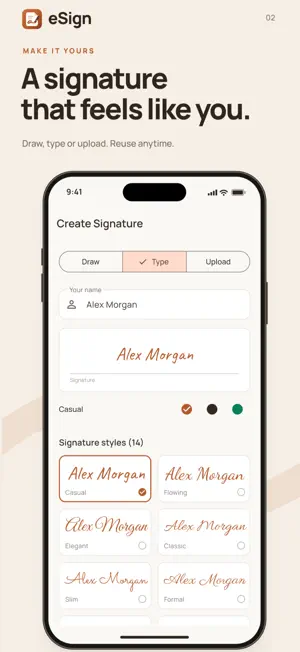


About eSign: Smart PDF Signature
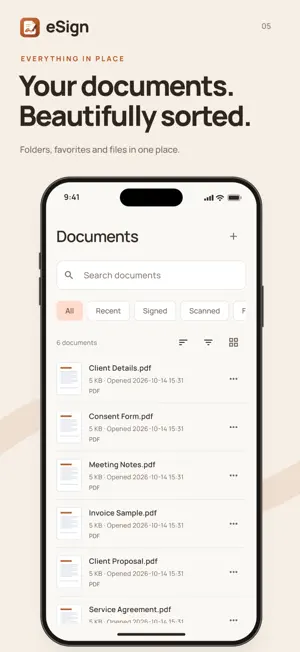
Sign PDFs and keep your documents organized with eSign. Import a PDF, draw or type a signature, place it on the page, and save a signed copy. Your original document stays available. Turn paper into PDF with the document scanner, your camera, or photos. Crop and rotate pages, rearrange them, and save a multipage PDF. Add text, initials, dates, and check marks to documents. Merge PDFs, organize pages, and export with Files, Share, or Print. Your documents stay on your device and are never uploaded. Start using the app without creating an account. Face ID, Touch ID or your passcode can lock the app. What you can do: - Draw, type, or import a visual signature - Sign and fill PDF documents - Scan paper and turn photos into PDF pages - Merge, rearrange, rotate, and extract pages - Keep recent files, folders, and favorites - Save, share, or print document copies Free and Pro: The free plan includes 5 signed or edited documents and 5 scans every month. eSign Pro, an optional monthly or yearly auto-renewing subscription, removes these limits. Pro works with a free eSign account, so it also unlocks on your other devices where you sign in. Payment is charged to your Apple ID when you confirm the purchase. The subscription renews automatically unless you cancel it at least 24 hours before the end of the current period. Manage or cancel it in Settings → your name → Subscriptions. Signature marks are visual PDF additions, not certificate-based digital signatures. Scans contain page images; text recognition (OCR) is not included. Terms of Use: https://signapi.ridoze.com/terms Apple Standard EULA: https://www.apple.com/legal/internet-services/itunes/dev/stdeula/ Privacy Policy: https://signapi.ridoze.com/privacy
App privacy
The developer, MUHAMMAD FAHAD, reported these privacy practices to Apple.
Data Used to Track You
The following data may be used to track you across apps and websites owned by other companies:
- Location: Coarse Location
- Identifiers: Device ID
- Usage Data: Product Interaction, Advertising Data
Data Linked to You
The following data, which may be collected and linked to your identity, may be used for the following purposes:
- Location: Coarse Location
- Identifiers: Device ID, User ID
- Usage Data: Product Interaction, Advertising Data
- Diagnostics: Crash Data, Performance Data, Other Diagnostic Data
- Contact Info: Email Address, Name
Used for: Third-Party Advertising, Analytics, App Functionality
Data Not Linked to You
The following data, which may be collected but is not linked to your identity, may be used for the following purposes:
- Purchases: Purchase History
Used for: App Functionality
Alternatives to eSign: Smart PDF Signature
Looking for apps like eSign: Smart PDF Signature? Here are 3 similar apps on the App Store. The highest rated is Freedom: Screen Time Control (4.5/5), and all 3 are free to download.


| App | Rating | Price | Last updated | Compare |
|---|---|---|---|---|
| eSign: Smart PDF Signature | – | Free | November 5, 2026 | |
| GIC Collect | 4.4 / 5 (163) | Free | Nov 11, 2026 | Compare |
| Freedom: Screen Time Control | 4.5 / 5 (6,180) | Free | Nov 23, 2026 | Compare |
| DeskIn Remote Desktop | 4.5 / 5 (332) | Free | Aug 19, 2026 | Compare |