

PixDim: Resize & Compress
zhentao zhang Graphics & Design iPhoneiPadiPod touch
PixDim: Resize & Compress is a free Graphics & Design app for iPhone and iPad by zhentao zhang. Requires iOS 17.0. Updated October 23, 2026.
- Price
- Free
- on the App Store
- Size
- 5 MB
- Age 4+
- Updated
- Oct 23
- 2026 · v1.01
Screenshots

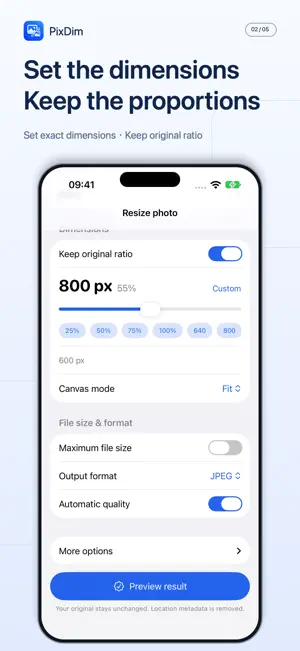


About PixDim: Resize & Compress
PixDim is a focused photo utility for the times when a picture must fit an exact pixel size or file limit. Choose Resize or Compress, pick a photo, and set the output you need: • Exact width and height, with an optional locked aspect ratio • Fit, Fill or Stretch canvas, with a draggable crop position • A target file size in KB or MB, using a real encoding search • JPEG, PNG or HEIC output where supported • Solid or transparent backgrounds • Manual or automatic quality Before exporting, compare the original and result, inspect the actual dimensions, format and file size, and zoom in to check details. PixDim verifies the encoded file instead of estimating the result. If a requested limit cannot be met, it tells you instead of silently changing your dimensions. Your image is processed on your device, and the output is written without the original EXIF or GPS metadata. PixDim does not upload your photos. Limited product-interaction and purchase analytics help improve the app; see the privacy policy for details. Processing and preview are free. Export requires a purchase: unlock the current processed result, or buy lifetime access for unlimited single-image exports. No subscription. Lifetime access can be restored with your Apple Account. PixDim handles one image at a time. It is built for quick, precise exports rather than batch processing. Requires iOS 17 or later.
What’s new
Version 1.01 · Updated October 23, 2026
Raised the processing limit for large photos.
App privacy
The developer, zhentao zhang, reported these privacy practices to Apple.
Data Not Linked to You
The following data, which may be collected but is not linked to your identity, may be used for the following purposes:
- Usage Data: Product Interaction
Used for: Analytics
Alternatives to PixDim: Resize & Compress
Looking for apps like PixDim: Resize & Compress? Here are 6 similar apps on the App Store. The highest rated is Image Converter: JPG PDF PNG (4.8/5), and all 6 are free to download.
-
 Image Compressor - CompressKIT
-
 Image Converter: JPG PDF PNG
4.8
-
 Rezona: Make. Play. Earn.
4.5
-
 PhotoCut - AI Photo Editor
4.2
-
 AI Vista
2.9
-
 Google Flow
3.8
| App | Rating | Price | Last updated | Compare |
|---|---|---|---|---|
| PixDim: Resize & Compress | – | Free | October 23, 2026 | |
| Image Compressor - CompressKIT | – | Free | Oct 13, 2026 | Compare |
| Image Converter: JPG PDF PNG | 4.8 / 5 (622) | Free | Nov 9, 2026 | Compare |
| Rezona: Make. Play. Earn. | 4.5 / 5 (130) | Free | Nov 9, 2026 | Compare |
| PhotoCut - AI Photo Editor | 4.2 / 5 (1,105) | Free | Dec 17, 2025 | Compare |
| AI Vista | 2.9 / 5 (50) | Free | Mar 30, 2026 | Compare |
| Google Flow | 3.8 / 5 (143) | Free | Nov 9, 2026 | Compare |