

Yellow: Slow Your Scroll
Bridge the App Mobile LLC Productivity iPhoneiPadiPod touch
Yellow: Slow Your Scroll is a free Productivity app for iPhone and iPad by Bridge the App Mobile LLC. Requires iOS 17.0. Updated November 19, 2026.
- Price
- Free
- on the App Store
- Size
- 5 MB
- Age 4+
- Updated
- Nov 19
- 2026 · v1.0.11
Screenshots
Save to Pinterest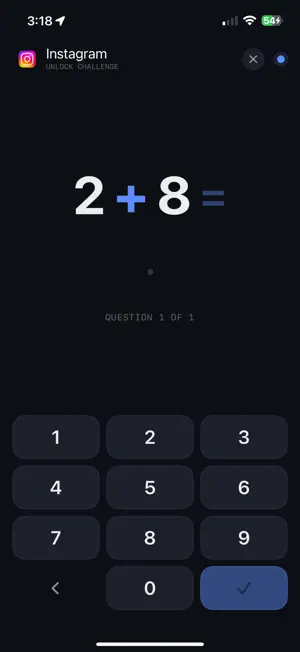


About Yellow: Slow Your Scroll
Thinking about a dumbphone? You don't have to buy one. Yellow turns the iPhone you already have into the phone you actually want: quiet when you want quiet, useful when you need it. GO YELLOW: DUMBPHONE MODE IN ONE TAP Pick your essentials once (Phone, Messages, Maps, a ride app), then tap Go Yellow. Everything else is blocked until the time you choose: an hour, the afternoon, or until morning. Your essentials keep working, and when time's up everything comes back on its own. Run it on demand, set it on a schedule like weeknights 9 PM to 7 AM, or start it with Siri or a Focus. Ending early takes a quick math problem, so it sticks. SOLVE TO SCROLL For everyday use, choose the apps you open on autopilot. When you reach for one, Yellow asks you to solve a short math challenge first. Get it right and the app opens for a few minutes, then locks itself again. Every app you don't choose keeps working like always. SEE THE DIFFERENCE Yellow shows how your screen time has changed since you started, today and day by day, with up and down arrows for each app. Your Yellow Score sums up each day as a single 0–100 number for how well you kept your word to yourself. Watch it climb, keep your streak alive, and share your best days. • Go Yellow: one tap blocks everything but your essentials • On demand, on a schedule, or with Siri or a Focus • Solve-to-unlock: a brief math challenge earns a timed unlock • Auto re-lock when your unlock window ends • Block websites in Safari, like x.com, with the Yellow Safari extension • Since Yellow: your screen time before and after, app by app • Your daily Yellow Score, with an honest breakdown of what moved it • Share a beautiful score card — no app names, ever • Private by design: your picks and activity stay on your phone. No tracking, no ads. FOR YOUR KID'S IPHONE You can also set Yellow up on your child's iPhone. You approve the setup with your own Apple Account, and a parent PIN guards the settings. Your child needs their own Apple Account in your Family Sharing group. There's no separate parent app — you do this on the child's iPhone itself. Each iPhone needs its own Yellow subscription. You choose the apps, the math level (rough age guide from 6 to 13 and up) and a daily limit. They solve math to open those apps, and when the daily limit is used up, the apps stay locked until tomorrow. Make a deal together, like pizza night, and the block screen shows what they're working towards. It's parental controls with math. Yellow is built for iPhone (iOS 17 or later), using Apple's built-in Screen Time. On your own iPhone, it is a self-control tool, not a lock you can't undo. Yellow never sees which apps you picked (Apple keeps them private). The only thing we ever receive is the name and email you choose to give us at setup, for optional sign-in and tips. YELLOW PRO SUBSCRIPTION Yellow is a subscription app, free for your first 7 days. Start your free trial at the end of setup. After 7 days, Yellow Pro is $29.99 per year or $5.99 per month, billed to your Apple ID. It renews automatically unless cancelled at least 24 hours before the end of the current period; manage or cancel it in your Apple ID settings. Privacy Policy: https://getyellow.app/privacy/ Terms of Use: https://getyellow.app/terms/
What’s new
Version 1.0.11 · Updated November 19, 2026
Kid's phone is here. Set Yellow up on your child's iPhone and approve it with your own Apple Account. Then make a deal you both agree on, like pizza night or a later bedtime, and shake on it. They solve math, at a level matched to their age, to open the apps you choose, up to a daily limit you set. When the limit is used up, those apps stay locked until tomorrow. A parent PIN guards the settings. Your child needs their own Apple Account in your Family Sharing group. There's no separate parent app; you set this up on the child's iPhone. Also new for everyone: a schedule can now cover up to three times a day, like mornings and evenings, with your apps open in between. "What are you doing this for?" is now the last step of setup, and searching for an app while you pick is easier.
App privacy
The developer, Bridge the App Mobile LLC, reported these privacy practices to Apple.
Data Linked to You
The following data, which may be collected and linked to your identity, may be used for the following purposes:
- Contact Info: Email Address, Name
- Identifiers: User ID
Used for: Developer’s Advertising or Marketing, App Functionality
Data Not Linked to You
The following data, which may be collected but is not linked to your identity, may be used for the following purposes:
- Contact Info: Name
Used for: App Functionality
Alternatives to Yellow: Slow Your Scroll
Looking for apps like Yellow: Slow Your Scroll? Here are 6 similar apps on the App Store. The highest rated is BB - Screen Time & App Blocker (4.9/5), and all 6 are free to download.
-
 Peninsula Residences
-
 Napa Service Center
1.0
-
 Futureland – Goal Tracker
4.8
-
 Vimcal: AI Calendar & Schedule
4.7
-
 BB - Screen Time & App Blocker
4.9
-
 Dex - Rolodex and Personal CRM
4.4
| App | Rating | Price | Last updated | Compare |
|---|---|---|---|---|
| Yellow: Slow Your Scroll | – | Free | November 19, 2026 | |
| Peninsula Residences | – | Free | Oct 19, 2026 | Compare |
| Napa Service Center | 1.0 / 5 (1) | Free | May 20, 2026 | Compare |
| Futureland – Goal Tracker | 4.8 / 5 (105) | Free | Sep 14, 2025 | Compare |
| Vimcal: AI Calendar & Schedule | 4.7 / 5 (471) | Free | Nov 19, 2026 | Compare |
| BB - Screen Time & App Blocker | 4.9 / 5 (403) | Free | Nov 16, 2026 | Compare |
| Dex - Rolodex and Personal CRM | 4.4 / 5 (268) | Free | Nov 20, 2026 | Compare |