

Upa Alarm: Heavy Sleeper Clock
GANAVO LLC Lifestyle iPhoneiPadiPod touch
Upa Alarm: Heavy Sleeper Clock is a free Lifestyle app for iPhone and iPad by GANAVO LLC. Requires iOS 26.0. Updated November 11, 2026.
- Price
- Free
- on the App Store
- Size
- 169 MB
- Age 17+
- Updated
- Nov 11
- 2026 · v1.2.2
Screenshots
Save to Pinterest


About Upa Alarm: Heavy Sleeper Clock
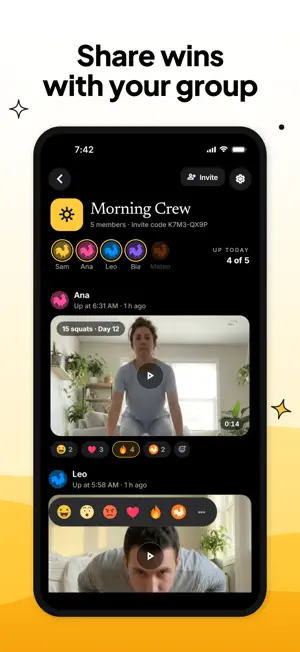
The loud alarm clock for heavy sleepers. Upa Alarm keeps ringing until you finish a mission: squats, push-ups, a photo of your made bed, math or reading out loud. Wake up your friends too: once a friend says yes, set a surprise alarm for them with your own voice message, and see who actually got up. MISSIONS • Move: push-ups (1 to 50) or squats (1 to 100), counted by your camera, on your phone. Or dance for 10 to 100 seconds. • Photo: make your bed, do the dishes, empty the dishwasher, take out the trash, feed your pet, walk the dog, get dressed (shoes on), or Object hunt: find a surprise object around the house and snap it. Not in the room? Spin again. • Think: 1 to 15 math problems, Number rush (tap the numbers in order) or Sequence (repeat the lights). • Read: Bible verses by topic, affirmations or fun facts, read out loud until your phone hears you. Stack up to 3 missions on one alarm. IT KEEPS COMING BACK Upa Alarm uses the iPhone's built-in alarm system, so your alarm can ring on the Lock Screen, even in silent mode or Focus. Swipe it away or close Upa Alarm before the mission is done, and it rings again a few seconds later, for up to 2 hours after the alarm time. Backup rings also come about 2, 5, 10, 20, 40 and 80 minutes and 2 hours after the alarm time. NEVER STUCK Sore, injured or just can't today? On your own alarms, every mission except math has "Can't do this one?", which switches to a few easy math problems. After 10 minutes of ringing, an emergency stop appears. SOUNDS More than 50 sounds: Loud alarms, Classic, Sirens, Nature, Peaceful, Rave, House, Classical, Latin and Upbeat jazz, plus wake-up speeches and a grandma who wants you out of bed. Or search for a song and wake up to its 30-second clip, or add a file, a video's sound or your voice (up to 2 minutes each). Your sounds ring on the Lock Screen too (their first 29 seconds). Set an alarm volume too: while the alarm rings in Upa Alarm, your phone's volume goes to that level (not on headphones). FRIENDS (OPTIONAL) Sign in with Apple only for Friends. Add friends with a code, make a group of up to 20 and share a short clip of your win (checked online first, gone after 7 days). Let a friend set an alarm for you, or set one for them with a surprise voice message or a chore: alarms a friend sets can't be switched to math, so the dishes really get done. Only friends and missions you allow, and you can delete their alarms anytime. THE ROOSTER CROWS Win, and the rooster stomps your alarm quiet and crows. Every real win adds a day to your streak. WATCH IT BACK Camera and photo missions are recorded on your phone, without sound. Watch it back, share it or save it to Photos. Videos you don't save are deleted when you leave. IN YOUR LANGUAGE The whole app works in English, Spanish and Portuguese, down to the buttons on your alarm. PRIVATE BY DESIGN No account needed for alarms and missions. Reps are counted on your phone, and your videos and sounds stay on it unless you share a clip or send a friend a voice message. Photo-mission photos are checked online and never stored by us. Readings are checked on your phone; only when it's unsure, a short clip is double-checked online, and we don't keep it. No ads, no tracking. Go at your own pace and stop if anything hurts. Upa Alarm is an alarm clock, not medical advice. SUBSCRIPTION Upa Alarm requires a subscription: monthly, or yearly with a 3-day free trial for eligible new subscribers. Payment is charged to your Apple Account. Subscriptions renew automatically unless auto-renew is turned off at least 24 hours before the end of the current period. A free trial turns into a paid subscription unless you cancel at least 24 hours before it ends. Manage or cancel anytime in your App Store account settings. Requires iOS 26 or later. Photo missions, the reading double-check and Friends need an internet connection. Terms of Service: https://upaalarm.com/terms Privacy Policy: https://upaalarm.com/privacy
What’s new
Version 1.2.2 · Updated November 11, 2026
Bug fixes and UI improvements.
App privacy
The developer, GANAVO LLC, reported these privacy practices to Apple.
Data Linked to You
The following data, which may be collected and linked to your identity, may be used for the following purposes:
- Purchases: Purchase History
- Identifiers: User ID, Device ID
- Usage Data: Product Interaction
- Other Data: Other Data Types
- Health & Fitness: Fitness
- Contact Info: Email Address, Name
- Contacts: Contacts
- User Content: Photos or Videos, Audio Data, Other User Content
- Diagnostics: Other Diagnostic Data
Used for: Analytics, App Functionality
Alternatives to Upa Alarm: Heavy Sleeper Clock
Looking for apps like Upa Alarm: Heavy Sleeper Clock? Here are 6 similar apps on the App Store. The highest rated is Jesus Words - New Testament (5.0/5), and all 6 are free to download.
-
 Rouse: Social Alarm & Wake
-
 cLock In - Challenge Alarm
-
 Jesus Words - New Testament
5.0
-
 Loudly: Smart Alarmy Clock
-
 Alarm Kids: Loud Alarm Clock
3.9
-
 Calendar & Agenda
| App | Rating | Price | Last updated | Compare |
|---|---|---|---|---|
| Upa Alarm: Heavy Sleeper Clock | – | Free | November 11, 2026 | |
| Rouse: Social Alarm & Wake | – | Free | Nov 6, 2026 | Compare |
| cLock In - Challenge Alarm | – | Free | Nov 16, 2026 | Compare |
| Jesus Words - New Testament | 5.0 / 5 (1) | Free | Oct 22, 2026 | Compare |
| Loudly: Smart Alarmy Clock | – | Free | Oct 19, 2026 | Compare |
| Alarm Kids: Loud Alarm Clock | 3.9 / 5 (17) | Free | Oct 30, 2026 | Compare |
| Calendar & Agenda | – | Free | Nov 13, 2026 | Compare |