

Ukuma: Books Library
Abdol Hamid Yousefi Book iPhoneiPadiPod touchMac
Ukuma: Books Library is a free Book app for iPhone and iPad by Abdol Hamid Yousefi. Requires iOS 26.0. Updated November 6, 2026.
- Price
- Free
- on the App Store
- Size
- 3 MB
- Age 4+
- Updated
- Nov 6
- 2026 · v1.3
Screenshots


About Ukuma: Books Library
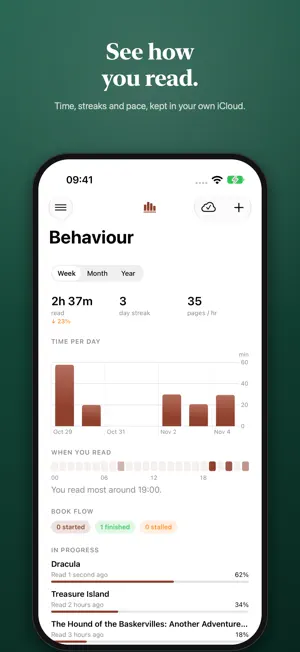
Ukuma is a personal library for your EPUBs and PDFs. It keeps your books beautifully organized, remembers where you are in every one, and does the tidying for you with Apple Intelligence, right on your device. YOUR LIBRARY, ORGANIZED FOR YOU • Add EPUB and PDF books and browse them as covers or a list. • Apple Intelligence writes an introduction for each book and works out its genre, language and series, all on your device. • Books without a cover get one designed for them. • Sort by recently added, title, author, progress or status. NEW IN 1.3 • Home: the book to pick up again, this week's reading, and the series you're part-way through. • Behaviour: see how you read, with time read, your day streak, your pace, a chart of minutes per day and the hours you read most. • Series pages: a fan of covers, how far along you are, the book to read next, and every book in order. • Search: find any book by title, author, series or tag, then narrow by genre, language and reading state. • Storage: see how much space your books take, download them all for offline reading, or free up space. MADE FOR LONG READS • A calm, paper-toned reader for EPUB and a built-in PDF reader. • Pick up at the exact line you stopped, even on another device or at a different text size. • Light or dark pages, six reading fonts, and your choice of text size, margins and line spacing. ON EVERY DEVICE Your library syncs between Mac, iPad and iPhone through your own iCloud. PRIVATE BY DESIGN • No accounts, no analytics, no tracking. • Your books and reading history stay on your devices and in your own iCloud. • Book details and covers are made on your device with Apple Intelligence. • Books can't reach the internet or run scripts while you read. Apple Intelligence features need a device that supports Apple Intelligence.
What’s new
Version 1.3 · Updated November 6, 2026
NEW • Home: a new first screen with the book to pick up again, this week's reading, the series you're part-way through, and what arrived lately. • Behaviour: see how you read, with time read, your day streak and pace, a chart of minutes per day, the hours you read most, and books started, finished or stalled. • Ukuma now remembers each stretch of reading. Glances under 30 seconds are left out. • Series pages: a fan of covers, how far along you are, the book to read next, and every book in order. Tap a series name anywhere to open it. • A Series screen with every series in your library, filtered by progress, with an A–Z index. • Search: find books by title, author, series or tag, and narrow by genre, language and reading state. • A sidebar on iPad and a Menu button on iPhone take you to every place in Ukuma, with Settings and About at hand. • Storage in Settings: see how much space your books take, download them all, or remove local copies to free space. IMPROVED • Sort the library from pills along the top: Recently Added, Title, Author, Progress or Status. • Page controls and a choice of books per page in the library and series list. • Redesigned Settings, with theme cards and a live preview of your reading settings. • Searching waits until you stop typing, and Ukuma stays responsive while downloading your whole library. • The sync icon stays steady during transfers. FIXED • If iCloud can't be reached, Ukuma now says so instead of showing an empty library. • If a book can't be shared, Ukuma now tells you why. • Damaged EPUB files no longer close the app. • Going back to the first page of a book no longer resets its progress. • Book text no longer turns blue in dark mode. • On iPad, the sidebar is no longer titled Filters, and the sort pills no longer get cut off. • Minor bug fixes and general improvements.
App privacy
The developer, Abdol Hamid Yousefi, reported these privacy practices to Apple.
Data Not Collected
The developer does not collect any data from this app.