

Eternal Word Bible Handbook
Luke Johnston Reference iPhoneiPadiPod touch
Eternal Word Bible Handbook is a free Reference app for iPhone and iPad by Luke Johnston. Requires iOS 17.0. Updated November 2, 2026.
- Price
- Free
- on the App Store
- Size
- 664 MB
- Age 12+
- Updated
- Nov 2
- 2026 · v1.8
Screenshots


About Eternal Word Bible Handbook
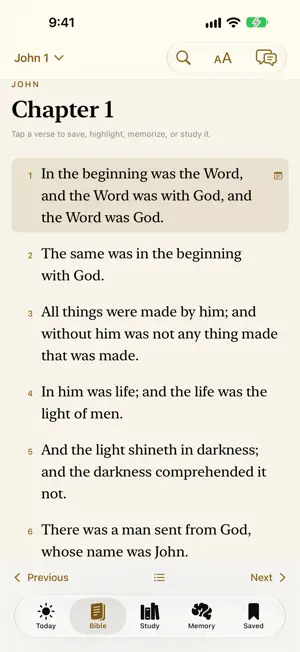
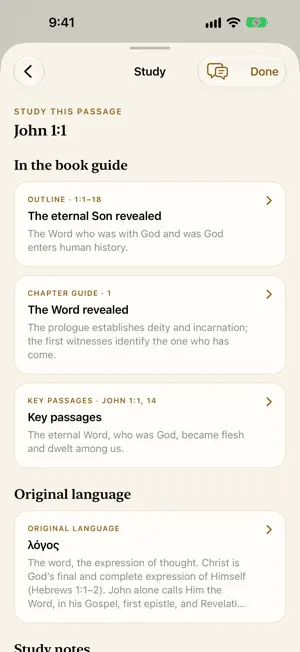
Eternal Word Bible Handbook brings the Bible and a detailed study companion together in one app for iPhone and iPad. Read a passage, explore its connections, and keep your work together in a study you can return to. READ AND STUDY OFFLINE Read all 66 books, move directly to a passage, and follow links to related handbook material. Adjust text size and spacing, highlight verses, save passages, and keep personal notes. The app remembers where you were reading. Linked words and verse study controls make deeper study available from the Bible reader. MY STUDY DESK Create a workspace for a passage, topic, or lesson. Collect Scripture, handbook material, word studies, saved answers, and your own observations. Add questions, mark them resolved, and complete study worksheets. Your work saves as you write. EXPLORE SCRIPTURE • Word Explorer: study Hebrew, Aramaic and Greek words and their use in other passages, with credited definitions from the STEPBible Greek lexicons and the Brown–Driver–Briggs lexicon, the passages they cite, related words and, for New Testament words, the Greek form where it can be identified. Open word links from the Bible reader. • Follow the Connection: take guided trails through related passages, with explanations of how they connect. Save a trail or add your own connection to a study. • The Bible in Parallel: read related accounts together and compare the details and emphasis of each passage. • Walk the Bible World: follow biblical journeys and locations on offline maps, with the relevant Scripture close at hand. • Difficult Passages: read developed answers with the surrounding context, differing interpretations and related Scripture. • Older English: archaic words, older forms and phrases, and changed meanings, explained from the verses that use them. Selected entries quote Webster’s 1828 dictionary and historical Bible-word glossaries. Notes appear on the words and phrases they explain in the reader. A HANDBOOK FOR EVERY BOOK Explore each book’s theme, setting, authorship, outline, key passages, historical background, original-language insights, and doctrinal and devotional teaching. Search Scripture and handbook content together. LEARN HOW TO STUDY Work through a detailed course covering interpretation, context, right division, word study, cross-references, and application. Examples and Scripture references show how the principles work in practice. MEMORIZE VERSES AND PASSAGES Choose Hide words, First letters, Fill the blanks, Put in order, Type it, Flashcards, or Phrase by phrase. Practice a verse or passage with hints and answer checks, then choose when to review it again. Memory practice works offline. SEE THE CHRONOLOGY Explore interactive Old and New Testament atlases in three-dimensional and flat-chart views. Follow the main historical narrative, locate books written during the same period, and trace dispensational and prophetic connections. KEEP YOUR STUDIES WITH YOU No account is required for guest study. Guest notes, progress, and workspaces save on your device. Sign in with your email address and password, or with Apple, for optional sync with the website and your other devices. Guest work stays separate until you choose to import it. Export your workspace, review connected devices, or delete your Eternal Word cloud account from Saving and account. ASK A STUDY QUESTION Ask about the page or passage you are studying. The optional online assistant prepares explanations with Scripture references. Before your first question, the app explains how your question and recent conversation are shared with Eternal Word Study and Anthropic. Saved private notes are not sent automatically. The Bible, handbook, course, atlases, included study resources, search, and saved work are available offline. Online answers and account sync require an internet connection. From Eternal Word Publishing.
What’s new
Version 1.8 · Updated November 2, 2026
Word links now follow translated phrases across all 66 books, with Hebrew, Aramaic and Greek forms shown separately from dictionary headwords. Full word studies keep the passage context. Cleaner cross-reference lists and word-study pages, with the bibliography at the bottom. New reading presets and controls for line spacing, verse spacing, margins, reading width, typeface, and verse numbers. Simplified study navigation and an updated Difficult Passages icon.
App privacy
The developer, Luke Johnston, reported these privacy practices to Apple.
Data Linked to You
The following data, which may be collected and linked to your identity, may be used for the following purposes:
- Contact Info: Email Address
- User Content: Other User Content
- Identifiers: User ID
- Usage Data: Product Interaction, Other Usage Data
- Sensitive Info: Sensitive Info
- Diagnostics: Performance Data, Other Diagnostic Data
- Other Data: Other Data Types
Used for: App Functionality
Alternatives to Eternal Word Bible Handbook
Looking for apps like Eternal Word Bible Handbook? Here are 6 similar apps on the App Store. The highest rated is VerseKeeper: Scripture Memory (5.0/5), and all 6 are free to download.
-
 Milheim Baptist Church
-
 Bible Trivia - Memorise verse
-
 VerseKeeper: Scripture Memory
5.0
-
 Etch - Bible Memory
-
 Luther Rice Moodle App
-
 Unveiled: Bible Word Study
4.9
| App | Rating | Price | Last updated | Compare |
|---|---|---|---|---|
| Eternal Word Bible Handbook | – | Free | November 2, 2026 | |
| Milheim Baptist Church | – | Free | Sep 27, 2026 | Compare |
| Bible Trivia - Memorise verse | – | Free | Jun 30, 2026 | Compare |
| VerseKeeper: Scripture Memory | 5.0 / 5 (5) | Free | Aug 29, 2026 | Compare |
| Etch - Bible Memory | – | Free | Oct 14, 2026 | Compare |
| Luther Rice Moodle App | – | Free | Apr 26, 2024 | Compare |
| Unveiled: Bible Word Study | 4.9 / 5 (9) | Free | Oct 15, 2026 | Compare |