

Sight Reader Trainer
Edmund Trujillo Music iPhoneiPadiPod touch
Sight Reader Trainer is a free Music app for iPhone and iPad by Edmund Trujillo. Requires iOS 15.0. Updated October 28, 2026.
- Price
- Free
- on the App Store
- Size
- 85 MB
- Age 4+
- Updated
- Oct 28
- 2026 · v2.0.0
Screenshots
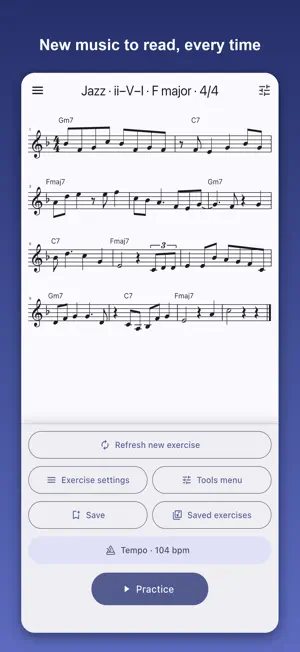


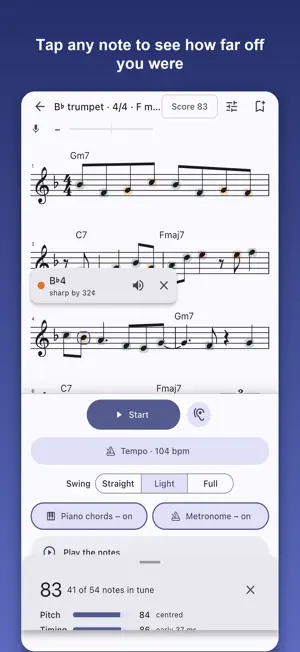
About Sight Reader Trainer
Sight reading only improves one way: by reading music you have never seen. Sight Reader Trainer writes a fresh exercise every time you tap Next, for your instrument, in your key, at your level. Play it through, and the app listens and tells you how you did. READ SOMETHING NEW EVERY TIME Every exercise is generated on the spot, so there is nothing to memorise. Pick a key or let the app surprise you with a new one each time. Choose the number of bars, the tempo and how busy the rhythms get. STYLES THAT SOUND LIKE REAL MUSIC Etudes, jazz lines, bebop, blues shuffle, bossa nova, samba, tango, ragtime, ballads, rock, funk, reggae, salsa, modal vamps, baroque sequences, Classical periods, marches, waltzes, klezmer, Balkan dances, Irish reels and jigs. Harmony-based styles show chord symbols and follow real progressions: ii–V–I, 12-bar blues, rhythm changes, So What and more. Technique drills cover scales, thirds, arpeggios, chromatics and long tones, and rhythm reading keeps you on one pitch. HEAR IT, THEN PLAY IT Each take plays back with a count-in, a metronome and the notes themselves, so you can listen first or play along. A look-ahead window reveals the music a few beats before the cursor arrives. TURN ON THE MIC AND GET SCORED Point your phone at your instrument and the app follows your pitch in real time. Notes light up green when you land them. At the end you get a score for pitch, timing and flow, with the tendency behind each: sharp or flat, early or late, where you hesitated. Tap any note afterwards to see how far off it was and hear the pitch it should have been. Choose how strict "in tune" should be, set your reference pitch, and calibrate for your phone's microphone delay. WAIT FOR ME MODE Not ready for tempo yet? The clock waits at each note until you play it, so you can work through a passage at your own pace and still be scored on pitch. PLAY A DUET Turn on Duet, pick a partner from any of the 40 instruments, and the app writes a second part to go with yours, each on its own staff in its own key. The phone plays the partner's line while you read yours. WRITTEN FOR YOUR INSTRUMENT Transposed and in the right clef for 40 instruments: flute, piccolo, oboe, English horn, bassoon, clarinets, every saxophone, trumpet, cornet, flugelhorn, horn, mellophone, alto horn, trombones, euphonium and baritone in either clef, tuba, violin, viola, cello, double bass, soprano, alto, tenor and bass voices, marimba, vibraphone, xylophone and glockenspiel, plus a concert-pitch option for anything else. SAVE, SHARE AND TRACK Save the exercises you want to come back to, and every scored take is kept in that exercise's history so you can watch a hard passage get easier. Share an exercise with a short code so a teacher, student or bandmate can play the exact same notes. Practice trends show your minutes, takes, accuracy and best score by day, week and month, and 29 awards mark the milestones along the way. A built-in tuner and practice reminders round it out. FREE AND PRO Everything you need to practise real sight reading is free: every instrument, etudes, jazz lines, technique drills and rhythm reading, listening and scoring, 3/4 and 4/4 with quarter and eighth-note rhythms, and a few saved exercises. Sight Reader Trainer Pro, yearly with a 7-day free trial or as a one-time lifetime purchase, makes it harder and makes it yours: every style; triplets, syncopation and sixteenths; odd meters; the look-ahead control; custom range limits; duets with any partner instrument; unlimited saved exercises; and the full pitch, timing and flow breakdown. Note names in letters, German (H) or solfège. Available in 11 languages. No account, no ads. Your playing never leaves your phone; the microphone is used only to detect pitch while you play. Terms of Use (EULA): https://www.apple.com/legal/internet-services/itunes/dev/stdeula/ Privacy Policy: https://www.trumpettrainer.com/privacy
What’s new
Version 2.0.0 · Updated October 28, 2026
New in 2.0: duets. Turn on Duet in the Exercise settings and pick a partner from any of the 40 instruments. The app writes a second part to go with yours, over the same chords, each part on its own staff and in its own key. The phone plays the partner's line while you read yours; with two of the same instrument, choose the top or bottom line. Duets are Pro; anyone can set one up and read both parts.
App privacy
The developer, Edmund Trujillo, reported these privacy practices to Apple.
Data Not Linked to You
The following data, which may be collected but is not linked to your identity, may be used for the following purposes:
- Usage Data: Product Interaction
Used for: Analytics
Alternatives to Sight Reader Trainer
Looking for apps like Sight Reader Trainer? Here are 6 similar apps on the App Store.
-
 Solfa Music
-
 iChanges - Jazz Chord Trainer
-
 BopBot: Bebop Solo Generator
-
 Accelonome
-
 Orchestra Audition Prep
-
 FluteGym
| App | Rating | Price | Last updated | Compare |
|---|---|---|---|---|
| Sight Reader Trainer | – | Free | October 28, 2026 | |
| Solfa Music | – | Free | Oct 23, 2026 | Compare |
| iChanges - Jazz Chord Trainer | – | 3.99 USD | Sep 15, 2026 | Compare |
| BopBot: Bebop Solo Generator | – | Free | Aug 4, 2026 | Compare |
| Accelonome | – | 0.99 USD | Mar 7, 2026 | Compare |
| Orchestra Audition Prep | – | Free | Oct 20, 2026 | Compare |
| FluteGym | – | Free | Oct 14, 2026 | Compare |