

WristMemo - Watch Voice Notes
悦茨 宿 Productivity iPhoneiPadiPod touchApple Watch
WristMemo - Watch Voice Notes is a paid Productivity app for iPhone and iPad by 悦茨 宿. Rated 2.5/5 from 2 ratings. Requires iOS 18.0.
- Rating
- 2.5
- 2 ratings
- Price
- 3.99 USD
- on the App Store
- Size
- 258 MB
- Age 4+
- Updated
- Oct 21
- 2026 · v1.0.4
Screenshots



About WristMemo - Watch Voice Notes
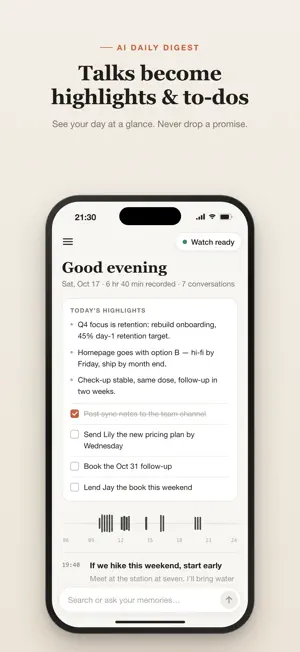
WristMemo turns your Apple Watch into an all-day voice recorder. Tap once and it quietly captures your day. Recordings sync to your iPhone automatically, get transcribed right on the device, and land in a searchable timeline you can scroll back through. Meetings, lectures, interviews, conversations, sudden ideas: no phone to pull out, no screen to watch. Put it on and forget about it. WATCH-FIRST RECORDING • Apple Watch does the recording, even with the screen off or iPhone out of range • Every clip is saved on the Watch first, then synced to iPhone in the background • Long-press for 1 second to stop, so an accidental tap won't end a recording ON-DEVICE TRANSCRIPTION • Built-in offline speech recognition for Chinese, English, Cantonese, Japanese and Korean • Transcription runs on your iPhone. Audio is never uploaded, and it works offline • Play back the original audio for any line of text AI KEY POINTS & TO-DOS • A daily summary of what was discussed and decided • Promises you made to others become a to-do list • Ask your memories: "What did I promise last week?" Answers cite the exact lines, and you can tap to hear them YOUR DAY AS A TIMELINE • See the whole day at a glance, newest first • Full-text search across every transcript • Delete any clip you don't want to keep PRIVACY FIRST • No account. Recordings and transcripts stay on your Apple Watch and iPhone • AI works out of the box with a built-in StepFun model. You can switch to on-device Apple Intelligence, or add your own key for DeepSeek or another provider • Only when you use AI is the relevant transcript text sent to the provider you chose. Audio is never uploaded Great for meeting minutes, lecture notes, interviews, voice journaling, and anyone who forgets things. Available in English and Simplified Chinese. Requires a paired Apple Watch. Please follow local laws and get consent before recording others. Privacy policy: https://kelvinmade.com/wristmemo/privacy.html
What’s new
Version 1.0.4 · Updated October 21, 2026
- Favorites: long-press a moment on the timeline, or use its … menu, to star it. Favorites in the sidebar gathers them from every day, and their audio is never removed by Auto-Delete Audio or Clean Up Now. - Long-press a moment on the timeline to delete it, with the option to remove only the audio and keep the text. - Auto Export Text: pick a folder in Settings (such as iCloud Drive or an Obsidian vault) and each day's transcripts are saved there as a Markdown file for your notes app or your own AI assistant. - Labs: cloud transcription with your own Groq or Tencent Cloud keys, for better punctuation. Refine one moment, or have favorites or all new recordings go to the cloud. Groq is for users outside China; Tencent Cloud serves users in China. On-device stays the default and takes over when the quota runs out. - A Refine with Cloud button sits right under the player, showing progress, retry, and which service was used. If cloud isn't set up yet, it takes you to setup and starts when you're done. - Long-press a moment on the timeline or in Favorites to share its text or refine it in the cloud. Cloud-transcribed moments show a cloud icon, with progress and failures shown right in the list. - Audio and text line up sentence by sentence: the current line is highlighted, and tapping a line plays from there. Scrubbing and skipping 15 seconds are more precise. - When Siri, a call, or another app interrupts recording on Apple Watch, your iPhone shows a Recording Paused notification, which clears once recording resumes. No complication needed. - New Voice Detection Sensitivity slider in Settings: slide right to transcribe only clear speech close to the Watch, so nearby colleagues aren't transcribed. Off by default, with a recommended value one tap away. - New onboarding pages introduce Auto Export and explain that recording interruptions come from watchOS, not a bug, with a way to email the developer.
App privacy
The developer, 悦茨 宿, reported these privacy practices to Apple.
Data Not Collected
The developer does not collect any data from this app.
Alternatives to WristMemo - Watch Voice Notes
Looking for apps like WristMemo - Watch Voice Notes? Here are 6 similar apps on the App Store. The highest rated is 饭耳 - Watch全天AI录音助理 (5.0/5), and all 6 are free to download.
-
 饭耳 - Watch全天AI录音助理
5.0
饭耳 - Watch全天AI录音助理
5.0
-
 VoiceDay - AI Watch Recorder
5.0
VoiceDay - AI Watch Recorder
5.0
-
 insighto 洞见笔记-卢曼卡片·待办清单·AI洞察
-
 DeepWatch AI: Watch Assistant
-
 Remi - AI Reminders & To-Dos
3.5
Remi - AI Reminders & To-Dos
3.5
-
 nanochat - chat with AI agent
| App | Rating | Price | Last updated | Compare |
|---|---|---|---|---|
| WristMemo - Watch Voice Notes | 2.5 / 5 (2 ratings) | 3.99 USD | October 21, 2026 | |
| 饭耳 - Watch全天AI录音助理 | 5.0 / 5 (2) | Free | Oct 28, 2026 | Compare |
| VoiceDay - AI Watch Recorder | 5.0 / 5 (5) | Free | Oct 28, 2026 | Compare |
| insighto 洞见笔记-卢曼卡片·待办清单·AI洞察 | – | Free | Oct 23, 2026 | Compare |
| DeepWatch AI: Watch Assistant | – | Free | Oct 23, 2026 | Compare |
| Remi - AI Reminders & To-Dos | 3.5 / 5 (2) | Free | Oct 22, 2026 | Compare |
| nanochat - chat with AI agent | – | Free | Sep 16, 2026 | Compare |