

Yeya — AI Book Reader
震 张 Book iPhoneiPadiPod touchMac
Yeya — AI Book Reader is a free Book app for iPhone and iPad by 震 张. Requires iOS 18.0. Updated November 24, 2026.
- Price
- Free
- on the App Store
- Size
- 296 MB
- Age 12+
- Updated
- Nov 24
- 2026 · v1.0.11
Screenshots
Save to Pinterest


About Yeya — AI Book Reader
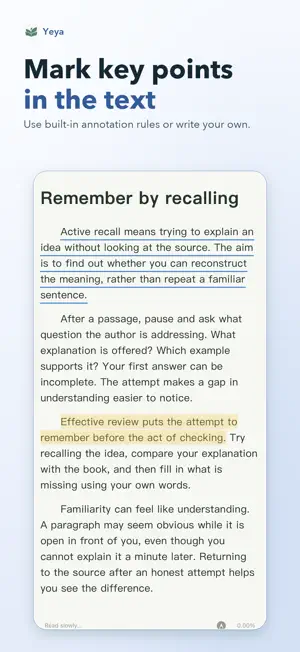
Yeya is a reading tool for books you import yourself, with narration and optional AI assistance. It does not provide books. AI features require your own compatible provider and API key. Read your own books Import EPUB, PDF, TXT, Markdown, MOBI, AZW3, CBZ and CBR files. Adjust fonts, size, spacing, backgrounds and page-turning options for reflowable text. PDFs keep their original layout. Photograph pages to save an original-page PDF, then optionally organize the text and images. Character voices and profiles Listen from your reading position with system voices, compatible offline voice packages or online services. Assign and preview narrator and character voices, edit bindings, and explore relationships supported by source text in character profiles. Narration supports speed controls, Lock Screen controls and a sleep timer. Intelligent emotion, reference recordings and voice presets depend on the selected model and voice. Offline packages need a separate download. Annotate with chosen strategies Describe what to look for, confirm matching rules and mark styles, then let AI annotate visible source text. Choose highlights, underlines, circles or side marks, with colors and style presets. Automatic key-point annotations are a separate option for definitions, main conclusions and key conditions. Your manual annotations stay in place; review saved reasons or undo the latest batch. Ask questions and practice what you read Read translations alongside the original, ask about selected text and continue the conversation. Choose Reading or Study for each book. Both open the original book directly. Study records the text actually displayed and reminds you to practice at an interval you choose. Daily, weekly and monthly exercises use the corresponding reading records. Yesterday's review reuses questions you answered. Interruptions preserve drafts, generated questions and reading still due for practice. Revisit notes, annotations, AI conversations and saved study records. Local storage and manual sync Books and reading records stay on your device. Basic reading needs no Yeya account. Configure iCloud, WebDAV or a supported cloud drive, then choose upload or download and the data categories to transfer. Restoring purchases does not sync your library. Configure API keys and download offline voices on each device. Remote features ask permission before sending relevant content. Free features, trial and full unlock Basic importing and reading, manual notes and annotations, viewing saved content, and single-voice system narration are free. Claim a 14-day full software trial when ready, or unlock all features with a one-time purchase. The trial runs from the original claim date, with no automatic charge or renewal. New AI generation, multi-character narration, intelligent emotion, offline voice playback and online narration require an active trial, permanent unlock or eligible previous paid purchase. After the trial, your books, notes, translations, study content, character settings and installed voice packages remain. Saved study content stays viewable and answer drafts can be saved. Generating exercises, submitting answers for checking and grading require full access. Bring your own API key (BYOK). The trial and one-time unlock do not include third-party model, paid voice or other remote service charges. Prices follow your current App Store storefront, regardless of interface language; check the price before payment. Restore purchases on iPhone, iPad and Mac App Store versions with the same Apple Account for Media & Purchases. Changing devices does not restart the trial. Voice availability depends on device, language, model and voice. Continuous narration needs extractable text. AI answers, feedback, annotations and translations may be inaccurate; check the original.
What’s new
Version 1.0.11 · Updated November 24, 2026
You can now change book covers and open illustrations directly from EPUB pages. Books open with a smoother transition from the book details screen as the text loads.
App privacy
The developer, 震 张, reported these privacy practices to Apple.
Data Linked to You
The following data, which may be collected and linked to your identity, may be used for the following purposes:
- User Content: Other User Content, Photos or Videos
- Search History: Search History
- Usage Data: Product Interaction
- Identifiers: User ID
Used for: Product Personalization, App Functionality, Other Purposes
Alternatives to Yeya — AI Book Reader
Looking for apps like Yeya — AI Book Reader? Here are 6 similar apps on the App Store. The highest rated is Parse - Novels, Web & eBooks (5.0/5), and all 6 are free to download.
-
 Grafumi: Book & Comic Reader
-
 Inspan: EPUB & FB2 Reader
-
 Parse - Novels, Web & eBooks
5.0
-
 EPUB OMG: EPUB Editor & Maker
-
 Unfold: TXT, Comic, PDF Reader
-
 百回 - 微信读书划线与书摘回顾小组件
5.0
| App | Rating | Price | Last updated | Compare |
|---|---|---|---|---|
| Yeya — AI Book Reader | – | Free | November 24, 2026 | |
| Grafumi: Book & Comic Reader | – | Free | Oct 24, 2026 | Compare |
| Inspan: EPUB & FB2 Reader | – | Free | Nov 23, 2026 | Compare |
| Parse - Novels, Web & eBooks | 5.0 / 5 (1) | Free | Nov 22, 2026 | Compare |
| EPUB OMG: EPUB Editor & Maker | – | Free | Nov 26, 2026 | Compare |
| Unfold: TXT, Comic, PDF Reader | – | Free | Sep 30, 2026 | Compare |
| 百回 - 微信读书划线与书摘回顾小组件 | 5.0 / 5 (1) | Free | Nov 25, 2026 | Compare |