

LuLaLa - Hum to Piano
Yutaka Taketoshi Music iPhoneiPadiPod touch
LuLaLa - Hum to Piano is a free Music app for iPhone and iPad by Yutaka Taketoshi. Requires iOS 18.0. Updated November 17, 2026.
- Price
- Free
- on the App Store
- Size
- 6 MB
- Age 4+
- Updated
- Nov 17
- 2026 · v1.0.1
Screenshots

About LuLaLa - Hum to Piano
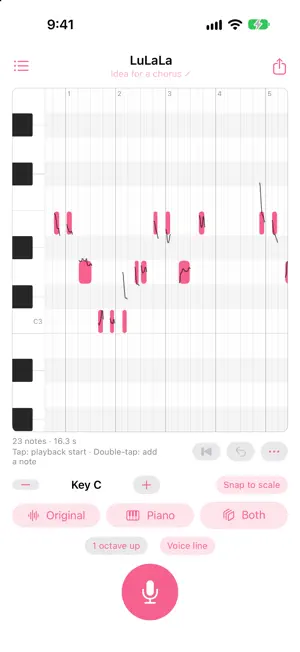
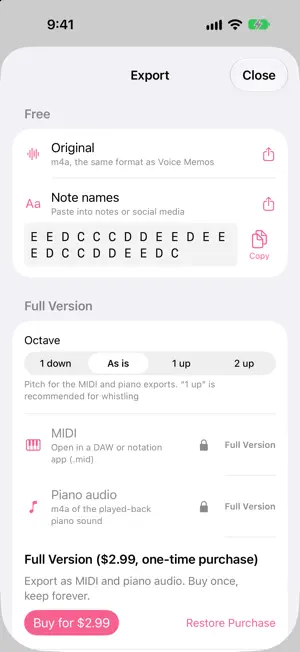
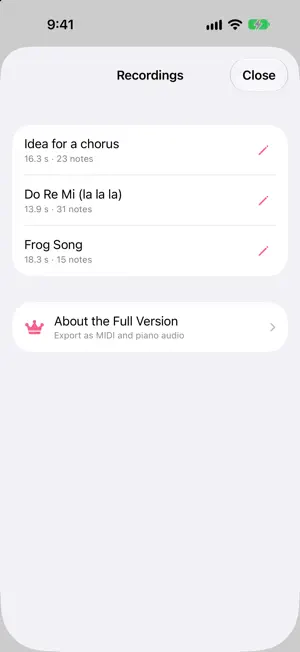
LuLaLa listens to your humming, turns it into notes, and plays them back with a piano sound. Just hum the melody in your head. When you stop, it becomes a row of notes you can hear on piano, or layered over your own voice to compare. FOR ONE MELODY AT A TIME LuLaLa detects a single melody sung by one person. It cannot detect chords, accompaniment or several voices at once. The quieter the room and the clearer each note, the cleaner the result. FIX NOTES WITH YOUR FINGER Pitch detection is never perfect, so editing is made as easy as possible. - Tap a note to hear it. Drag up and down to change its pitch, sideways to move it, or drag its ends to change its length - Double-tap to add a note. Long-press to split, join or delete - Snap the rhythm to eighth or sixteenth notes, and adjust the tempo - Shift the key by semitones. "Snap to scale" keeps the notes in key even when your singing drifts - Tap the keyboard on the left to hear any note - Unlimited undo RECORD IN AN INSTANT - Start from a Home Screen or Lock Screen widget, or a Control Center button: the app opens already recording - Recordings are saved automatically. Name them and come back to edit later - Up to 3 minutes per recording EXPORT - The original recording (m4a) - Note names as text, ready to paste into notes or social media - MIDI (.mid) for your DAW or notation app (Full Version) - Piano audio (m4a) of the played-back notes (Full Version) FREE AND FULL VERSION Recording, editing, playback, saving, and exporting the original recording and note names are free, forever. The Full Version, a one-time purchase, adds MIDI and piano audio export, with a choice of octave. No subscription. It also works on your other devices with the same Apple Account. PRIVACY Your recordings and notes stay on your device and are never sent anywhere. No ads. No account required. Available in English, German and Japanese. Requires iOS 18 or later.
What’s new
Version 1.0.1 · Updated November 17, 2026
- Tap MIDI or Piano audio on the export screen to see the Full Version right away, with the price shown up front - Now available in German - Minor improvements
App privacy
The developer, Yutaka Taketoshi, reported these privacy practices to Apple.
Data Not Collected
The developer does not collect any data from this app.
Alternatives to LuLaLa - Hum to Piano
Looking for apps like LuLaLa - Hum to Piano? Here are 6 similar apps on the App Store. The highest rated is HUM - Your Music, Your Voice (5.0/5), and all 6 are free to download.
-
 Melody to Notes: Hum to Score
-
 HUM - Your Music, Your Voice
5.0
-
 Hamoru
-
 Beat Scribe
5.0
-
 Hummidi: Audio to MIDI
-
 AirPianoPro
5.0
| App | Rating | Price | Last updated | Compare |
|---|---|---|---|---|
| LuLaLa - Hum to Piano | – | Free | November 17, 2026 | |
| Melody to Notes: Hum to Score | – | Free | Nov 2, 2026 | Compare |
| HUM - Your Music, Your Voice | 5.0 / 5 (3) | Free | Nov 14, 2026 | Compare |
| Hamoru | – | Free | Nov 10, 2026 | Compare |
| Beat Scribe | 5.0 / 5 (5) | Free | Aug 15, 2026 | Compare |
| Hummidi: Audio to MIDI | – | Free | Nov 15, 2026 | Compare |
| AirPianoPro | 5.0 / 5 (1) | Free | Nov 10, 2026 | Compare |