

WakeVia: Alarm with Tasks
VITALII VASYLENKO Lifestyle iPhoneiPadiPod touch
WakeVia: Alarm with Tasks is a free Lifestyle app for iPhone and iPad by VITALII VASYLENKO. Requires iOS 26.1. Updated October 25, 2026.
- Price
- Free
- on the App Store
- Size
- 22 MB
- Age 4+
- Updated
- Oct 25
- 2026 · v1.0.1
Screenshots


About WakeVia: Alarm with Tasks
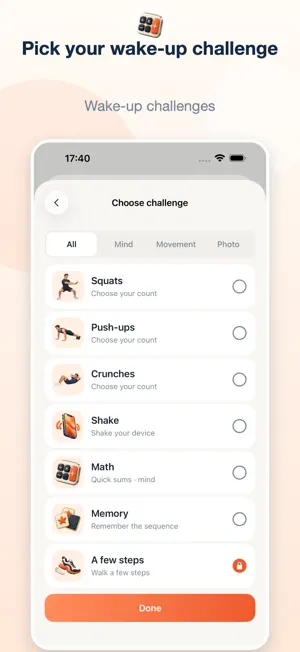
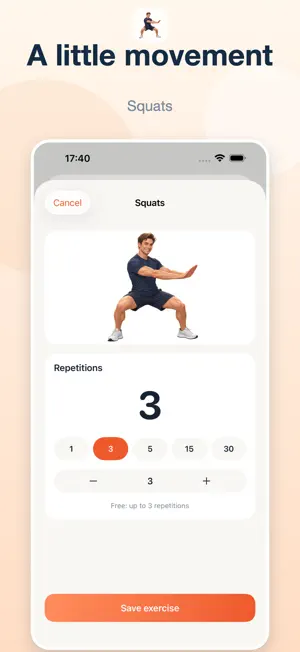
Start your morning with action instead of endless scrolling. WakeVia is a smart alarm with tasks, math and exercise. Set your wake-up time, build a morning plan and take breaks from your phone throughout the day. AN ALARM THAT HELPS YOU WAKE UP After the alarm sounds, shift your attention to a quick task: solve math problems, test your memory, make a word or find an emoji. Prefer to move? Choose steps, squats or push-ups. PUT TASKS IN YOUR OWN ORDER Keep one task or build a wake-up sequence. For example: math, a few steps and breathing. Press and hold a card to move it into place. Preview a task beforehand so you know what to do in the morning. A MORNING PLAN THAT FITS YOUR ROUTINE Choose an alarm time and repeat days: weekdays, weekends or your own schedule. Plan a start to the day that suits you. Keep your morning routine in one app. EXERCISE AT YOUR OWN PACE Start small and choose the number of repetitions that works for you. Use the slider or enter an exact number. Breathing offers a calmer pause; movement tasks help you get active. Choose male or female exercise illustrations and change them in Settings. BREAKS FROM YOUR PHONE Been scrolling or watching videos for a while? Choose apps, websites or categories and decide when a break is due. Set a usage interval from 1 to 180 minutes and add a break task: a little movement, breathing or an attention exercise. WakeVia helps you use screen time more intentionally: switch from an app to an action you chose. YOUR PROGRESS IN ONE PLACE Review completed tasks, day streaks and the results of wake-ups and breaks. Find a rhythm that works for you and return to habits that fit your life. Some tasks may require camera or Motion & Fitness access. Breaks for selected apps use Screen Time permission; feature availability and timing depend on iOS and device settings. WakeVia also works on iPhone Duo, on its outer display when folded and inner display when unfolded. Start with one alarm. Make the morning yours. Privacy Policy: https://www.mentivo.net/en/apps/wakevia/privacy/ Terms of Use (EULA): https://www.apple.com/legal/internet-services/itunes/dev/stdeula/
What’s new
Version 1.0.1 · Updated October 25, 2026
Improved alarm scheduling: one-time alarms now use their exact saved date and time, and WakeVia checks for outdated system alarms. The next-alarm countdown updates when an alarm passes. Removed bedtime reminder notifications and improved the Breaks layout.
App privacy
The developer, VITALII VASYLENKO, reported these privacy practices to Apple.
Data Not Collected
The developer does not collect any data from this app.
Alternatives to WakeVia: Alarm with Tasks
Looking for apps like WakeVia: Alarm with Tasks? Here are 6 similar apps on the App Store. The highest rated is SunriseClub: Social Alarm (5.0/5), and all 6 are free to download.
-
 Child Tracker: Family Locator
-
 Sunwake: Sunrise Alarm Clock
-
 Coeli: Catholic Prayers
-
 SunriseClub: Social Alarm
5.0
SunriseClub: Social Alarm
5.0
-
 Family GPSme Locator via SMS
-
 Rafiq: Quran, Prayer & Qibla
| App | Rating | Price | Last updated | Compare |
|---|---|---|---|---|
| WakeVia: Alarm with Tasks | – | Free | October 25, 2026 | |
| Child Tracker: Family Locator | – | Free | Oct 27, 2026 | Compare |
| Sunwake: Sunrise Alarm Clock | – | Free | Oct 25, 2026 | Compare |
| Coeli: Catholic Prayers | – | Free | Aug 29, 2026 | Compare |
| SunriseClub: Social Alarm | 5.0 / 5 (7) | Free | Oct 25, 2026 | Compare |
| Family GPSme Locator via SMS | – | Free | Aug 21, 2026 | Compare |
| Rafiq: Quran, Prayer & Qibla | – | Free | Oct 26, 2026 | Compare |