

DM Receiver Remote
JOSHUA CHARLES JORDAN Utilities iPhoneiPadiPod touchMacApple Watch
DM Receiver Remote is a free Utilities app for iPhone and iPad by JOSHUA CHARLES JORDAN. Requires iOS 17.0. Updated October 28, 2026.
- Price
- Free
- on the App Store
- Size
- 4 MB
- Age 4+
- Updated
- Oct 28
- 2026 · v1.2.0
Screenshots
Save to Pinterest

About DM Receiver Remote
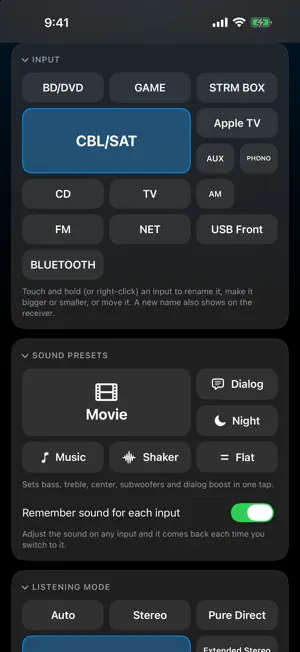
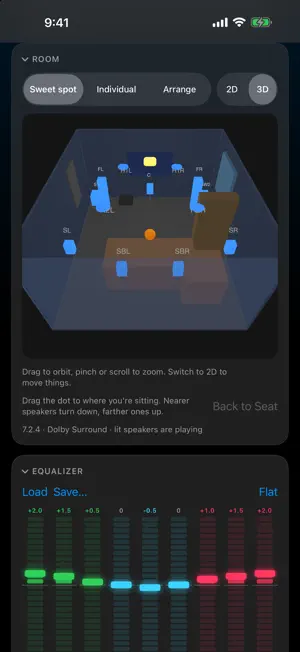
DM Receiver Remote controls your network AV receiver from your Mac, your iPhone and your Apple Watch over your home Wi-Fi. No account, no ads, no data collected. Works with many Pioneer, Onkyo and Integra network receivers. It talks to the receiver directly on your local network, so it is fast and keeps working without an internet connection. KNOW WHAT YOU ARE HEARING Now Playing shows what is playing and where it comes from: the receiver's own network player, Bluetooth, USB or radio, or the device on an input. It shows the whole path to your speakers (format, listening mode, speaker layout), and play, pause and skip for the receiver's player. MAKE IT YOURS • Full, Compact or Minimal layouts, or your own • Cards side by side in as many columns as your window fits, like a web page • Drag any card where you want it, even into an empty spot, and give it a width, a zoom and a control size • A wider volume card gets a bigger knob and a wider equalizer; larger sliders for touch screens • Make the inputs and presets you use most Large and the rest Small WHAT YOU CAN DO • Turn the receiver on and off • Precise volume, in the same steps the front panel shows, with a slider or a knob, and mute • Pick an input by name, and rename inputs (the new name shows on the receiver too) • Choose a listening mode and see the live audio and video format • Sound presets (Movie, Dialog, Night, Music) and sound remembered for each input • A 9-band equalizer with saved curves, bass, treble, dialog level and Music Optimizer • Center and subwoofer levels, and lip sync • A room planner: draw your room, place and turn speakers, furniture and the TV, stick windows to the walls, see it in 3D, find the sweet spot, and measure distances • Control Zone 2 and Zone 3 • Move around the receiver's own on-screen setup menu • Change HDMI Control, ARC, Standby Through, the display dimmer and the sleep timer EVERYWHERE • iPhone widgets and Control Center controls for volume, mute, power and inputs • An Apple Watch remote: turn the Digital Crown for volume, mute, power and inputs • Siri and Shortcuts actions: switch inputs, set the volume, pick a sound preset • On the Mac, a menu-bar control strip and keyboard shortcuts for volume, mute, power and the first nine inputs • Your room, speakers, equalizer curves and per-input sound stay the same on your Mac and iPhone through iCloud TRY IT FIRST No receiver handy? Tap "Try Demo Mode" on the first screen to explore the whole app with a made-up receiver. Nothing is sent to your network in demo mode. PRIVACY DM Receiver Remote does not collect any information about you. It talks to the receiver on your own network, and keeps your room and sound settings in step between your own devices through your iCloud account. Local Network access is needed to find the receiver. An independent app, not affiliated with or endorsed by any receiver manufacturer.
App privacy
The developer, JOSHUA CHARLES JORDAN, reported these privacy practices to Apple.
Data Not Collected
The developer does not collect any data from this app.
Alternatives to DM Receiver Remote
Looking for apps like DM Receiver Remote? Here are 6 similar apps on the App Store. The highest rated is Remote97 (5.0/5), and all 6 are free to download.
-
 Remote97
5.0
-
 AmpliWidgets
-
 AVR Link
5.0
-
 Beamote: Projector & TV Remote
-
 RAmp - Remote Amp Controller
-
 eSee Smart
1.0
| App | Rating | Price | Last updated | Compare |
|---|---|---|---|---|
| DM Receiver Remote | – | Free | October 28, 2026 | |
| Remote97 | 5.0 / 5 (1) | Free | Nov 18, 2026 | Compare |
| AmpliWidgets | – | Free | Nov 21, 2026 | Compare |
| AVR Link | 5.0 / 5 (8) | Free | Sep 30, 2026 | Compare |
| Beamote: Projector & TV Remote | – | Free | Nov 25, 2026 | Compare |
| RAmp - Remote Amp Controller | – | Free | Sep 4, 2026 | Compare |
| eSee Smart | 1.0 / 5 (1) | Free | Jul 11, 2025 | Compare |
Compare DM Receiver Remote with the top alternatives: ratings, updates, ASO score and keyword gaps →