

Pedometer: Step Counter Widget
Fotios Avgidis Health & Fitness iPhoneiPadiPod touch
Pedometer: Step Counter Widget is a free Health & Fitness app for iPhone and iPad by Fotios Avgidis. Requires iOS 17.0. Updated October 26, 2026.
- Price
- Free
- on the App Store
- Size
- 2 MB
- Age 4+
- Updated
- Oct 26
- 2026 · v1.5
Screenshots


About Pedometer: Step Counter Widget
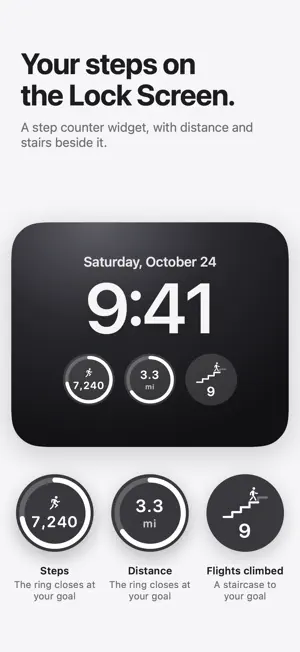
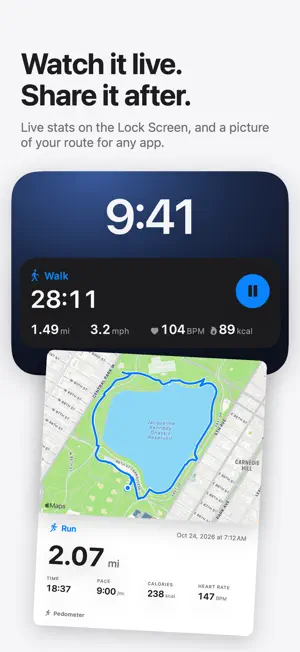
Pedometer counts your steps, distance, and flights climbed, and shows them as plain numbers and charts. It reads Apple Health, so if you wear an Apple Watch, its steps are included. TODAY Your steps against your goal, with what is left to go. Distance and flights climbed against their goals, with active energy and walking speed beside them. A chart shows today hour by hour, next to a usual day. GOALS Set a daily goal for steps, distance, and flights climbed. They start at 10,000 steps, 8 km or 5 miles, and 10 flights. HISTORY One chart per number, for the last week, month, or year. Each shows the daily average and how it compares with the period before. Touch a chart to read a single day, or a single week in the year view. Records show your step totals for every month and year, and your best day, week and month for steps, flights climbed and walking speed. WALKS AND RUNS Record a walk or run with GPS. The map keeps you in the middle and draws your route, with your time, distance, speed or pace, calories, elevation and climb. With AirPods Pro 3, Powerbeats Pro 2 or a Bluetooth heart rate strap, your heart rate shows live too (iOS 26). While you go, the numbers stay on the Lock Screen with a pause button. Each walk is saved to Apple Health with its route, and you can share a picture of it with the map and your numbers. WIDGETS • Lock Screen: steps and distance, each inside a ring that closes at your goal, and flights climbed, with a little figure that climbs a staircase to your goal. Above your steps, a figure goes from walking to running as you near your goal. • Home Screen: the same card as the app, small, medium or large. The large size adds today hour by hour. Touch and hold the widget to make it light or dark, or to show the steps alone. NO APPLE WATCH REQUIRED Your iPhone counts your steps on its own. PRIVATE BY DESIGN • Reads Apple Health, and writes to it only the walks and runs you record. • Your location is used only while you record, and stays on your iPhone. • Everything is counted and stored on your iPhone. Nothing is uploaded. • No account, no analytics, no tracking. Pedometer is not a medical device and does not give medical advice.
What’s new
Version 1.5 · Updated October 26, 2026
Walks and runs: record them with GPS and see your route on a map, with speed or pace, elevation, climb and calories. Live heart rate from AirPods Pro 3, Powerbeats Pro 2 or a Bluetooth heart rate strap (iOS 26). Live numbers on the Lock Screen while you go, with a pause button. Share a picture of each walk or run, with the map and your numbers. Every one is saved to Apple Health. You can now leave a tip under Settings > Support Pedometer. Tips are optional and unlock nothing.
App privacy
The developer, Fotios Avgidis, reported these privacy practices to Apple.
Data Not Collected
The developer does not collect any data from this app.
Alternatives to Pedometer: Step Counter Widget
Looking for apps like Pedometer: Step Counter Widget? Here are 6 similar apps on the App Store. The highest rated is Japanese Walk (5.0/5), and all 6 are free to download.
-
 ActivSlot - Smart Walk Planner
-
 Pacewall
-
 PetChronicle: Pet Health Log
-
 Runny nose unblock
-
 Japanese Walk
5.0
Japanese Walk
5.0
-
 PetCare+ - Pet Health Tracker
5.0
PetCare+ - Pet Health Tracker
5.0
| App | Rating | Price | Last updated | Compare |
|---|---|---|---|---|
| Pedometer: Step Counter Widget | – | Free | October 26, 2026 | |
| ActivSlot - Smart Walk Planner | – | Free | Apr 7, 2026 | Compare |
| Pacewall | – | Free | Sep 1, 2026 | Compare |
| PetChronicle: Pet Health Log | – | Free | May 4, 2026 | Compare |
| Runny nose unblock | – | Free | Feb 17, 2026 | Compare |
| Japanese Walk | 5.0 / 5 (2) | Free | Sep 29, 2026 | Compare |
| PetCare+ - Pet Health Tracker | 5.0 / 5 (2) | Free | May 19, 2026 | Compare |