

Captioner: Quick Add Captions
Stephen Robles Photo & Video iPhoneiPadiPod touchMac
Captioner: Quick Add Captions is a free Photo & Video app for iPhone and iPad by Stephen Robles. Rated 5.0/5 from 3 ratings. Requires iOS 26.0.
- Rating
- 5.0
- 3 ratings
- Price
- Free
- on the App Store
- Size
- 9 MB
- Age 4+
- Updated
- Oct 29
- 2026 · v1.2.1
Screenshots


About Captioner: Quick Add Captions
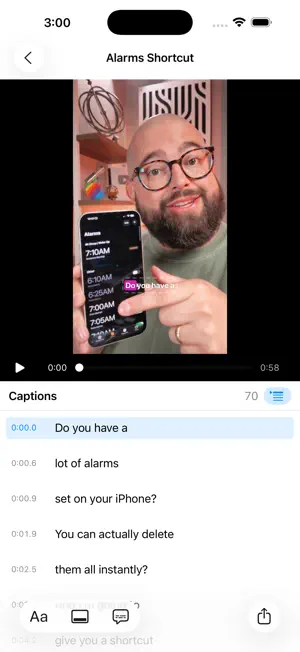
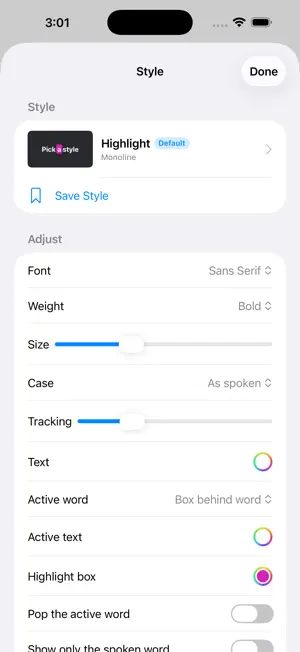
Captioner adds animated, word-by-word captions to your videos, entirely on your device. Drop in a clip, pick a style, fix any word, and export a new video with the captions burned in. Nothing is uploaded, there is no account, and it's free. WORD BY WORD Captioner listens to your video with Apple's on-device speech engine and keeps the moment every word is spoken, so the word being said lights up as it's said. Perfect for Reels, Shorts, TikTok and any video watched with the sound off. FIFTEEN STYLES, ALL YOURS TO CHANGE Highlight boxes, outlines, karaoke colors, pops, typewriter reveals, boxed subtitles, and single-word styles that show only the spoken word. Every style's font, weight, size, case, colors, outline, shadow and animation can be changed. Use San Francisco in sans serif, rounded, serif or monospaced designs, any font on your device, or a font file you add. Save your own styles and make one the default for every new video. PUT THEM WHERE YOU WANT Drag the caption in the preview, or set a vertical position and left, center or right alignment. Vertical 9:16 and widescreen 16:9 videos each remember their own spot. FIX THE WORDS Every caption is editable next to the preview. Split a line before any word, merge two, delete one, or rebuild from the original recognition. Punctuation, title case and curse words are simple toggles. TRANSLATE Turn the captions into Spanish, French, German, Portuguese, Japanese, Chinese and dozens more with Apple's on-device translation, keeping them timed to the original speech. YOUR VIDEO, UNTOUCHED Exports keep the original resolution and frame rate, and the audio is copied exactly as it was. H.264 by default, HEVC if you prefer. Already have an SRT or WebVTT file? Use it instead of transcribing. PRIVATE BY DESIGN Speech recognition, translation and rendering all happen on your device. Captioner has no account, no analytics and no tracking. The first time you caption a language, the system downloads Apple's speech model for it; after that it works offline. Captioner for Mac adds batch queues and watched folders that caption and export videos automatically.
What’s new
Version 1.2.1 · Updated October 29, 2026
Ready for iPhone Duo. Unfold it and your video sits beside its captions, so you can watch, edit and restyle without switching views.
App privacy
The developer, Stephen Robles, reported these privacy practices to Apple.
Data Not Collected
The developer does not collect any data from this app.
Alternatives to Captioner: Quick Add Captions
Looking for apps like Captioner: Quick Add Captions? Here are 6 similar apps on the App Store. The highest rated is On This Day Rewind (5.0/5), and all 6 are free to download.
-
 On This Day Rewind
5.0
-
 Video Compressor - HEVCut
4.7
-
 Captions for Video: AI Subs
3.7
-
 BitCam
4.7
-
 Cassette: Home Video Player
4.8
-
 pico cam: Dynamic Island pics
4.5
| App | Rating | Price | Last updated | Compare |
|---|---|---|---|---|
| Captioner: Quick Add Captions | 5.0 / 5 (3 ratings) | Free | October 29, 2026 | |
| On This Day Rewind | 5.0 / 5 (24) | Free | Oct 15, 2026 | Compare |
| Video Compressor - HEVCut | 4.7 / 5 (96) | Free | Oct 24, 2026 | Compare |
| Captions for Video: AI Subs | 3.7 / 5 (6) | Free | Sep 19, 2026 | Compare |
| BitCam | 4.7 / 5 (92) | Free | Sep 18, 2026 | Compare |
| Cassette: Home Video Player | 4.8 / 5 (213) | Free | Oct 10, 2026 | Compare |
| pico cam: Dynamic Island pics | 4.5 / 5 (58) | Free | Oct 26, 2026 | Compare |