

Arc Lock – App Blocker
JUN HYUK CHOI Productivity iPhoneiPadiPod touch
Arc Lock – App Blocker is a free Productivity app for iPhone and iPad by JUN HYUK CHOI. Requires iOS 18.0. Updated October 29, 2026.
- Price
- Free
- on the App Store
- Size
- 7 MB
- Age 4+
- Updated
- Oct 29
- 2026 · v1.1.0
Screenshots



About Arc Lock – App Blocker
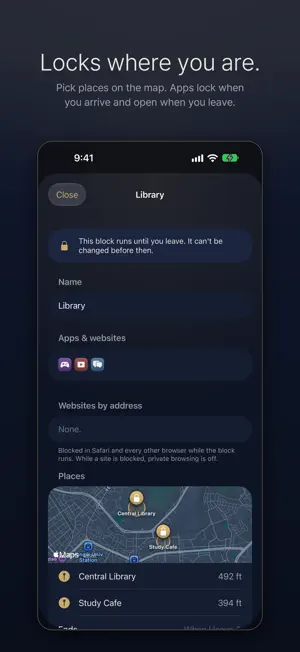
Companies fight for every second of your time to keep you distracted. Taking control of your screen time should be a human right, not something locked behind a paywall. Arc Lock blocks the apps and websites that eat your day, and once a block starts, it stays on. Every feature is free for everyone: no subscription, no account, no ads, no in-app purchases. SCHEDULES Pick apps, app categories and websites, choose the hours and days, and they lock on their own. Overnight windows like 11 PM – 7 AM work too (up to 22 hours). DAILY LIMITS Allow yourself a set time each day, from 5 minutes to 8 hours. See exactly how many minutes are used and left. When the time is used up, those apps lock until the limit resets: at midnight, or at the time you pick (say 4:00 AM, for late nights). A heads-up comes 5 minutes before. TIME-OUTS Not a full block, a pause. After a stretch of use, the apps take a short break, then open again. For example: after 20 minutes of short videos, a 10-minute break. It repeats all day and starts fresh at its reset time. BLOCK NOW Lock distractions right away, from 15 minutes to 12 hours. The Block now button is always one tap away. PLACES Pick one or more places on the map, like the library, your school or the gym, and the apps lock when you arrive. Each place block ends when you leave, or after a set time, whichever you choose, and starts only on the days you pick. Location access is asked for only when you set up a place block, and Arc Lock never sends your location anywhere. STRICT LOCK Every block can have Strict lock, and it's on by default. While a strict block runs: • it can't be stopped, loosened or deleted in Arc Lock • the date and time can't be changed by hand • the block screen has a single button: Close Daily limits and time-outs are locked in until they reset: you can make one stricter once a day, but looser settings only start at its next reset. Want a gentler block? Switch Strict lock off for that block, and you can stop it whenever you like. Switching Strict lock off for the whole app works right away: a block that's running or counting stays strict only until its own reset, or until it ends. DELETION PROTECTION On by default: no app can be deleted from your iPhone, Arc Lock included. Switching it off waits only until your strict blocks reset or end. LOCK-IN Freeze every rule for 1 to 30 days, even between blocks: no loosening, no deleting rules, no deleting apps. Changes you queued before it wait until it ends. WEBSITES BY ADDRESS Type a site like youtube.com and it's blocked in Safari and every other browser, in schedules, daily limits, time-outs and Block now. APPLE'S OWN LOOK Native lists and a compact Liquid Glass tab bar: Home, Blocks and Settings. Names are optional: a block without one is shown by its first app. Five themes (Navy, Graphite, Forest, Plum and Paper), each with a matching app icon. The phone-and-lock mark in the app closes while something is blocked. PRIVATE BY DESIGN Arc Lock works through Apple's Screen Time. Apple keeps your activity on your iPhone; Arc Lock never learns which apps you use and sends nothing anywhere. No account, no analytics, no tracking. OPEN SOURCE The complete source code is on GitHub under the MIT license: github.com/WeldingArc/arc-lock
What’s new
Version 1.1.0 · Updated October 29, 2026
• Places: pick one or more places on the map and the apps lock when you arrive. Each place block ends when you leave, or after a set time, and starts only on the days you pick. Location access is asked for only when you set one up, and Arc Lock never sends your location anywhere. • Names are optional: a block without one is shown by its first app. • Korean: Arc Lock now follows your iPhone's language, in English or Korean. • Apple's own look: native lists and a compact Liquid Glass tab bar (Home, Blocks, Settings), with Block now one tap away. • Choose when each daily limit and time-out resets, like 4:00 AM for late nights. • No more waiting for midnight: turning Strict lock off works right away. A block that's running or counting stays strict only until its own reset, or until it ends. Deletion protection follows the same rule. • Fixes and polish.
App privacy
The developer, JUN HYUK CHOI, reported these privacy practices to Apple.
Data Not Collected
The developer does not collect any data from this app.
Alternatives to Arc Lock – App Blocker
Looking for apps like Arc Lock – App Blocker? Here are 6 similar apps on the App Store. The highest rated is NoStim: Screen Time (5.0/5), and all 6 are free to download.
-
 Unracked: App Blocker
-
 NoStim: Screen Time
5.0
-
 Unstuck:App Blocker
5.0
-
 Just Nod
-
 FocusLock: Block Apps & Focus
-
 App Blocker: Block Apps & Site
| App | Rating | Price | Last updated | Compare |
|---|---|---|---|---|
| Arc Lock – App Blocker | – | Free | October 29, 2026 | |
| Unracked: App Blocker | – | Free | Sep 9, 2026 | Compare |
| NoStim: Screen Time | 5.0 / 5 (5) | Free | Nov 2, 2026 | Compare |
| Unstuck:App Blocker | 5.0 / 5 (2) | Free | May 15, 2026 | Compare |
| Just Nod | – | Free | Oct 21, 2026 | Compare |
| FocusLock: Block Apps & Focus | – | Free | Sep 7, 2026 | Compare |
| App Blocker: Block Apps & Site | – | Free | Oct 30, 2026 | Compare |