

Widget Studio: Home Assistant
Daniel Hall Utilities iPhoneiPadiPod touchApple Watch
Widget Studio: Home Assistant is a free Utilities app for iPhone and iPad by Daniel Hall. Requires iOS 17.0. Updated October 27, 2026.
- Price
- Free
- on the App Store
- Size
- 27 MB
- Age 4+
- Updated
- Oct 27
- 2026 · v1.4.2
Screenshots

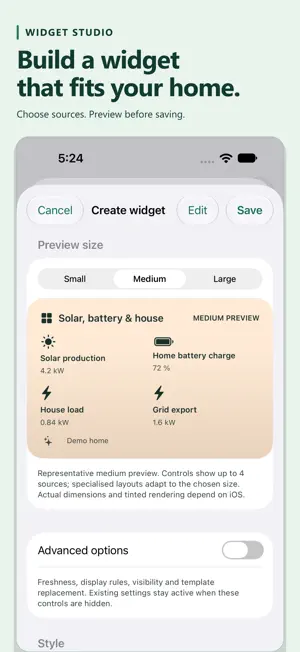


About Widget Studio: Home Assistant
Make your Home Assistant useful at a glance. Widget Studio helps you turn readings from your own Home Assistant server into personal widgets for iPhone and iPad. Choose what matters, preview the layout, and add it to your Home Screen. Supported readings can also appear on the Lock Screen and Apple Watch. GET STARTED - Explore the demo before connecting your home. - Find useful sources for solar, battery, climate, bins and more. - Review every suggestion and choose what goes into each widget. WIDGETS THAT FIT YOUR HOME - Build small, medium and large Home Screen layouts. - Choose clear labels, colours, icons, chart styles and reading precision. - Bring together energy, weather, calendars, lists and other supported Home Assistant sources. - Preview sizes and repair a layout if one of its sources changes. - See selected readings on Apple Watch, including supported complications. READINGS YOU CAN TRUST - See saved readings and charts when your connection drops, with clear age and connection information. - Explore history and compare compatible readings where your Home Assistant server provides the data. - Refresh the app when you need a current view. iOS controls widget refresh timing, so widgets are not guaranteed to update in real time. PRIVATE BY DESIGN Widget Studio is permanently free, with no subscription, paid upgrade, tracking or Widget Studio account. Your Home Assistant credentials stay in the device Keychain. Nothing is sent from the optional support report unless you choose to share it. Supported device controls require an explicit action. Scenes, scripts and covers ask for confirmation; locks are read-only. Commands are not queued while offline or replayed later. YOU WILL NEED Your own Home Assistant installation and a reachable connection to it. History, calendars, bin dates and other suggestions depend on the sources you have configured. Remote access needs your own reachable HTTPS address; Widget Studio does not provide a cloud relay. Settings includes optional Tesla, Starlink and OVO Energy referral links. Daniel may receive a reward if you use one and qualify. Referrals never unlock or limit app features; each provider sets its own terms. Widget Studio is an independent app and is not affiliated with or endorsed by the Open Home Foundation or Nabu Casa.
What’s new
Version 1.4.2 · Updated October 27, 2026
- Add Widget Studio to Apple Watch to see selected home readings at a glance, including supported complications. - Enjoy a roomier dashboard on iPad and layouts tuned for iPhone Duo's inner and outer displays. - Find your next widget and the first-time setup guide more easily. - Saved widget readings recover sooner after a brief local storage interruption.
App privacy
The developer, Daniel Hall, reported these privacy practices to Apple.
Data Linked to You
The following data, which may be collected and linked to your identity, may be used for the following purposes:
- Contact Info: Email Address
- User Content: Customer Support
- Diagnostics: Performance Data, Other Diagnostic Data
Used for: App Functionality
Alternatives to Widget Studio: Home Assistant
Looking for apps like Widget Studio: Home Assistant? Here are 6 similar apps on the App Store.
-
 Pocket AI Mechanic
-
 Survival Storehouse
-
 PoolWater-Pro
-
 SpotGrid – Energy Prices
-
 Enviroflo Config
-
 No Shorts for YouTube
| App | Rating | Price | Last updated | Compare |
|---|---|---|---|---|
| Widget Studio: Home Assistant | – | Free | October 27, 2026 | |
| Pocket AI Mechanic | – | Free | May 31, 2026 | Compare |
| Survival Storehouse | – | 9.99 USD | Feb 22, 2026 | Compare |
| PoolWater-Pro | – | Free | Feb 19, 2025 | Compare |
| SpotGrid – Energy Prices | – | Free | Sep 10, 2026 | Compare |
| Enviroflo Config | – | Free | Dec 18, 2025 | Compare |
| No Shorts for YouTube | – | 0.99 USD | Jul 5, 2026 | Compare |