

Ad Blocker & PiP Helper
Masaaki Sano Utilities iPhoneiPadiPod touch
Ad Blocker & PiP Helper is a free Utilities app for iPhone and iPad by Masaaki Sano. Requires iOS 26.5. Updated November 27, 2026.
- Price
- Free
- on the App Store
- Size
- 46 MB
- Age 4+
- Updated
- Nov 27
- 2026 · v3.0
Screenshots
Save to Pinterest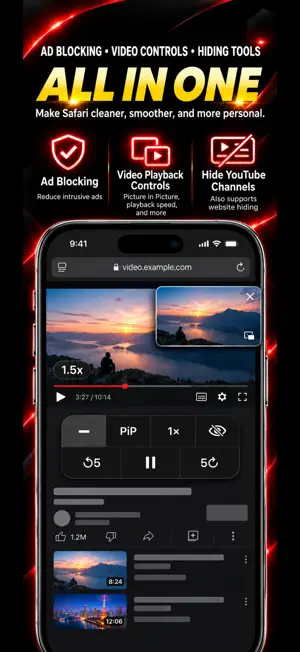


About Ad Blocker & PiP Helper
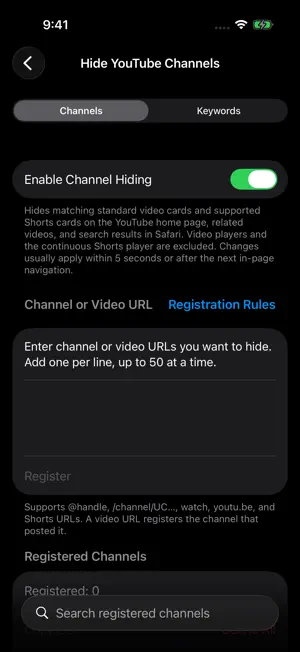
"Ad Blocking & PiP" is an app designed exclusively for Safari that combines ad blocking, video playback controls, and tools to hide unwanted YouTube channels and websites. It helps reduce ads on web pages while providing Picture-in-Picture (PiP), playback speed control, play/pause, and skip controls on supported video pages. You can also hide videos matching selected YouTube channels or keywords, and unwanted Google Search results. 【Free Trial & Pricing】 Try the app free for 30 days from your first use. You will not be charged automatically when the free trial ends. If you wish to continue using the app, you can make a one-time purchase. The one-time purchase does not involve any monthly or annual subscription fees. 【About the One-Time Purchase】 With a one-time purchase, you can continue using all included features without additional charges. Future free updates to features included in the one-time purchase are also available at no extra cost. The purchase price may change, but existing purchasers will not be charged again for features included in their purchase. New features or services offered separately in the future may require an additional fee. 【Main Features】 ■ Ad Blocking Reduces ads and intrusive elements on Safari web pages. • Blocks ad-related network requests • Hides dynamically displayed ad elements • Helps reduce video ads • Per-site exclusion settings Some ads may still appear depending on the website. ■ YouTube Channel & Keyword Filtering Hide videos and Shorts cards matching selected channels or blocked keywords on YouTube in Safari. • Works on the home page, related videos, and search results • Add channels using channel or video URLs • Bulk registration, list management, and individual ON/OFF controls Video playback pages and the Shorts player are not affected. ■ Website & Keyword Filtering Hide matching websites or keywords from standard Google Search results. • Filter by website domain or keywords in result titles • Manage lists and toggle entries individually Direct access to websites is not blocked. ■ Picture-in-Picture (PiP) Support Watch videos in a floating window while using other apps on supported pages. PiP may also work where Safari's standard controls make it difficult. ■ Playback Speed Control Set speeds from 0.1× to 5.0× on supported video pages. Your preferred speed can be retained across videos and page reloads. ■ Floating Video Controller Control supported videos without tapping the video itself. • Start or stop PiP • Change speed and play/pause • Skip backward or forward • Collapse or expand the controls Customize layout, visible buttons, size, opacity, and skip intervals. An Extra Large size and in-app preview are available. ■ Ad Blocking Statistics View estimated blocked ads and data savings. Actual results may vary. 【Getting Started】 Enable the app's Safari extensions in your device settings. Follow the in-app instructions to complete setup. 【Ongoing Improvements & Website Support】 We plan to improve ad blocking, video playback, and filtering as websites change. For feature requests or supported website suggestions, leave an App Store review or email us. For bug reports and individual support, please use email: [email protected] 【Important Notes】 • This app is exclusively for Safari. • Complete blocking of all ads is not guaranteed. • Video assistance features may not work on every site. • Filtering hides matching items in supported results; it does not delete content or block direct access. • Website changes may affect some features. • Refreshing a Safari page may resolve an unresponsive video controller. • Future separately paid features or services may not be included in the current one-time purchase.
What’s new
Version 3.0 · Updated November 27, 2026
What's New in Version 3.0 - Added the ability to hide YouTube videos and Shorts that match specified channels or blocked keywords. - Added filtering for Google Search results based on specified websites and blocked keywords. - Improved list management with bulk registration, copying, and individual ON/OFF controls. - Added options to rate and review the app and submit feature requests. - Improved the Japanese and English interfaces and overall usability.
App privacy
The developer, Masaaki Sano, reported these privacy practices to Apple.
Data Not Collected
The developer does not collect any data from this app.
Alternatives to Ad Blocker & PiP Helper
Looking for apps like Ad Blocker & PiP Helper? Here are 6 similar apps on the App Store.
-
 Aegis Browser
-
 Fusegi - 広告ブロックブラウザ
-
 Phone Guardian - Ad Blocker
-
 Vision Dolphin Private Browser
-
 BrowseWide: Full Screen Web
-
 Tab Suspender for Safari
| App | Rating | Price | Last updated | Compare |
|---|---|---|---|---|
| Ad Blocker & PiP Helper | – | Free | November 27, 2026 | |
| Aegis Browser | – | Free | Nov 17, 2026 | Compare |
| Fusegi - 広告ブロックブラウザ | – | Free | Nov 18, 2026 | Compare |
| Phone Guardian - Ad Blocker | – | Free | Nov 23, 2026 | Compare |
| Vision Dolphin Private Browser | – | Free | Nov 26, 2026 | Compare |
| BrowseWide: Full Screen Web | – | Free | Nov 11, 2026 | Compare |
| Tab Suspender for Safari | – | Free | Oct 29, 2026 | Compare |