

Red Sheet - Photo & PDF Study
Tiep Nguyen Education iPhoneiPadiPod touch
Red Sheet - Photo & PDF Study is a free Education app for iPhone and iPad by Tiep Nguyen. Rated 3.0/5 from 1 ratings. Requires iOS 17.0.
- Rating
- 3.0
- 1 ratings
- Price
- Free
- on the App Store
- Size
- 11 MB
- Age 4+
- Updated
- Nov 23
- 2026 · v1.1
Screenshots
Save to Pinterest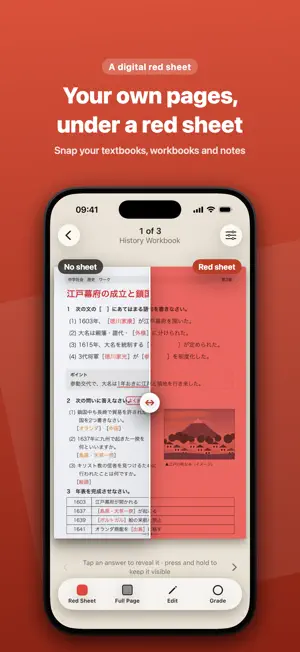


About Red Sheet - Photo & PDF Study
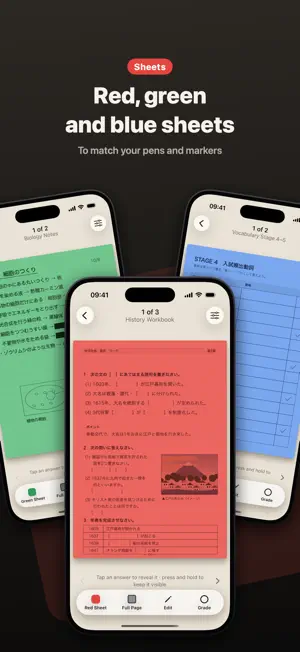
Red Sheet turns photos of your own notes, textbooks and worksheets into a quiz on iPhone and iPad, with no typing. Snap a page, scan it or import a PDF: Red Sheet finds what you wrote in red, orange or pink pen and the words under a green highlighter, and hides them. Tap to reveal one answer at a time, mark it right or wrong, and the ones you missed come back the next day. It's active recall and spaced repetition on the pages you already study from. Every feature is free, with no ads, no account and no page limit. It works like the red plastic sheet students in Japan lay over their notes: write the answers in red, and the sheet hides them until you're ready to check. WHAT IT'S FOR - Redoing workbook and worksheet questions without seeing the answers - Quizzing yourself on notes you made with colored pens and highlighters - Turning any textbook page into fill-in-the-blank practice - Memorizing vocabulary, terms, dates and formulas for tests and exams HOW IT WORKS 1. Tap + to add pages from the scanner, your photos or a PDF 2. Red Sheet finds the answer colors and hides them 3. Choose a red, green or blue sheet, over the full page or as a band 4. Tap an answer to reveal it, then mark it ○ (right) or × (wrong) 5. Answers you marked × come back the next day in Review FEATURES Red, green and blue sheets Under the Red Sheet, red, orange and pink pen disappears, and words under a green highlighter turn dark and are hidden. Under the Green Sheet, words under a pink highlighter are hidden. Under the Blue Sheet, blue check pen disappears. Full page or a band Lay the sheet over the whole page, or slide a horizontal or vertical band down it to check one question at a time. Change what's hidden In Edit, draw a box around anything you want hidden, draw over words with the marker to hide them, or use the eraser to show what was hidden by mistake. On a page printed all in black, box the words you want to learn and it becomes a fill-in-the-blank test. Grade and review Mark each answer ○ or ×. An answer marked × comes back the next day, and answers you know come back at longer intervals. The Review tab has today's review and a round of only the answers you missed. Live Hold your iPhone over a book and see the page through a sheet on screen, without taking a photo. iPhone and iPad, in sync Sync your pages, edits and grades between iPhone and iPad through your own iCloud. On iPad, study on the big screen, and draw boxes and markers with Apple Pencil. Free backup Export every notebook as one file to Files or anywhere else, and restore from it on a new iPhone. Privacy We never see your pages. Hiding runs on your device without the internet, and there is no server of ours to receive them. QUESTIONS PEOPLE ASK How do I turn my notes into a quiz without typing? Take a photo of the page with Red Sheet. It hides the answers written in red, orange or pink pen and the words under a green highlighter, so each one becomes a question you reveal with a tap. How do I hide the answers on a worksheet? Scan or photograph it. Answers written in red, orange or pink pen are hidden for you; for answers printed in black, draw a box around them in Edit. Is Red Sheet free? Yes. Every feature is free, including PDF import, grading, spaced-repetition review and iCloud sync. There are no in-app purchases, no ads and no page limit. Does it work with PDFs? Yes. Import a PDF from Files and each of its pages becomes a page in a notebook. Notes from another note-taking app work too, once you export them as a PDF. Do I need an account? No. A sample notebook is on your shelf, so you can try everything without the camera. Does it work offline? Yes. Adding pages, hiding, grading and review all run on your device. Only iCloud sync uses the internet. Which devices does it run on? iPhone with iOS 17 or later, and iPad with iPadOS 17 or later. The app is in English and Japanese.
What’s new
Version 1.1 · Updated November 23, 2026
Performance improvements and bug fixes.
App privacy
The developer, Tiep Nguyen, reported these privacy practices to Apple.
Data Linked to You
The following data, which may be collected and linked to your identity, may be used for the following purposes:
- Location: Coarse Location
- Identifiers: Device ID
- Usage Data: Product Interaction, Advertising Data
Used for: Third-Party Advertising, Developer’s Advertising or Marketing, Analytics
Data Not Linked to You
The following data, which may be collected but is not linked to your identity, may be used for the following purposes:
- Diagnostics: Performance Data, Other Diagnostic Data, Crash Data
Used for: Third-Party Advertising, Developer’s Advertising or Marketing, Analytics
Alternatives to Red Sheet - Photo & PDF Study
Looking for apps like Red Sheet - Photo & PDF Study? Here are 6 similar apps on the App Store.
-
 Read! Recall! PDF Flashcards
-
 暗記ノート
-
 診療放射線技師 過去問|アプ問 国試対策
-
 Oboeru Sheet: PDF Flashcards
-
 OtoPRA
-
 シャドニャン~Español~
| App | Rating | Price | Last updated | Compare |
|---|---|---|---|---|
| Red Sheet - Photo & PDF Study | 3.0 / 5 (1 rating) | Free | November 23, 2026 | |
| Read! Recall! PDF Flashcards | – | Free | Nov 23, 2026 | Compare |
| 暗記ノート | – | Free | Oct 21, 2026 | Compare |
| 診療放射線技師 過去問|アプ問 国試対策 | – | Free | Nov 19, 2026 | Compare |
| Oboeru Sheet: PDF Flashcards | – | Free | Nov 24, 2026 | Compare |
| OtoPRA | – | Free | Aug 6, 2026 | Compare |
| シャドニャン~Español~ | – | Free | Mar 17, 2026 | Compare |