

EchoLines
TONDA K.K. Education iPhoneiPadiPod touch
EchoLines is a free Education app for iPhone and iPad by TONDA K.K. Requires iOS 26.0. Updated November 15, 2026.
- Price
- Free
- on the App Store
- Size
- 40 MB
- Age 4+
- Updated
- Nov 15
- 2026 · v1.16.0
Screenshots
Save to Pinterest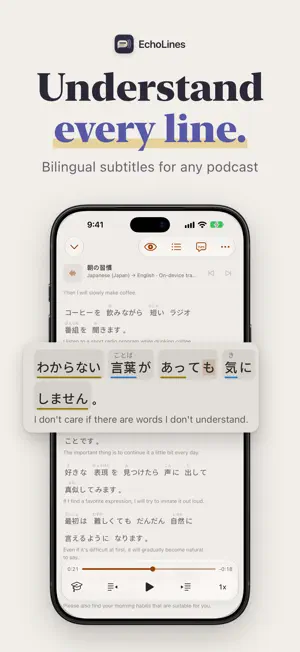


About EchoLines
Press play on any podcast episode or audio file and EchoLines turns the speech into time-synced subtitles in the original language, highlighted word by word, with a translation underneath. Loop any sentence until you catch every word. Turn on shadowing and EchoLines pauses after each line so you can say it yourself. Or listen blind first, then reveal the text to check what you heard. Subscribe to podcasts or import your own audio. There's no sign-up, and your audio never leaves your device. SUBTITLES FOR YOUR PODCASTS AND AUDIO • Podcasts, lectures, audiobooks, voice memos: if you can import it, EchoLines can caption it. • Subtitles appear a few seconds after you press play and stay ahead of the audio. • The current sentence is highlighted word by word, karaoke style. • If a podcast publishes its own transcript, EchoLines uses it and translates it. • Japanese audio can show hiragana above the kanji, or romaji if you prefer. • Show and episode titles come with a translation underneath. • Six subtitle themes, each in light and dark, and export to SRT or VTT. PRACTICE SENTENCE BY SENTENCE • Loop a single sentence until you catch every word. • Shadowing: EchoLines pauses after each sentence so you can repeat it out loud. • Record your shadowing and compare your words and intonation with the original. • A-B repeat for any stretch of audio. • Hide the original or the translation to test yourself. • Look up words in the system dictionary and save sentences to review later. PODCASTS AND YOUR OWN AUDIO • Search and subscribe to podcasts, with suggestions in the language you're learning. • New episodes can download automatically, and a play queue keeps the next one ready. • Import audio from Files, other apps, or a computer on the same Wi-Fi. • Prepare subtitles for a whole episode ahead of time. PRIVATE BY DESIGN • Speech recognition and translation run on your iPhone or iPad with Apple's on-device frameworks. • No account and no server of ours. Your audio and shadowing recordings never leave your device. • iCloud sync keeps your shows, playback positions and saved sentences in step across your devices, in your own iCloud account. You can turn it off. On iPad, a sentence panel sits beside the subtitles and keyboard shortcuts control playback. On iPhone Duo, the open phone shows the subtitles and the sentence panel side by side. Supports the languages offered by Apple's on-device speech recognition and translation.
What’s new
Version 1.16.0 · Updated November 15, 2026
New • Video: import your own videos and get subtitles; MKV, WebM and more are converted on device • Colored Phrases: Japanese originals are colored phrase by phrase, so the sentence structure stands out • A new home: Continue Playing and New Episodes up front, and pick up where you left off on another device • Continue Listening widget for the Home Screen and Lock Screen Improvements and Fixes • Word Tracking styles, subtitle fonts, Sleep Timer, autoplay of the next episode, and Featured Shows • Copy just the original, the translation, or any part of a sentence • Larger covers in lists and one long-press menu for every episode • Fixed translations that sometimes repeated a word; lower battery use and better stability
App privacy
The developer, TONDA K.K., reported these privacy practices to Apple.
Data Not Collected
The developer does not collect any data from this app.
Alternatives to EchoLines
Looking for apps like EchoLines? Here are 6 similar apps on the App Store. The highest rated is PodPop (5.0/5), and all 6 are free to download.
-
 LangPod
-
 PodPop
5.0
-
 Donkimu: Read Japanese Menus
-
 Learn Italian - LingFast
-
 IELTS Lab: AI Test Prep
-
 LevelNews: Learn English
| App | Rating | Price | Last updated | Compare |
|---|---|---|---|---|
| EchoLines | – | Free | November 15, 2026 | |
| LangPod | – | Free | Mar 27, 2025 | Compare |
| PodPop | 5.0 / 5 (2) | Free | Nov 17, 2026 | Compare |
| Donkimu: Read Japanese Menus | – | Free | Nov 6, 2026 | Compare |
| Learn Italian - LingFast | – | Free | Aug 18, 2026 | Compare |
| IELTS Lab: AI Test Prep | – | Free | Feb 18, 2026 | Compare |
| LevelNews: Learn English | – | Free | Nov 15, 2026 | Compare |
Compare EchoLines with the top alternatives: ratings, updates, ASO score and keyword gaps →