

MyTime – Time Tracking
Tommy Sadiq Hinrichsen Productivity iPhoneiPadiPod touchApple Watch
MyTime – Time Tracking is a free Productivity app for iPhone and iPad by Tommy Sadiq Hinrichsen. Requires iOS 17.0. Updated October 21, 2026.
- Price
- Free
- on the App Store
- Size
- 4 MB
- Age 4+
- Updated
- Oct 21
- 2026 · v1.2.0
Screenshots


About MyTime – Time Tracking
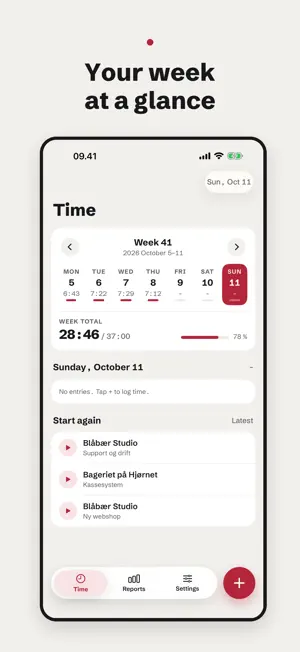
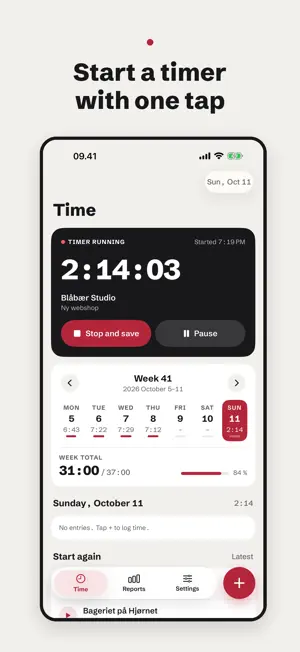
MyTime is time tracking for people who bill hours to clients and projects. Everything is stored on your phone. There is no account, no cloud and no subscription. YOUR WEEK AT A GLANCE See today's entries and the week's total against your weekly target. Swipe between weeks and tap a day to see where the time went. START A TIMER WITH ONE TAP Start a timer on a project, pause it, and stop and save when you are done. The timer runs in the Dynamic Island and on the Lock Screen, so you can stop it without opening the app. Your latest projects are ready to start again. WIDGET, APPLE WATCH AND SIRI See today's hours on the Home Screen, the Lock Screen and your Apple Watch, and pause or stop the timer from there. With Siri and Shortcuts you can start and stop the timer, add clients and projects, and log time with a sentence like "2 hours Nordlys extension yesterday". LOG TIME IN SECONDS Pick a client and project and adjust the duration with time buttons. You choose which buttons to show, such as +0:15, +1:00 or a full working day. REMINDERS AT YOUR PLACES Add the office and the clients you visit often. When you arrive, MyTime suggests starting the timer, and when you leave, stopping and saving it. Your location stays on the phone. REPORTS See hours by day, week and month, split by client and project. The hourly rate is shown alongside the hours, and for each project with a budget you see how much is used and whether you are over. EXPORT FOR PAYROLL AND INVOICES Export as CSV for spreadsheets, payroll or invoicing, or share a PDF timesheet with room for the client's signature. Pick one of the built-in formats, or describe the file in your own words and Apple Intelligence builds the format on the phone. The file is always built from your entries, so the totals match. YOUR DATA IS YOURS • No account and no sign-in • Nothing is sent to a server • Back up everything to one file you keep where you like, and restore it later
What’s new
Version 1.2.0 · Updated October 21, 2026
• MyTime on Apple Watch: see today's hours and the timer, pause or stop and save it, or start one of your latest projects again. • Log time with Siri: say "Log time in MyTime" and, for example, "2 hours Nordlys extension yesterday", and Apple Intelligence fills in the entry on the phone. • Add clients and projects with Siri and in Shortcuts. • Timesheet as PDF: share the period's entries with a total and room for the client's signature. • Export for Danløn: pick the Danløn format, enter your employee number and wage code, and load the file under Lønberegning → Indlæs fra fil. • Register automatically at a place: when you leave, the time you spent there is saved as an entry for the place's project, with no need to confirm.
App privacy
The developer, Tommy Sadiq Hinrichsen, reported these privacy practices to Apple.
Data Not Collected
The developer does not collect any data from this app.
Alternatives to MyTime – Time Tracking
Looking for apps like MyTime – Time Tracking? Here are 6 similar apps on the App Store. The highest rated is FirstSeed Calendar (4.7/5), and all 6 are free to download.
-
 Rd4-app
3.7
Rd4-app
3.7
-
 NoMachine
3.0
NoMachine
3.0
-
 Capacities – Notes & PKM
4.3
Capacities – Notes & PKM
4.3
-
 MeisterTask - Task Management
4.6
MeisterTask - Task Management
4.6
-
 Anytype - The Everything App
4.5
Anytype - The Everything App
4.5
-
 FirstSeed Calendar
4.7
FirstSeed Calendar
4.7
| App | Rating | Price | Last updated | Compare |
|---|---|---|---|---|
| MyTime – Time Tracking | – | Free | October 21, 2026 | |
| Rd4-app | 3.7 / 5 (3) | Free | Oct 9, 2026 | Compare |
| NoMachine | 3.0 / 5 (126) | Free | Aug 3, 2026 | Compare |
| Capacities – Notes & PKM | 4.3 / 5 (116) | Free | Oct 26, 2026 | Compare |
| MeisterTask - Task Management | 4.6 / 5 (1,811) | Free | Sep 21, 2026 | Compare |
| Anytype - The Everything App | 4.5 / 5 (252) | Free | Sep 25, 2026 | Compare |
| FirstSeed Calendar | 4.7 / 5 (339) | Free | Oct 25, 2026 | Compare |