

Calfect: Calendar Planner
HIROYUKI SUMIYA Productivity iPhoneiPadiPod touch
Calfect: Calendar Planner is a free Productivity app for iPhone and iPad by HIROYUKI SUMIYA. Requires iOS 16.4. Updated November 24, 2026.
- Price
- Free
- on the App Store
- Size
- 105 MB
- Age 4+
- Updated
- Nov 24
- 2026 · v1.3.0
Screenshots
Save to Pinterest

About Calfect: Calendar Planner
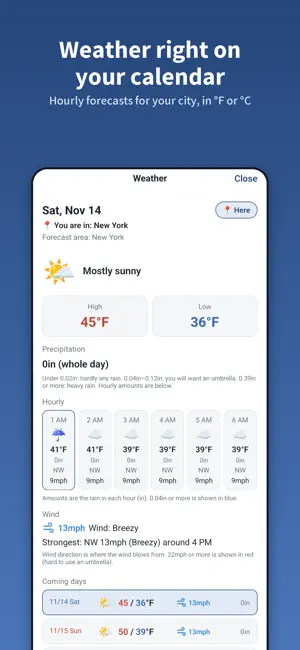
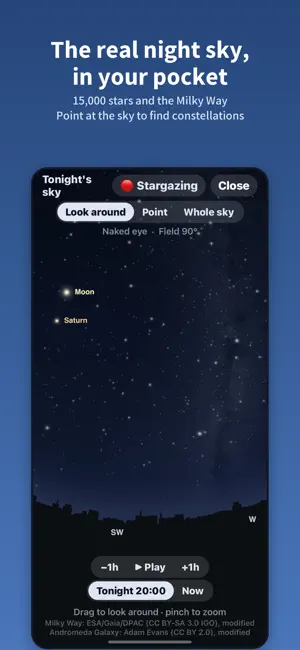
Calfect shows the month and the selected day's events together on one screen. It uses the calendars already on your iPhone or iPad (iCloud, Google, Outlook and more), so you can start right away. No account needed. ■ Everything at a glance - The day's events listed right below the month - Day, week, month and year views ■ Add events in a tap - Stamps: add "Work" or "Day off" with one tap - Type it: write "tomorrow 3pm dentist" and the date, time and title are filled in - From a photo: read dated events from a school notice or schedule - Share text from other apps to Calfect, or add events with Siri or the app icon menu - Templates, repeating events, and as many alerts as you like - Press and hold an event, then drop it on another day to move or copy it ■ Home Screen and Lock Screen - Widgets for today and the whole month, plus Lock Screen widgets, with your own photo as background - Your next event and a countdown on the Lock Screen and in the Dynamic Island - An alert the day before or on the day when rain or strong wind is forecast during an event ■ Everything around your events - To-dos with due dates that show up in the day's list - Anniversary countdowns with the year count - A daily note or diary - Stamp totals: counts, hours and estimated pay per month (great for shift work) - Print the month or save it as a PDF - Birthdays from contacts, week numbers and moon phases - Lock the app with Face ID ■ More for your events - Attach photos, open the location in your maps app, and share by message or email - Give each event its own color - Search by title, location or notes - Subscribe to calendars published by URL (.ics) ■ Weather on your calendar - Weather for about 10 days right on each date, with hourly weather, temperature and wind (Apple Weather) - Use your current location, or search for any city - °C or °F, mph, km/h or m/s, mm or inches, set for your region - In Japan: Japan Meteorological Agency forecasts, a rain radar and typhoon information ■ Made for where you live - Public holidays for 8 countries, including state and regional holidays - Text size, colors, and light or dark appearance ■ Tonight's sky (free) - Moon phase, sunrise and sunset, visible planets and meteor showers - A full-screen sky with 15,000 stars, the Milky Way and constellations - "Point" your phone at the sky to see what's there - A dim red stargazing mode for use outdoors ■ A guardian that grows every day (free) Draw an omikuji (a Japanese shrine fortune) and a guardian comes to you, then grows a little each day you open the app. Omikuji are always free and cannot be bought. ■ Private by design - Events, photos, notes and settings stay on your device - No sign-up or login - Back up and restore, with optional daily backup to iCloud Drive ■ Calfect Premium Most features are free. Calfect Premium adds: - No ads - Home Screen and Lock Screen widgets (all sizes), and photo backgrounds - Your next event on the Lock Screen - Weather alerts for events - Read events from a photo - Full stamp totals (this month's counts are free) - Unlimited anniversaries (3 on the free plan) - Print / PDF - Copy an event to several days at once - Create your own stamps and colors - Wider event search, and no limit on templates or photos per event - Change the app icon (63 icons) - 1.5 guardian bonds a day Three plans are available: monthly, yearly and lifetime. You can also try Calfect Premium free for 24 hours by watching an ad. - Prices are shown on the purchase screen. Payment is charged to your Apple Account. - The monthly and yearly plans renew automatically unless you cancel at least 24 hours before the end of the current period. - You can cancel in Settings > your name > Subscriptions. - Lifetime is a one-time payment and does not renew. Terms of Use: https://yutakano1005.github.io/mycalendar-legal/terms-en.html Privacy Policy: https://yutakano1005.github.io/mycalendar-legal/privacy-en.html
What’s new
Version 1.3.0 · Updated November 24, 2026
- Traditional Chinese and Korean are now supported - Holidays for Taiwan, Hong Kong and South Korea (choose the country and language from a list) - Show the lunar calendar (Settings → Region & units) in the month, week and day views and in widgets - Read events from photos now works with Chinese and Korean text - A new sparkling hologram for your fully grown guardian that shines as you tilt your phone - Widget and Siri names now follow your device language
App privacy
The developer, HIROYUKI SUMIYA, reported these privacy practices to Apple.
Data Used to Track You
The following data may be used to track you across apps and websites owned by other companies:
- Location: Coarse Location
- Identifiers: Device ID
- Usage Data: Product Interaction, Advertising Data
Data Not Linked to You
The following data, which may be collected but is not linked to your identity, may be used for the following purposes:
- Location: Coarse Location
- Identifiers: Device ID
- Usage Data: Product Interaction, Advertising Data
- Diagnostics: Crash Data, Performance Data
- Purchases: Purchase History
- User Content: Customer Support
Used for: Third-Party Advertising, Analytics, App Functionality
Alternatives to Calfect: Calendar Planner
Looking for apps like Calfect: Calendar Planner? Here are 6 similar apps on the App Store.


| App | Rating | Price | Last updated | Compare |
|---|---|---|---|---|
| Calfect: Calendar Planner | – | Free | November 24, 2026 | |
| Hitome Calendar | – | Free | Oct 15, 2026 | Compare |
| SunTodo | – | Free | Aug 13, 2026 | Compare |
| WorkCost | – | Free | Jul 14, 2026 | Compare |
| Mansai Calendar | – | Free | Nov 18, 2026 | Compare |
| Outings Calendar | – | Free | Oct 13, 2026 | Compare |
| かんたんカレンダー | – | Free | Nov 12, 2026 | Compare |