

Finis – Write a Book
Giovanni Di Gregorio Productivity iPadMac
Finis – Write a Book is a free Productivity app for iPad and Mac by Giovanni Di Gregorio. Rated 5.0/5 from 1 ratings. Requires iOS 18.0.
- Rating
- 5.0
- 1 ratings
- Price
- Free
- on the App Store
- Size
- 30 MB
- Age 12+
- Updated
- Nov 16
- 2026 · v1.1
Screenshots


About Finis – Write a Book
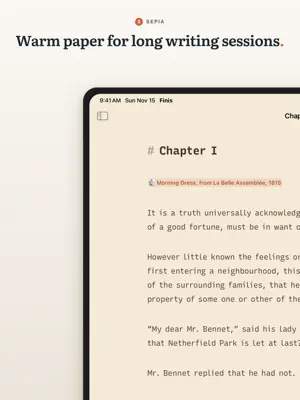
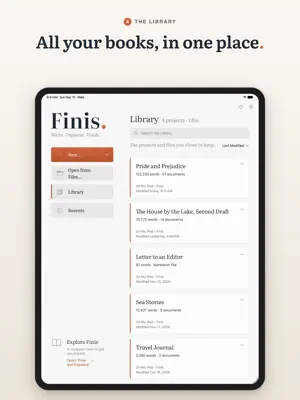
From the first idea to the final page. Finis gives your book a home on Mac and iPad: a calm place to write, a clear view of every chapter, and the tools to shape your manuscript into a finished book. WRITE ON MAC AND IPAD Keep your projects in the Finis folder in iCloud Drive to work on the same book on both devices. One unlock covers Mac and iPad with the same Apple Account. On iPad, use touch or a keyboard, open documents side by side and manage your projects in the Files app. FIND YOUR WRITING FLOW A clean page, thoughtful typography and your words at the center. Stay with a sentence or paragraph in focus mode, keep your line in view with typewriter mode, and build a writing habit with word goals and daily statistics. Simple formatting is always within reach — no Markdown knowledge required. SEE THE WHOLE BOOK Move from a scene to the bigger picture. Arrange chapters in the sidebar, explore ideas on the corkboard and track progress in the outline. Keep synopses, notes, tags and chapter statuses beside your manuscript, then read an entire part as one continuous text. A FRESH PERSPECTIVE, WITH VIRGIL Meet your optional AI writing assistant, right beside the page. Ask questions about your book, draft a synopsis, review clarity, pace, dialogue and continuity, or compare alternative wording for a passage. You decide what belongs in your story. Connect DeepSeek, OpenAI, Anthropic Claude, Google Gemini or Grok, and choose a model for each task. You select the texts to share; Finis sends them only with your consent and when you press Send. REVISE WITH CONFIDENCE Keep comments and suggested changes close to the text. Compare document versions, restore earlier work and search across your project. Automatic backups help you keep your progress. TAKE YOUR BOOK BEYOND THE PAGE Export the whole book or a single chapter to Word, PDF, ePub, HTML or Markdown, or print it. Preview your book with a title page and numbered chapters, ready for the next step in your publishing journey. For agents and publishers, your manuscript follows the conventions of your book’s language, such as standard manuscript format in English. COMING FROM WORD OR SCRIVENER? Import your book with its chapters, notes and comments, and pick up where you left off. YOUR WORDS STAY YOURS No Finis account required. Projects are ordinary folders of Markdown files on your Mac or iPad, or in your iCloud Drive, readable in other text editors. Work on your book offline; AI features need an internet connection and your own provider API keys. Providers charge for API usage separately — it is not included in the Finis trial or unlock. TRY FINIS FREE FOR 14 DAYS Explore every feature, then unlock Finis with one purchase and no Finis subscription. If you choose not to unlock, you can still open, read and export your projects. In English, Italian, French, German, Spanish and Portuguese. Includes a complete Pride and Prejudice example project to explore before starting your own book. A small curiosity: the name comes from the finis Africae, the secret room of the library in Umberto Eco’s The Name of the Rose. In Latin, finis means “end” — here, the end of your book.
What’s new
Version 1.1 · Updated November 16, 2026
Finis 1.1 brings new typography. • Finis Serif and Finis Sans, the two typefaces of the page, made from Literata and Recursive. Finis Sans has the rhythm of a typewriter. • A lighter page on screen, with a little more air between the letters. PDFs keep the full weight, for print. • The same line spacing with both typefaces: Tight, Normal and Loose space the lines alike. • The cursor is as tall as the text. • About Finis › Show the Typeface Licenses opens both licenses in one text. • Split at Headings goes down to ####.
App privacy
The developer, Giovanni Di Gregorio, reported these privacy practices to Apple.
Data Linked to You
The following data, which may be collected and linked to your identity, may be used for the following purposes:
- User Content: Other User Content
- Identifiers: User ID
Used for: App Functionality, Other Purposes
Alternatives to Finis – Write a Book
Looking for apps like Finis – Write a Book? Here are 6 similar apps on the App Store.
-
 Haloscript
-
 Abyss Writer: Markdown Editor
-
 The Book I Wrote
-
 Feather Book Writing App
-
 Reflect: Creative Sparks
-
 ScriblyGo – AI Story Toolkit
| App | Rating | Price | Last updated | Compare |
|---|---|---|---|---|
| Finis – Write a Book | 5.0 / 5 (1 rating) | Free | November 16, 2026 | |
| Haloscript | – | Free | Oct 28, 2026 | Compare |
| Abyss Writer: Markdown Editor | – | Free | Nov 11, 2026 | Compare |
| The Book I Wrote | – | Free | Aug 21, 2026 | Compare |
| Feather Book Writing App | – | Free | Oct 13, 2026 | Compare |
| Reflect: Creative Sparks | – | Free | May 12, 2026 | Compare |
| ScriblyGo – AI Story Toolkit | – | Free | Jul 17, 2025 | Compare |