

Prompter: Teleprompter Studio
Aprex AS Photo & Video iPhoneiPadiPod touch
Prompter: Teleprompter Studio is a free Photo & Video app for iPhone and iPad by Aprex AS. Requires iOS 26.0. Updated October 30, 2026.
- Price
- Free
- on the App Store
- Size
- 14 MB
- Age 4+
- Updated
- Oct 30
- 2026 · v1.0
Screenshots
Save to Pinterest
About Prompter: Teleprompter Studio
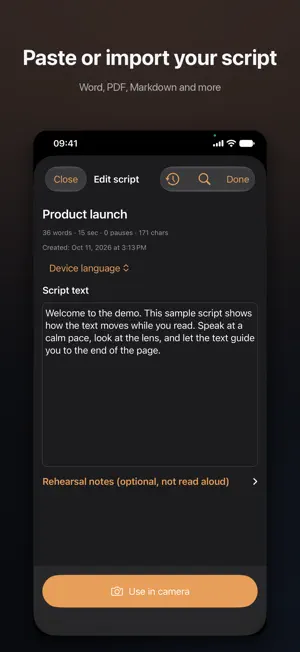
Prompter shows your script above the camera, so you can read and film at the same time. Keep your eyes close to the lens and your delivery stays natural. Read while you film - A movable text window sits over the camera preview, with soft fading edges and a reading guide. - Set the scroll speed, font, size, width, line spacing and alignment. Mirror the text when your setup needs it. - Start with a three-second countdown. Pause, restart or jump to any point in the script. - Keep many scripts in one library. Import TXT, JSON and PDF files, or open a document in Prompter from another app. Voice following keeps the text in step with what you say. It uses Apple speech recognition on your iPhone, so available languages depend on your device. Record with control - Record video with sound on the front or back camera. - Choose the video quality and frame rate your iPhone supports. - Adjust exposure, focus and white balance by hand, or leave them on automatic. - Choose a microphone and watch the level meter before you start. - Each take stays on your iPhone. Save a copy to Photos whenever you like. Edit and caption - Smart cut finds pauses and silences, checks them against the audio level, and previews the result before you export. - The caption editor adds animated captions, word by word, with a steady preview. - Brand kit keeps your caption fonts, colors and style presets in one place. - Safe-zone guides show where text stays clear of the platform interface on vertical videos for TikTok, Instagram Reels and YouTube Shorts. Made for iPhone - Siri Shortcuts and App Intents open the camera or your scripts, and create a new script. - Start and stop sounds and haptic feedback are optional, and you can switch them off in settings. - Short tips appear in context, at most once a day. - Available in English, Norwegian, German, Spanish and French. Privacy Your scripts, recordings, captions and settings stay on your iPhone. Prompter has no account, no sign-in, no ads and no tracking. Online speech recognition is off unless you turn it on yourself, and then the app shows what is sent to Apple. Free and Pro Prompter is free to download. The first three finished video exports from the caption editor are free. Recording, saving and sharing the original video are free. Prompter Pro is a one-time purchase that removes the export limit. There is no subscription.
App privacy
The developer, Aprex AS, reported these privacy practices to Apple.
Data Not Linked to You
The following data, which may be collected but is not linked to your identity, may be used for the following purposes:
- Purchases: Purchase History
Used for: Analytics, App Functionality
Alternatives to Prompter: Teleprompter Studio
Looking for apps like Prompter: Teleprompter Studio? Here are 6 similar apps on the App Store. The highest rated is Realty Pro Shots - Camera App (5.0/5), and all 6 are free to download.
-
 TeleStudio: 4K Teleprompter
-
 Prompter.. - Record Script
-
 Realty Pro Shots - Camera App
5.0
-
 Teleprompt Overlay
1.0
-
 Oil Paint - Photo to Art Maker
4.6
-
 AI filters for selfies - Yern
4.5
| App | Rating | Price | Last updated | Compare |
|---|---|---|---|---|
| Prompter: Teleprompter Studio | – | Free | October 30, 2026 | |
| TeleStudio: 4K Teleprompter | – | Free | Nov 16, 2026 | Compare |
| Prompter.. - Record Script | – | Free | Mar 5, 2026 | Compare |
| Realty Pro Shots - Camera App | 5.0 / 5 (7) | Free | Nov 27, 2026 | Compare |
| Teleprompt Overlay | 1.0 / 5 (1) | Free | Nov 16, 2026 | Compare |
| Oil Paint - Photo to Art Maker | 4.6 / 5 (445) | Free | Apr 16, 2025 | Compare |
| AI filters for selfies - Yern | 4.5 / 5 (175) | Free | Nov 28, 2026 | Compare |