

CardioFit: Home Cardio Workout
Quyen Dang Health & Fitness iPhoneiPadiPod touch
CardioFit: Home Cardio Workout is a free Health & Fitness app for iPhone and iPad by Quyen Dang. Requires iOS 18.0. Updated November 11, 2026.
- Price
- Free
- on the App Store
- Size
- 13 MB
- Age 4+
- Updated
- Nov 11
- 2026 · v1.1
Screenshots
Save to Pinterest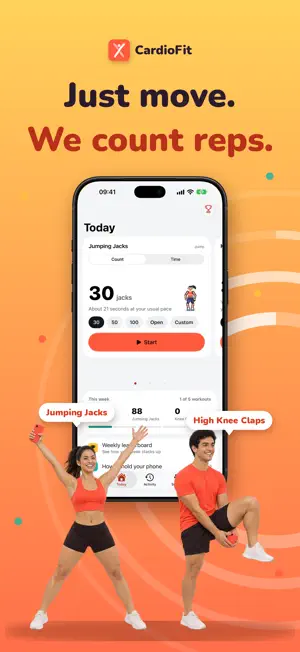


About CardioFit: Home Cardio Workout
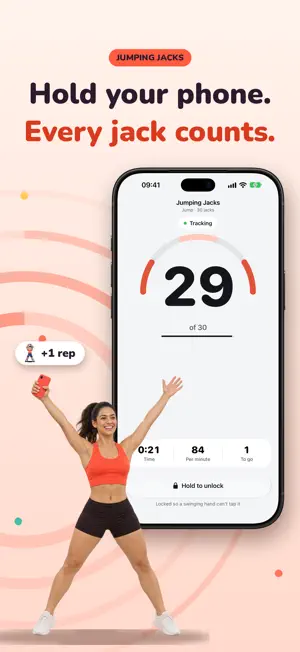
Want a quick home cardio workout without counting reps in your head? Just hold your iPhone, pick a target, and start doing Jumping Jacks or Knee Claps (High Knee Claps) — CardioFit automatically tracks your reps using phone motion. No camera setup or smartwatch required. TWO CORE EXERCISES, FOUR MOVEMENT STYLES • Jumping Jacks: Go for classic jumps, or switch to low-impact Step Jacks by stepping to the side while reaching overhead. • Knee Claps (High Knee Claps): Alternate driving your knees up and bring your hands underneath, with a clap or no-clap style. Simply follow the in-app holding guide and keep a secure grip on your phone while you move. PICK YOUR TARGET & STAY IN THE ZONE • Jump right in with 30, 50, or 100 rep sets, or switch to timed workouts (1 to 3 minutes). • Turn on Voice Count to hear your progress every 5, 10, or 20 reps so you never lose focus. Crisp sound effects and haptic feedback keep you on pace. MIX IT UP WITH CIRCUIT TRAINING • Keep your home cardio fresh with 5 free Mixed Circuit presets that alternate Jumping Jacks, High Knee Claps, rest breaks, and rounds. • Choose a quick session for a busy day or a multi-round bodyweight workout when you have more time. TRACK YOUR WEEKLY PROGRESS • Set a weekly workout goal from 1 to 20 sessions to build a consistent routine. • Dive into your post-workout summary: review total reps, duration, pace charts, and personal bests. • Your entire workout log stays right on your device, complete with easy JSON export and import for safe backups. SHARE YOUR FINISH • Turn any completed session into a shareable visual card with Poster, Ticket, or Pixel designs. • Pick between Story or Square formats to post on social media or save straight to your Photos. UNLOCK MORE WITH CARDIOFIT PLUS The free version gives you preset rep counts, timed sets, and five mixed circuits. CardioFit Plus is an optional auto-renewing subscription designed for total flexibility: • Custom Targets: Set your own exact rep counts or timer durations. • Open Sets: Work out with an open-ended counter that keeps going until you decide to stop. • Circuit Builder: Create, edit, and duplicate your own custom circuits by combining exercise and rest blocks. Available subscription plans and local pricing are displayed clearly in the app before purchase. You can manage or cancel your subscription anytime in your Apple Account settings. Privacy Policy: https://8play.dev/privacy/ Terms of Use: https://8play.dev/terms/ Support: [email protected]
What’s new
Version 1.1 · Updated November 11, 2026
Updated App Store screenshots and artwork. Minor bug fixes.
App privacy
The developer, Quyen Dang, reported these privacy practices to Apple.
Data Linked to You
The following data, which may be collected and linked to your identity, may be used for the following purposes:
- Health & Fitness: Fitness
- User Content: Other User Content
- Identifiers: User ID
Used for: App Functionality
Data Not Linked to You
The following data, which may be collected but is not linked to your identity, may be used for the following purposes:
- Usage Data: Product Interaction
Used for: Analytics
Alternatives to CardioFit: Home Cardio Workout
Looking for apps like CardioFit: Home Cardio Workout? Here are 6 similar apps on the App Store.
-
 Getting-Fit: Workout Coach
-
 GymBeat Counter
-
 APPersonal Trainer
-
 Pilates at Home: Matelle
-
 PhoneFit: Standing Workouts
-
 ShakeFit: AI Home Workout
| App | Rating | Price | Last updated | Compare |
|---|---|---|---|---|
| CardioFit: Home Cardio Workout | – | Free | November 11, 2026 | |
| Getting-Fit: Workout Coach | – | Free | Oct 9, 2026 | Compare |
| GymBeat Counter | – | Free | Aug 30, 2026 | Compare |
| APPersonal Trainer | – | Free | Nov 12, 2026 | Compare |
| Pilates at Home: Matelle | – | Free | Nov 12, 2026 | Compare |
| PhoneFit: Standing Workouts | – | Free | Nov 10, 2026 | Compare |
| ShakeFit: AI Home Workout | – | Free | Nov 24, 2026 | Compare |