

Write Words
Bryan Mortensen Productivity iPhoneiPadiPod touch
Write Words is a free Productivity app for iPhone and iPad by Bryan Mortensen. Rated 5.0/5 from 1 ratings. Requires iOS 18.0. Updated November 4, 2026.
- Rating
- 5.0
- 1 ratings
- Price
- Free
- on the App Store
- Size
- 6 MB
- Age 4+
- Updated
- Nov 4
- 2026 · v1.0.1
Screenshots
Save to Pinterest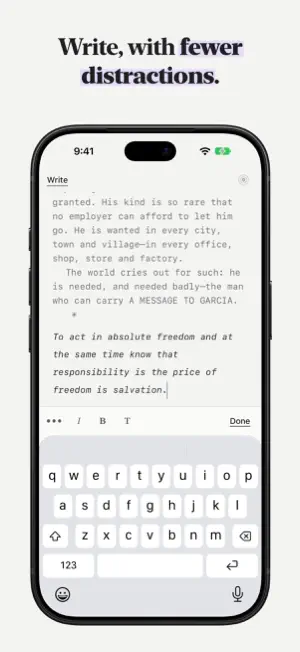


About Write Words
Write Words is a writing app built around revision. Write freely, read your work as pages, then revise it one sentence at a time. WRITE A calm column with the paragraph you're writing in focus and the ones before it softened. Bold, italic and headings as you type, kept as Markdown underneath. READ Your text set as numbered pages, the way a reader will meet it, with the sentences you've revised highlighted. REVISE Hold a sentence to revise it. The original and your revision sit side by side with every change marked and how the length compares. Accept it when it's better; each sentence keeps its history. FEEDBACK FROM APPLE INTELLIGENCE Ask for feedback on a sentence and get specific suggestions, each with its change marked, then revise from one or write your own. It reads the sentence with its earlier wordings, your notes on it and the sentences around it. It runs on your device, so your writing goes nowhere. Needs a device with Apple Intelligence turned on. A DAILY PRACTICE Rings for new words, sentences revised and a day read, with goals you set, a streak for each, a log of what you've read, and a reminder at the time you choose. YOUR TEXTS, YOUR FILES Import Word, PDF, Pages, RTF, HTML, Markdown and plain text, or send a copy from Google Docs. Export Markdown, Word, PDF, EPUB, rich text or plain text. While a text is open it's backed up every minute, and every text once a day with its history, to iCloud Drive or a folder you choose. MADE FOR IPHONE DUO Write on the outer screen. Unfold it, and Revise opens where you were, the original and your revision facing each other across the fold. Also for iPhone and iPad. PRIVATE BY DESIGN No account, no ads, no tracking. Write Words collects no data. WRITE WORDS PRO Write and Read are free. Pro adds Revise, sentence history and feedback from Apple Intelligence. It starts with 7 days free when you choose a plan, then $0.99 a month or $4.99 a year. Payment is charged to your Apple Account when the free week ends. Subscriptions renew automatically unless cancelled at least 24 hours before the end of the period; manage or cancel them in Settings. Terms of Use: https://www.apple.com/legal/internet-services/itunes/dev/stdeula/ Privacy Policy: https://writewords.app/privacy
What’s new
Version 1.0.1 · Updated November 4, 2026
Added Write Words Pro, the paid tier for Revise and Apple Intelligence feedback. New subscribers start with a free week.
App privacy
The developer, Bryan Mortensen, reported these privacy practices to Apple.
Data Not Collected
The developer does not collect any data from this app.
Alternatives to Write Words
Looking for apps like Write Words? Here are 6 similar apps on the App Store. The highest rated is x2y (5.0/5), and all 6 are free to download.
-
 WriterBlocks: Writing Focus
-
 Talelay: Creative Writing
-
 SoloBeat Writer
3.0
-
 Bamboo Lite
-
 x2y
5.0
-
 Copy and paste app "Kopitoku"
| App | Rating | Price | Last updated | Compare |
|---|---|---|---|---|
| Write Words | 5.0 / 5 (1 rating) | Free | November 4, 2026 | |
| WriterBlocks: Writing Focus | – | Free | May 5, 2026 | Compare |
| Talelay: Creative Writing | – | Free | Nov 16, 2026 | Compare |
| SoloBeat Writer | 3.0 / 5 (1) | Free | Oct 29, 2026 | Compare |
| Bamboo Lite | – | Free | Jul 13, 2026 | Compare |
| x2y | 5.0 / 5 (8) | Free | Oct 18, 2026 | Compare |
| Copy and paste app "Kopitoku" | – | Free | Dec 4, 2024 | Compare |
Compare Write Words with the top alternatives: ratings, updates, ASO score and keyword gaps →