

SlipJot: Thai Slip Expenses
Thirawat Tatatmi Finance iPhoneiPadiPod touch
SlipJot: Thai Slip Expenses is a free Finance app for iPhone and iPad by Thirawat Tatatmi. Requires iOS 17.0. Updated October 12, 2026.
- Price
- Free
- on the App Store
- Size
- 4 MB
- Age 4+
- Updated
- Oct 12
- 2026 · v1.0
Screenshots


About SlipJot: Thai Slip Expenses
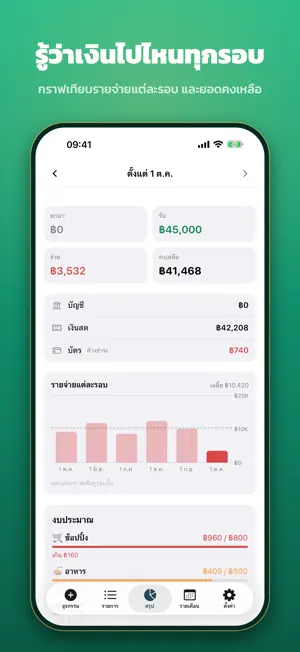
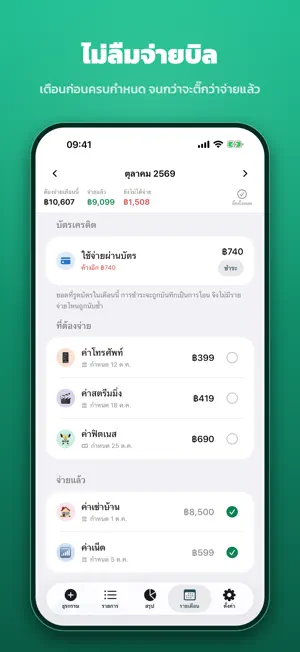
Every time you pay by transfer, your banking app saves a slip to Photos. SlipJot reads those slips and has the entries ready for you: check them, tap confirm, done. No more typing amounts in one by one. READS YOUR SLIPS • Reads e-slips your banking app saves to Photos, in the bank's album and among recent photos • Picks up the amount, fee, date and time, and who was paid, and tells money out from money in • Add your name once, and transfers between your own accounts are not counted as spending • A slip is never recorded twice, and a slip that matches an entry you typed in yourself is flagged first • Reads bank slips as well as make by KBank and Dime! • A credit card bill paid by transfer is recorded as paying the card, not as spending twice GUESSES THE CATEGORY AND LEARNS • A shop you have paid before goes to the category you used last time; a new one is guessed from its name • Change a category once and the app remembers it • See where your money goes, and optionally let Apple Maps tell what kind of place each payee is, so new ones land in the right category • Money moved to your own savings or broker account is recorded as a transfer to that pot STILL A COMPLETE EXPENSE TRACKER • The keypad is the first screen, so cash and anything without a slip takes seconds • Bank, cash and credit card, with what is owed on the card • Cycles that follow your payday, monthly bills, savings and investments • Each cycle ranked by category, a chart comparing cycles, and a calendar of daily spending • Budgets per category, search, a Home Screen widget and Siri • Money lent to friends or borrowed, kept until it is paid back • Simple mode hides what you do not use, leaving just your slips NEVER MISS A BILL, NEVER LOSE YOUR DATA • A reminder the day before a bill or the card is due, and on the morning itself, until it is ticked off • An automatic backup every week to a folder you choose, such as iCloud Drive • Export everything as a CSV for Excel or Numbers PRIVATE Slips are read on the phone with the iPhone's own text recognition. Images are never uploaded, and the app never edits or deletes your photos. No account, no sign-in, no ads, no tracking. Your entries stay on your device. FREE Every feature, at no cost. No subscription and no ads. Prefer typing everything yourself, with no Photos access? The same developer's Simple Expenses: Daily Log does just that. FIRST VERSION More banks, wallets and features are on the way. If a slip is read wrong or something is missing, tap "Send feedback" in Settings.
App privacy
The developer, Thirawat Tatatmi, reported these privacy practices to Apple.
Data Not Collected
The developer does not collect any data from this app.
Alternatives to SlipJot: Thai Slip Expenses
Looking for apps like SlipJot: Thai Slip Expenses? Here are 6 similar apps on the App Store.
-
 SplitSlip: Split Bills by Item
-
 JodWai: Money Tracker
-
 Hi Monday: Portfolio Dashboard
-
 AI Expense Manager MoneyPot
-
 Mochi Money
-
 Thaifxbook
| App | Rating | Price | Last updated | Compare |
|---|---|---|---|---|
| SlipJot: Thai Slip Expenses | – | Free | October 12, 2026 | |
| SplitSlip: Split Bills by Item | – | Free | Oct 23, 2026 | Compare |
| JodWai: Money Tracker | – | Free | Nov 1, 2026 | Compare |
| Hi Monday: Portfolio Dashboard | – | Free | Oct 29, 2026 | Compare |
| AI Expense Manager MoneyPot | – | Free | Oct 2, 2026 | Compare |
| Mochi Money | – | Free | Aug 27, 2026 | Compare |
| Thaifxbook | – | Free | Oct 21, 2026 | Compare |