

Tingdong: Captions & Translate
GREP ADVISORY PTE. LTD. Productivity iPhoneiPadiPod touch
Tingdong: Captions & Translate is a free Productivity app for iPhone and iPad by GREP ADVISORY PTE. LTD. Rated 5.0/5 from 1 ratings. Requires iOS 26.1.
- Rating
- 5.0
- 1 ratings
- Price
- Free
- on the App Store
- Size
- 19 MB
- Age 4+
- Updated
- Oct 15
- 2026 · v1.0.5
Screenshots

About Tingdong: Captions & Translate
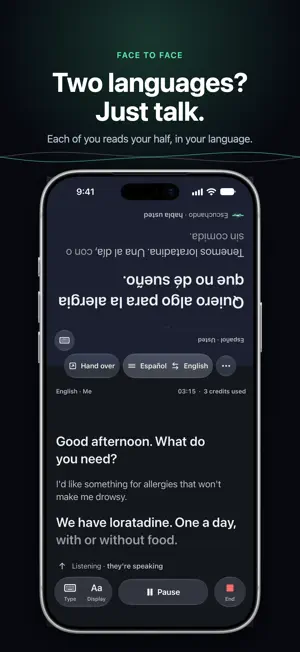
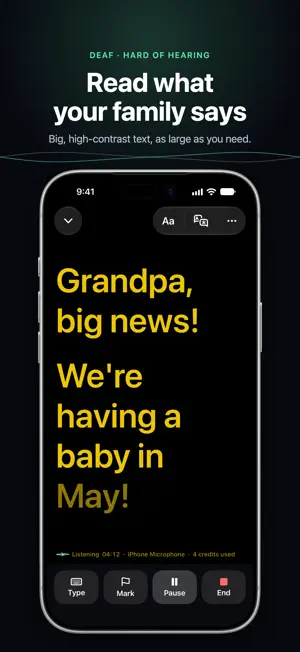
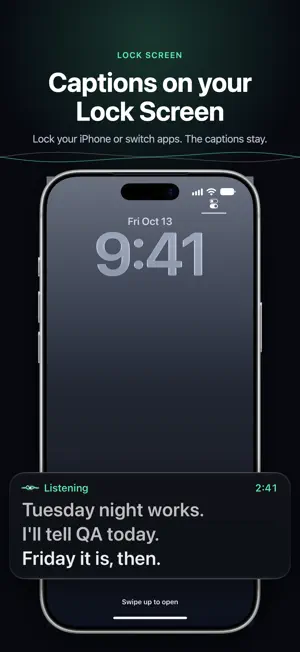
Words appear instantly, while people are still talking. Tingdong turns what people say in meetings, lectures and conversations into live captions on your iPhone or iPad, with high accuracy. When someone speaks another language, turn on translation and read the original and your language together, or talk face to face with each person reading their own half of the screen; Tingdong can read the translation aloud and show you how to pronounce it. If you are Deaf or hard of hearing, or just prefer reading along, make the text large and turn the screen toward the other person. Captions keep running when you lock the screen or switch apps. Turn on Lock Screen captions and the Lock Screen and the Dynamic Island show the latest lines; tap them to go back to the session. Every session is saved as a transcript on your device. Search it, copy it, share it, or let Apple Intelligence summarize it and answer questions about it, right on your device (requires a device and region where Apple Intelligence is available). Sessions are recorded on your device with their transcripts, so you can play one back from any line. By default, Tingdong asks when a session ends whether to keep its audio; in Settings, Save Recordings can also be Always or Never. Recordings stay on your device and are never uploaded. New users get 50 free credits of High Accuracy captions. After that, Tingdong needs a subscription: Standard (1,000 credits a month) or Pro (5,000 credits a month). Subscribers can also buy credit packs, which never expire. The free credits never turn into a paid plan by themselves. When a subscriber's monthly credits run out, captions continue with on-device recognition using Apple's models; it may be less accurate. Tingdong listens through your device's microphone. It can't caption phone calls. Privacy: High Accuracy sends audio in real time to a third-party speech recognition service; it isn't stored or used for training. Transcripts and recordings stay on your device. No ads, no analytics, no tracking. Tingdong is an everyday communication aid. It is not a replacement for sign language interpreters, CART or medical devices, and it shouldn't be relied upon in emergencies. Tingdong's interface is available in 19 languages, including English. Terms of Use: https://www.apple.com/legal/internet-services/itunes/dev/stdeula/
App privacy
The developer, GREP ADVISORY PTE. LTD., reported these privacy practices to Apple.
Data Linked to You
The following data, which may be collected and linked to your identity, may be used for the following purposes:
- Purchases: Purchase History
- Identifiers: User ID, Device ID
- Usage Data: Product Interaction
Used for: App Functionality
Data Not Linked to You
The following data, which may be collected but is not linked to your identity, may be used for the following purposes:
- User Content: Audio Data
Used for: App Functionality
Alternatives to Tingdong: Captions & Translate
Looking for apps like Tingdong: Captions & Translate? Here are 6 similar apps on the App Store.
-
 リアツウ: Live Voice Translator
-
 Simul - Live Voice Translator
-
 Voxsy
Voxsy
-
 wayaknow
-
 Talk Translator: Live Captions
-
 EasyLect: Lecture Translator
| App | Rating | Price | Last updated | Compare |
|---|---|---|---|---|
| Tingdong: Captions & Translate | 5.0 / 5 (1 rating) | Free | October 15, 2026 | |
| リアツウ: Live Voice Translator | – | Free | Oct 21, 2026 | Compare |
| Simul - Live Voice Translator | – | Free | Aug 15, 2026 | Compare |
| Voxsy | – | Free | Feb 6, 2026 | Compare |
| wayaknow | – | Free | Aug 21, 2026 | Compare |
| Talk Translator: Live Captions | – | Free | Oct 14, 2026 | Compare |
| EasyLect: Lecture Translator | – | Free | Oct 26, 2026 | Compare |