

qCurving
USHIO FUJIMURA Graphics & Design iPhoneiPadiPod touchMac
qCurving is a paid Graphics & Design app for iPhone and iPad by USHIO FUJIMURA. Requires iOS 17.0. Updated October 26, 2026.
- Price
- 5.99 USD
- on the App Store
- Size
- 6 MB
- Age 4+
- Updated
- Oct 26
- 2026 · v0.8.0
Screenshots


About qCurving
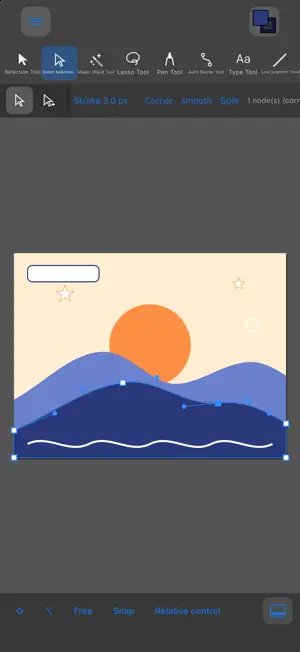
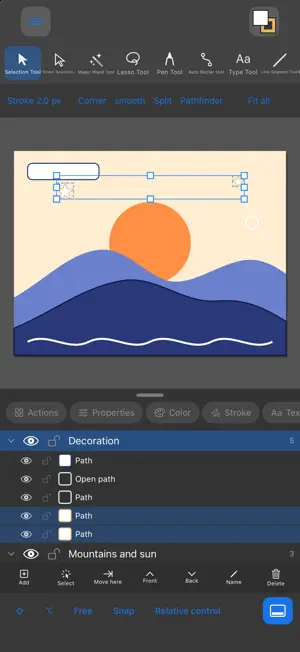
qCurving is a vector graphics editor for iPhone, iPad and Mac. Draw paths with the pen tool, fine-tune anchor points and handles right at your fingertips, and create logos, icons, diagrams and illustrations with precision, wherever you are. NO MORE TYPING NUMBERS TO RESIZE • Lock lengths to whole-number units while you drag, so rectangles, lines and polygons come out at round sizes right away • Set a polygon's radius or side length to an exact integer, and stop retyping values one by one to fix dimensions afterwards DRAW WITH PRECISION • Pen, pencil, line, rectangle, rounded rectangle, ellipse, polygon, star • Add, delete and convert anchor points; edit nodes and handles directly • Snap to points; move and rotate in set increments • Connectors between objects (snap to end points and centers; lines follow when shapes move) WORK WITH TYPE • Text panel: font, size, leading, tracking, horizontal and vertical scale, baseline shift • All caps, small caps, superscript, subscript, underline, strikethrough • Paragraph: left, center, right and justified alignment; left, right and first-line indents; space before and after • Convert text to outlines and edit it as paths BUILD SHAPES • Pathfinder (unite, intersect, minus front, exclude) • Outline stroke, offset path, round corners, reverse path direction • Align and distribute, compound paths, stacking order, flip • Layers (show/hide, lock, reorder, merge) • Fill and stroke (RGB / CMYK, width, caps, corners, dashes) • Numeric input for position, size, move, rotate and scale OPEN AND EXPORT • Open and edit SVG and PDF files (choose which pages to import from a multi-page PDF) • Export to SVG, PDF (millimeter units, CMYK supported), PNG / JPEG / BMP, and for the web • Default stroke width is 1 mm in PDF and 1 px in SVG, so dimensions are ready for print and technical drawing DESIGNED FOR EACH DEVICE • Mac: a desktop interface with a menu bar and keyboard shortcuts • iPhone and iPad: a "relative" mode that works like a trackpad, so your finger never hides what you're drawing • iPhone: a top bar fitted to the Dynamic Island and a collapsible bottom panel that leaves more room for your canvas • Connect an iPhone or iPad to an external display or AirPlay to get the desktop interface on the big screen, with a trackpad and shortcut display in your hands COLOR AND BLENDS • Gradient tool: drag on the canvas to set direction and range, and add, move or delete color stops directly • Blend tool: create any number of in-between shapes that interpolate shape, color and stroke width between two objects PAGES AND ALIGNMENT • Multiple artboards (exported as a multi-page PDF) and document tabs • Rulers and guides, unit-based alignment, and alignment to a key object PRIVACY No account required. All processing happens on your device; no data is collected or sent anywhere. GOOD TO KNOW • When opening a PDF, paths (fills and strokes) and colors are imported. Text, images, gradients and clipping are not imported yet. • Full compatibility with other vendors' software is not guaranteed. • CMYK and color handling are our own approximation; no ICC-profile color management is performed. On-screen colors may differ from printed results. Always check your printer's requirements and a proof before printing or submitting files. • Feedback and requests are welcome on the support page.
What’s new
Version 0.8.0 · Updated October 26, 2026
• Trace Image: convert a placed image into stacked vector shapes, one per color. Adjust colors, small specks and smoothness with a live preview, or let Auto pick the settings • Distort Path: apply Zigzag, Roughen, Pucker & Bloat and Twist directly to the path of selected shapes • Lock objects (⌘2) and Unlock All (⌥⌘2) • Open PDF and SVG files with "Open with", or by dragging and dropping onto the window: images are placed as they are; SVG, PDF, AI and DXF files open in a new tab or are imported into the current document, your choice • Lower memory use for large documents, with smaller temporary spikes while editing • Create Outlines from Text now works from the menu • Fixed: removing the last level of a clone, array or rotation mirror left the copies behind as separate shapes
App privacy
The developer, USHIO FUJIMURA, reported these privacy practices to Apple.
Data Not Collected
The developer does not collect any data from this app.
Alternatives to qCurving
Looking for apps like qCurving? Here are 6 similar apps on the App Store. The highest rated is ArtPort (5.0/5), and 5 of the 6 are free to download.
-
 ArtPort
5.0
ArtPort
5.0
-
 商品图海报设计-制作电商生图美图作图&视频工具
-
 Charcoal Studio
-
 Animated Drawing-DigitalSketch
-
 Ultimate Technical Design
-
 GoodsPic AI - Product Photos
| App | Rating | Price | Last updated | Compare |
|---|---|---|---|---|
| qCurving | – | 5.99 USD | October 26, 2026 | |
| ArtPort | 5.0 / 5 (1) | Free | Aug 20, 2026 | Compare |
| 商品图海报设计-制作电商生图美图作图&视频工具 | – | Free | Aug 20, 2026 | Compare |
| Charcoal Studio | – | Free | Oct 19, 2026 | Compare |
| Animated Drawing-DigitalSketch | – | Free | Sep 27, 2026 | Compare |
| Ultimate Technical Design | – | 3.99 USD | Jun 3, 2026 | Compare |
| GoodsPic AI - Product Photos | – | Free | Jul 9, 2026 | Compare |
Compare qCurving with the top alternatives: ratings, updates, ASO score and keyword gaps →