

Kite – Second Monitor
Yuki Imai Productivity iPhoneiPadiPod touch
Kite – Second Monitor is a free Productivity app for iPhone and iPad by Yuki Imai. Requires iOS 18.0. Updated November 28, 2026.
- Price
- Free
- on the App Store
- Size
- 8 MB
- Age 4+
- Updated
- Nov 28
- 2026 · v1.28.0
Screenshots
Save to Pinterest

About Kite – Second Monitor
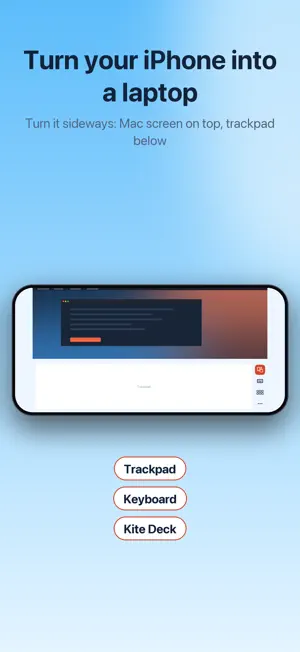
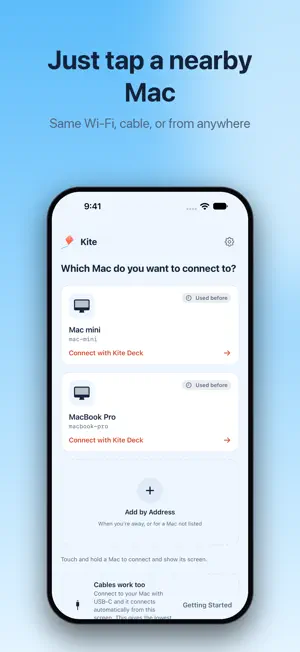
Kite turns your iPad into a real second display for your Mac. At your desk over a USB-C cable, around the house over Wi-Fi, and away from home over your own Tailscale network. Kite picks the shortest path on its own. No Wi-Fi network, or hotel Wi-Fi that blocks devices from talking to each other? When the iPad and Mac are close, they connect directly, still encrypted. On the same Wi-Fi you don't need Tailscale. For a new Mac, just compare a 6-digit code on the iPad and the Mac. After that, Kite connects to your last Mac as soon as you open it (you can turn this off). You can also connect from a Home Screen widget or a shortcut. MEASURED, NOT PROMISED • 25 ms average delay from Mac to iPad on home Wi-Fi (Mac mini and 10th-generation iPad) • Up to 60 fps, the most macOS draws for an added display A REAL DISPLAY • macOS sees the iPad as a monitor. Drag windows onto it and place it on any side from the menu bar • Runs at the iPad's own Retina resolution. When the screen stops changing, the picture sharpens further • Mirror your Mac's screen at the iPad's size so text stays crisp, or show any of your Mac's monitors • Hear your Mac's sound on the iPad • Great with a Mac mini that has no monitor: the Kite display stays when you disconnect, so your windows are where you left them when you reconnect, and the Mac's screen stays on while connected TOUCH, DRAW AND TYPE • Tap to click, drag to move, two fingers to scroll or right-click • Apple Pencil pressure and tilt reach the Mac like a drawing tablet. Double-tap for the eraser, with soft, standard and firm pressure curves • Sidebar with ⌘ ⌥ ⌃ ⇧, undo and redo • Type on the iPad, including Japanese and Chinese input, or use a hardware keyboard. Unlock a locked Mac from the iPad • Buttons for the app in front on your Mac appear in the sidebar, ready for Photoshop, Clip Studio Paint, Krita, Affinity, Figma and Blender. Hand and eyedropper stay held while you press them. Edit the buttons for any app • Finger gestures for drawing: two-finger tap to undo, three-finger tap to redo, long-press with Apple Pencil to right-click ANNOTATE AND FOCUS • Draw on your Mac's screen with Apple Pencil or a finger, on top of any app, even while screen sharing or presenting. A pen that fades after 3 seconds, a highlighter, arrows and an eraser • Send a single Mac window to fill the iPad, and send it back to where it was with one more press • Watch your Mac in Picture in Picture while you use other apps, and drag photos, PDFs and text from iPad apps onto the spot you choose on your Mac A BUTTON BOARD FOR YOUR MAC (KITE DECK) • Lay out big buttons on the iPad. Each one makes the Mac press a key combo, type saved text, open an app, run a Shortcut, change volume or playback, or open a web page • Not using it as a screen? Choose "Connect as Kite Deck" for just the buttons. Your Mac's display arrangement stays as it is • Make your own boards and buttons, and move them to another iPad as a file. Screenshot, media and meeting boards are ready to go ON IPHONE TOO • Tap a Mac on iPhone for a Kite Deck button board, or touch and hold to show the Mac's screen. The iPhone camera works as Kite Camera • Turn your iPhone sideways to use it like a laptop, with a trackpad and keyboard below the Mac's screen IPAD CAMERA AS A MAC CAMERA • Choose "Kite Camera" in FaceTime, Zoom or Meet and the iPad camera turns on. It runs only while an app is using it PRIVATE BY DESIGN • No account and no sign-up. Works with any Apple Account on either device • Video and input go directly between your own devices. No servers in between, no analytics, no data collected ONE IN-APP PURCHASE • Every feature works for up to 15 minutes per connection and 30 minutes a day • A single in-app purchase removes the time limit. No subscription, no ads REQUIREMENTS • Kite for Mac, the companion app for macOS 15 or later: https://kite.algorist.jp/download/ • For use away from home: Tailscale on both devices
What’s new
Version 1.28.0 · Updated November 28, 2026
• Small fixes
App privacy
The developer, Yuki Imai, reported these privacy practices to Apple.
Data Not Collected
The developer does not collect any data from this app.
Alternatives to Kite – Second Monitor
Looking for apps like Kite – Second Monitor? Here are 6 similar apps on the App Store.
-
 Spanscreen: Second Display
-
 Desktap
-
 WiPhoneMonitor: Second Screen
-
 Nimbo: beat ADHD
-
 Second Monitor: ScreenDeck
-
 Flex Extend Display
| App | Rating | Price | Last updated | Compare |
|---|---|---|---|---|
| Kite – Second Monitor | – | Free | November 28, 2026 | |
| Spanscreen: Second Display | – | Free | Oct 31, 2026 | Compare |
| Desktap | – | Free | May 13, 2026 | Compare |
| WiPhoneMonitor: Second Screen | – | Free | Nov 6, 2026 | Compare |
| Nimbo: beat ADHD | – | Free | Nov 24, 2026 | Compare |
| Second Monitor: ScreenDeck | – | Free | Nov 21, 2026 | Compare |
| Flex Extend Display | – | Free | Jul 28, 2026 | Compare |