

ReadFirst: App Blocker
TrueDigital LLC Productivity iPhoneiPadiPod touch
ReadFirst: App Blocker is a free Productivity app for iPhone and iPad by TrueDigital LLC. Rated 4.0/5 from 1 ratings. Requires iOS 18.0.
- Rating
- 4.0
- 1 ratings
- Price
- Free
- on the App Store
- Size
- 23 MB
- Age 4+
- Updated
- Oct 22
- 2026 · v1.1.1
Screenshots

About ReadFirst: App Blocker
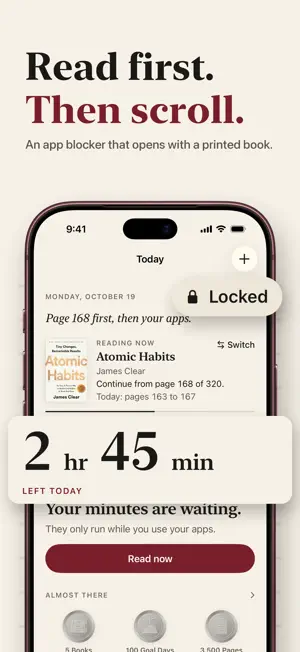
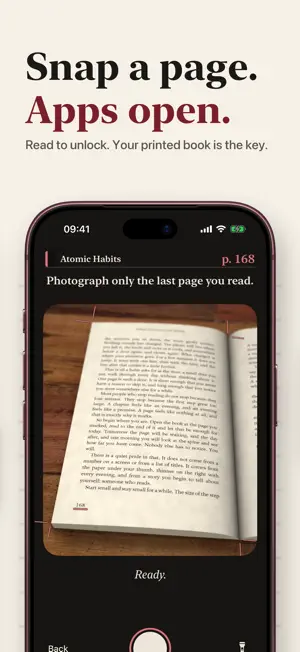
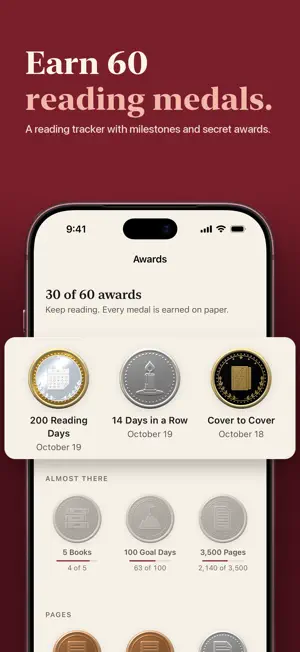
ReadFirst requires a purchase: an annual or monthly subscription, or a one-time purchase. All features below are included. New subscribers can try the annual plan free for 3 days. ReadFirst puts a page before the feed. Choose the apps that pull you in. ReadFirst locks them using Apple's Screen Time. When you want to use them, read a little in a printed book, take a photo of the page you reached, and your apps unlock for the number of minutes you set. HOW IT WORKS • You set the rule: reading one to five pages unlocks your apps for the number of minutes you choose. • A short reading timer runs before you can take the photo, so a quick snapshot does not count. • The photo is checked on your device. It is never uploaded or stored. • Minutes only count down while you use your apps. Any unused minutes go back into your bank. • Read more than you need, and the extra credit stays in your bank. • You get one skip a week for the days when you need it. You can allow up to three in Settings. • Set an optional daily limit if you want a ceiling. KEEP TRACK OF YOUR READING • Your bookshelf shows covers, page counts and the book you are currently reading. • A daily goal, a streak and statistics by week, month and year. • A reading log with every page you counted. • Widgets, a reading timer on the Lock Screen, a Read Now control and Siri shortcuts. • Works on iPhone and iPad. PRIVATE FROM THE START No account required. Your books and your reading stay on your device. When you look up a book or a cover, only its ISBN or title is sent to Open Library, Apple Books and public library catalogues. Anonymous usage statistics show us where the app can improve. They never include your name, books or photos. No ads, no tracking. ReadFirst uses Apple's Screen Time API (Family Controls) with your permission. You can change or remove the lock at any time in the app or in iOS Settings. PURCHASE AND SUBSCRIPTION ReadFirst requires a purchase: an annual subscription, a monthly subscription or a one-time purchase. Each option gives you full access to every feature above. New subscribers can try the annual plan free for 3 days. Payment is charged to your Apple Account when you confirm the purchase or when the free trial ends. Subscriptions renew automatically unless you cancel at least 24 hours before the end of the current period. The renewal payment is charged within the last 24 hours of the current period. You can manage or cancel your subscriptions in your Apple Account settings. Terms of Use (EULA): https://getreadfirst.com/terms/ Privacy Policy: https://getreadfirst.com/privacy/
What’s new
Version 1.1.1 · Updated October 22, 2026
Ready for iPhone Duo. A more refined camera view and small design improvements.
App privacy
The developer, TrueDigital LLC, reported these privacy practices to Apple.
Data Not Linked to You
The following data, which may be collected but is not linked to your identity, may be used for the following purposes:
- Purchases: Purchase History
- Identifiers: Device ID
- Usage Data: Product Interaction
Used for: Analytics
Alternatives to ReadFirst: App Blocker
Looking for apps like ReadFirst: App Blocker? Here are 6 similar apps on the App Store. The highest rated is Iroh: AI Voice Notes & Journal (5.0/5), and 5 of the 6 are free to download.
-
 Iroh: AI Voice Notes & Journal
5.0
Iroh: AI Voice Notes & Journal
5.0
-
 Blur. Image Video Blur
4.7
Blur. Image Video Blur
4.7
-
 Koro Voices: Text to speech
4.5
Koro Voices: Text to speech
4.5
-
 Quran Time: Screentime Control
4.7
Quran Time: Screentime Control
4.7
-
 Habit Tracker - HabitForm
5.0
Habit Tracker - HabitForm
5.0
-
 Quran Screen: Time Blocker
4.8
Quran Screen: Time Blocker
4.8
| App | Rating | Price | Last updated | Compare |
|---|---|---|---|---|
| ReadFirst: App Blocker | 4.0 / 5 (1 rating) | Free | October 22, 2026 | |
| Iroh: AI Voice Notes & Journal | 5.0 / 5 (9) | Free | Oct 14, 2026 | Compare |
| Blur. Image Video Blur | 4.7 / 5 (3) | 2.99 USD | Jun 18, 2025 | Compare |
| Koro Voices: Text to speech | 4.5 / 5 (2) | Free | Oct 15, 2026 | Compare |
| Quran Time: Screentime Control | 4.7 / 5 (42) | Free | Feb 3, 2026 | Compare |
| Habit Tracker - HabitForm | 5.0 / 5 (1) | Free | Oct 16, 2026 | Compare |
| Quran Screen: Time Blocker | 4.8 / 5 (93) | Free | Sep 1, 2025 | Compare |