

Pay Odometer - Salary Counter
Insight&myung, LLC Finance iPhoneiPadiPod touch
Pay Odometer - Salary Counter is a free Finance app for iPhone and iPad by Insight&myung, LLC. Requires iOS 16.0. Updated October 15, 2026.
- Price
- Free
- on the App Store
- Size
- 30 MB
- Age 4+
- Updated
- Oct 15
- 2026 · v1.0.2
Screenshots

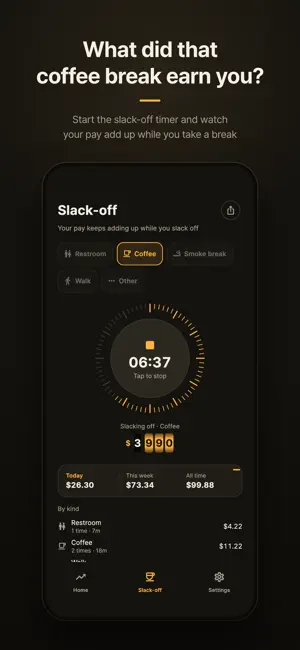


About Pay Odometer - Salary Counter
Pay Odometer shows how much you have earned up to this very second. Enter your annual, monthly, daily or hourly pay, and brass odometer drums roll up one digit at a time while you work. [An odometer for your pay] • See your earnings for this year, this month, today or this hour. • "This month" counts from your last payday, not from the 1st. • Start "this year" from any date you like, such as the day you joined. • Your per-second rate sits right under the drums. [Slack-off timer] • Tap a kind of break (restroom, coffee, smoke break, walk or other) and watch what you earn while you take it, second by second. • Today, this week and all-time totals, a breakdown by kind and a list of every break, all on one screen. • Close the app mid-break and the timer picks up where it left off. [Off-work countdown and payday D-day] • At work, it counts down to the end of your shift; before work, to the start of the next one. • See how many days are left until payday, moved earlier when payday falls on a weekend if you want. [Share cards] • Turn the "Today I earned" card or your weekly slack-off report into an image and share it. • Cards show only what you earned. Your salary never appears on them. [Home Screen, Lock Screen and StandBy widgets] • Small and medium Home Screen widgets show today's and this month's earnings, time left until off work and payday D-day without opening the app. • Lock Screen widgets keep today's earnings and payday D-day one glance away, and StandBy shows them while your iPhone charges. • The off-work countdown ticks every second on the widget too. [Fits the way you work] • Set different hours for each weekday, including overnight shifts that run past midnight. • Choose whether pay adds up around the clock or only during work hours. • Enter your pay before or after tax, whichever you know. • Shows amounts in KRW, USD, JPY, EUR, GBP or CNY. Currency symbols only; no exchange rates are applied. [No account, stays on your device] • No sign-up and no login. • Your pay settings and break history are stored only on your device. [Ads and purchase] • The app shows a banner ad and an ad at launch. • A one-time purchase removes all ads, or watch one ad to hide the banner for 12 hours. Amounts are your pay spread evenly over time, so they may differ from what you are actually paid. Languages: English, Korean, Japanese Contact: [email protected] Privacy policy: https://www.insightmyung.com/privacy-policy/pay-odometer-en
What’s new
Version 1.0.2 · Updated October 15, 2026
- Choose how often you're paid: monthly, twice a month, every 2 weeks or weekly - For non-monthly pay, Home and the widgets show what you've earned this pay period - Put the keyboard away after entering an amount (Done button on iPhone, or tap outside) - A slimmer tab bar and banner area leave more room on screen
App privacy
The developer, Insight&myung, LLC, reported these privacy practices to Apple.
Data Used to Track You
The following data may be used to track you across apps and websites owned by other companies:
- Identifiers: Device ID
- Usage Data: Product Interaction, Advertising Data
- Diagnostics: Crash Data
Data Not Linked to You
The following data, which may be collected but is not linked to your identity, may be used for the following purposes:
- User Content: Other User Content
- Identifiers: Device ID, User ID
- Usage Data: Product Interaction, Advertising Data
- Diagnostics: Crash Data, Performance Data, Other Diagnostic Data
- Location: Coarse Location
Used for: Third-Party Advertising, Analytics, App Functionality
Alternatives to Pay Odometer - Salary Counter
Looking for apps like Pay Odometer - Salary Counter? Here are 6 similar apps on the App Store. The highest rated is loanDepot Mobile (4.9/5), and all 6 are free to download.
-
 Save Your Salary
-
 Brezel Money
-
 MoneyTick: Salary Ticker
-
 SimpleBills for Residents
1.1
-
 loanDepot Mobile
4.9
-
 Commerce Bank for iPhone
4.7
| App | Rating | Price | Last updated | Compare |
|---|---|---|---|---|
| Pay Odometer - Salary Counter | – | Free | October 15, 2026 | |
| Save Your Salary | – | Free | Oct 22, 2026 | Compare |
| Brezel Money | – | Free | May 27, 2026 | Compare |
| MoneyTick: Salary Ticker | – | Free | Oct 22, 2026 | Compare |
| SimpleBills for Residents | 1.1 / 5 (42) | Free | Sep 10, 2026 | Compare |
| loanDepot Mobile | 4.9 / 5 (4,803) | Free | Sep 18, 2026 | Compare |
| Commerce Bank for iPhone | 4.7 / 5 (149,782) | Free | Oct 13, 2026 | Compare |