

Tenb Remix - AI Video Creator
YoungGil Yun Photo & Video iPhoneiPadiPod touch
Tenb Remix - AI Video Creator is a free Photo & Video app for iPhone and iPad by YoungGil Yun. Requires iOS 16.0. Updated November 25, 2026.
- Price
- Free
- on the App Store
- Size
- 74 MB
- Age 4+
- Updated
- Nov 25
- 2026 · v1.0.2
Screenshots
Save to Pinterest

About Tenb Remix - AI Video Creator
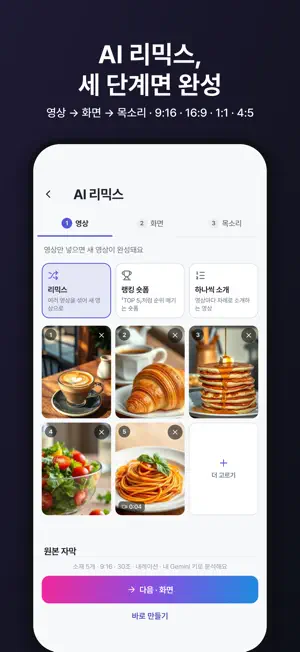
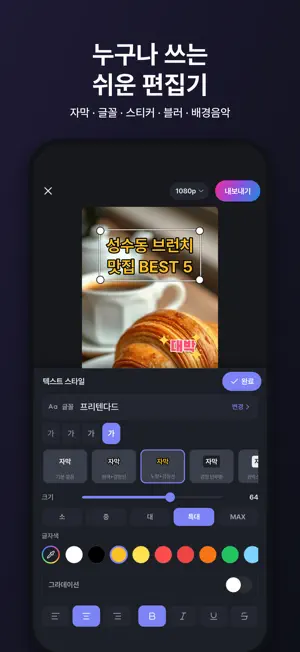
Pick → tap → done. Add your clips and AI writes the script, adds a voice and captions, and makes a new video. ■ AI Remix — clips in, new video out · Pick videos and photos; AI chooses the scenes, writes a script and stitches one video with voice and captions. · Three styles: Remix · Ranking short-form (countdown) · One-by-one introduction. · Set length, voice, tone and template; fix anything in the editor. ■ AI Short-form Extract — one long video, many short-form clips · Add a long video: the speech is transcribed, AI finds the most engaging parts and cuts them into vertical short-form clips with captions. ■ AI Dubbing & Translation · Speech and on-screen text are read on your phone by default; only the text to translate is sent. · Adds translated captions and a dubbed voice, and blurs the original on-screen captions. ■ AI Video · AI Short Drama · From one line of idea, AI writes scene prompts, then assembles the scene videos into one piece with voice and captions. · Scene video generation needs your own Gemini or xAI API key, or a Google Flow or Grok account; that service bills the cost, not credits. · AI Short Drama keeps characters and settings and plans episode after episode with scripts. ■ Shoot — your everyday (free) · Shoot short clips and get a video, kept in "My collections" by date and project. · Front & back dual capture (supported devices): record the scene and your reaction at once, and place the small view anywhere. · Make from album: pick photos and videos to get a video with date and place captions. Place names come from the photo's location data on your phone. ■ An editor anyone can use (free) · Trim, split, reorder, speed, filters and color, transitions and effects, photo motion. · Caption styles with many fonts and animations, stickers, picture-in-picture, rectangular/oval blur and mosaic. · Music and sound effects with auto-ducking under voice. · Vocal separation: split a clip's sound into voice, music and effects on your phone. · Text to speech: 10 free on-device Tenb TTS voices (5 female, 5 male). Record your own voice, or connect ElevenLabs and Typecast voices. · Templates, thumbnail editor, export in 720p, 1080p or 4K. Videos are saved to your gallery. ■ Straight to YouTube, Instagram, TikTok · One tap on [Shorts] [Reels] [TikTok] hands the video to that app's upload screen. · Platform-specific titles, captions and hashtags are copied to your clipboard. ■ Free trial · Subscription "Tenb Remix Mobile" · Sign in and try AI creation 3 times for free. · AI Remix, AI Short-form Extract, AI Dubbing & Translation, AI Video and AI Short Drama are unlocked by the in-app auto-renewable subscription "Tenb Remix Mobile" (monthly) or a Tenb Remix membership. The subscription includes Tenb credits every month for analysis, scripts and translation without your own key. · Editing, captions, blur, vocal separation, Tenb voices, stickers, templates, the camera and export are free without a subscription. · If you register a Google Gemini or xAI key in Settings › AI connection, it is used first while you are subscribed. · The subscription renews automatically every month. Payment is charged to your Apple ID account at confirmation of purchase. The price is the local price shown on the purchase screen. · It renews automatically unless cancelled at least 24 hours before the end of the current period; renewal is charged within 24 hours before the period ends. · Manage or cancel in your App Store account settings (Settings › Apple ID › Subscriptions) after purchase. You keep access until the end of the paid period. · Terms of Use (EULA): https://tenb.io/ko/terms · Privacy Policy: https://tenb.io/ko/privacy ■ Sign-in is optional · All editing works without an account. · Sign in with Kakao, Naver, Google, Apple, Tenb ID or QR if you like; delete your account in the app. · Videos are processed and stored on your phone. News notifications are sent only if you opt in. Support: https://tenb.io · [email protected]
What’s new
Version 1.0.2 · Updated November 25, 2026
· 촬영하기 새 카메라 — 더 빠른 반응·줌·0.5x 초광각·탭 초점, 앞뒤 동시 촬영 · 랭킹 숏폼·하나씩 소개: 사진도 넣고, 순위는 끌어서 바꾸기 · 자막 글자 효과 27가지, 「모든 자막에 적용」 · 원본 자막 가리기가 더 깔끔하게(부드러운 블러) · 텐비 클라우드에 저장한 영상으로 바로 리믹스 · 미리 보기 재생바·소리 끄기, 재생이 더 매끄럽게 · 내보낸 영상이 찌그러지던 문제 등 오류 수정
App privacy
The developer, YoungGil Yun, reported these privacy practices to Apple.
Data Linked to You
The following data, which may be collected and linked to your identity, may be used for the following purposes:
- Identifiers: Device ID, User ID
- Purchases: Purchase History
- Contact Info: Email Address, Name
Used for: Developer’s Advertising or Marketing, Analytics, App Functionality
Data Not Linked to You
The following data, which may be collected but is not linked to your identity, may be used for the following purposes:
- Usage Data: Product Interaction
- Diagnostics: Crash Data
- User Content: Photos or Videos, Audio Data, Other User Content
Used for: Analytics, App Functionality
Alternatives to Tenb Remix - AI Video Creator
Looking for apps like Tenb Remix - AI Video Creator? Here are 6 similar apps on the App Store. The highest rated is PennyVid: AI Video Maker (5.0/5), and all 6 are free to download.
-
 Unvanilla: AI Video Ideas
-
 PennyVid: AI Video Maker
5.0
-
 PixelMe: AI Photo Video Editor
-
 AutoTok: AI UGC Product Ads
5.0
-
 AURA: Photo & Video Editor
5.0
-
 StuffieSpark - AI Video Maker
| App | Rating | Price | Last updated | Compare |
|---|---|---|---|---|
| Tenb Remix - AI Video Creator | – | Free | November 25, 2026 | |
| Unvanilla: AI Video Ideas | – | Free | Nov 17, 2026 | Compare |
| PennyVid: AI Video Maker | 5.0 / 5 (1) | Free | Nov 27, 2026 | Compare |
| PixelMe: AI Photo Video Editor | – | Free | Nov 10, 2026 | Compare |
| AutoTok: AI UGC Product Ads | 5.0 / 5 (1) | Free | Oct 26, 2026 | Compare |
| AURA: Photo & Video Editor | 5.0 / 5 (1) | Free | Oct 22, 2026 | Compare |
| StuffieSpark - AI Video Maker | – | Free | Oct 26, 2026 | Compare |