

8 Count Studio
tzuhsiang hung Music iPhoneiPadiPod touch
8 Count Studio is a free Music app for iPhone and iPad by tzuhsiang hung. Requires iOS 16.4. Updated November 17, 2026.
- Price
- Free
- on the App Store
- Size
- 8 MB
- Age 4+
- Updated
- Nov 17
- 2026 · v1.9
Screenshots


About 8 Count Studio
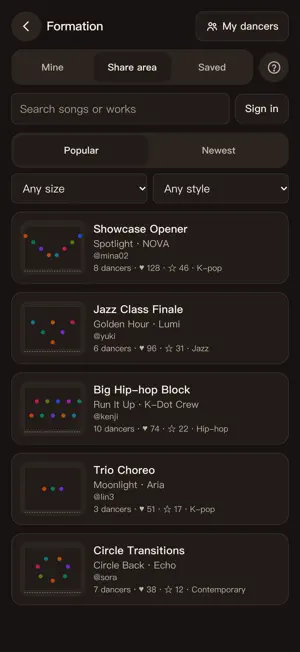
8 Count Studio is an 8-count practice room for dancers. Split your own music into sections and drill them one at a time, plan your formations, and cut songs together into your performance mix. Import a song and tap “End section here” each time a section ends as you listen. Sections get placeholder names (Intro, Verse, Pre-Chorus, Chorus) you can change. Then loop any section, slower to clean up details or faster for stamina. PRACTICE BY SECTION 1. Import music: an MP3 or M4A from Files, a downloaded song from the Music app, or a dance video (MP4/MOV) from Photos. 2. Split into sections: press Play, tap “End section here” whenever a section ends, then tap a name to rename it. 3. Fine-tune: tap a cut to nudge it and hear the join right away. Wrong cut? Merge it or tap “Undo”. 4. Practice: loop one section or play the whole song. Turn on the 5-6-7-8 count-in to get in place first. FORMATION • Place 1–20 dancers by name on a stage with center and quarter lines and spike marks • One formation per section; sections you skip carry over. Draw paths with turn points • Play the music to watch everyone move; show one dancer or mirror it • Export images, or a video with the music and section names • On iPad in landscape, mark sections right under the stage EDIT MUSIC • Cut songs into one mix: multiple tracks; drag, trim, split and duplicate clips • Fade in, fade out and crossfade, to 0.05 s • Volume per clip and track; mute or lock tracks • Snap to bass: clips snap to strong bass hits as you drag • Export M4A or WAV, or send the mix to Practice by section as a new song • Project files (.8count) include the audio, for backup or another iPhone or iPad RECORD YOURSELF • Record yourself to a section with the count-in; it stops by itself • Watch back with movement lines on your body (fingers too), slowed down or mirrored • A practice log lists every take by date • Full version: play two takes side by side, synced to the music, or compare with your teacher's video • Videos stay on your device. No scoring EDIT VIDEO • Pick a dance video from Photos, Files or your recordings, or share it to 8 Count • Trim the ends; the original stays intact • Swap in the clean song: it lines up automatically, even slowed down; fine-tune by 0.02 s • Sound: original, mute, song or both; mirror it and add movement lines • Crop to 9:16, 1:1 or 4:5; the frame can follow the dancer • Save to Photos or share. All on your device MADE FOR THE STUDIO • Just listen and tap. No BPM to set, no counting to line up • Waveform and bass hints; jump to the next strong bass hit • 5-6-7-8 count-in, in sync even with Bluetooth headphones • Speed from 0.5× to 1.5× without changing pitch; each section keeps its own speed • Speed ladder: each loop a little faster, up to full speed • “Calibrate by tapping” measures your timing delay • The screen stays on by the mirror • Plays on a locked screen; headphone buttons switch sections • Practice with imported videos (mirrored or audio only) or YouTube links (simple mode) • Notes, videos and photos for each section • Check off sections; AirDrop a song with its sections, notes and media • iPhone and iPad, any orientation and Split View • Built-in sample song; English, Traditional Chinese and Japanese FREE AND FULL VERSION The free version holds 3 songs in progress (the sample and finished songs don't count), exports up to 1 minute (videos watermarked), keeps 3 recordings, 3 imported videos and 3 formations. The full version is a one-time purchase that removes these limits and the watermark, and adds side-by-side compare. Not a subscription. PRIVACY No sign-up, no ads. Your music, videos, notes and sections stay on your device and are never uploaded. The app sends anonymous usage and error logs (no song names, files or notes) to help fix bugs; turn this off in Settings. Terms of Use (EULA): https://www.apple.com/legal/internet-services/itunes/dev/stdeula/ Privacy Policy: https://8count-studio.hnigel.workers.dev/privacy
What’s new
Version 1.9 · Updated November 17, 2026
• Highlights (free): Edit video finds the 15 or 30 seconds where you move the most. Try another part, preview it on loop in the app and export it for Reels or TikTok • Practice review (free): a movement curve shows where you moved the most, with one-tap replay. Compared with your last take, it tells you things like “bigger moves than last time”. No scoring • Videos opened from Edit video show the practice review too • iCloud backup: songs, audio, sections, notes, practice log, mixes and formations are backed up to your own iCloud automatically and can be restored on a new phone or after reinstalling. Videos are optional • Record yourself can now import a dance video you already shot, the same way as Edit video • Movement analysis is fully automatic: no more lines drawn on screen and no need to tap yourself first. Group-class videos pick a dancer automatically and find them again if lost • Formation: on iPad in portrait you can now cut sections right below the tools, which sit directly under the stage. “Flip” on a path now makes a sharp turn. “Clear this section” has an eraser icon so it isn’t mistaken for Undo • Full version: choose whether exported videos get the “8 Count Studio” watermark • Fixes: videos missing after restoring a backup, the screen getting stuck when an import failed, video out of sync when sending a song with edited music, leftover files when picking several videos from Photos • Fixes: some m4a and mov songs not loading, 3D view missing paths that loop back to the same spot, English and Japanese layout
App privacy
The developer, tzuhsiang hung, reported these privacy practices to Apple.
Data Not Linked to You
The following data, which may be collected but is not linked to your identity, may be used for the following purposes:
- Identifiers: Device ID, User ID
- Usage Data: Product Interaction
- Diagnostics: Crash Data, Performance Data, Other Diagnostic Data
- Contact Info: Email Address
- User Content: Photos or Videos, Customer Support, Other User Content
Used for: Analytics, App Functionality
Alternatives to 8 Count Studio
Looking for apps like 8 Count Studio? Here are 6 similar apps on the App Store. The highest rated is 8 Count AI: Dance Beat Counter (5.0/5), and all 6 are free to download.
-
 8 Count AI: Dance Beat Counter
5.0
-
 Music Editor: Trim, Cut, Merge
4.3
-
 Radio España FM en Vivo
4.5
-
 StreetVoice 街聲 - 暢聽獨立音樂、演出活動通知
4.8
-
 DanceTribe :For all dancers
4.6
-
 CMA Connect
3.5
| App | Rating | Price | Last updated | Compare |
|---|---|---|---|---|
| 8 Count Studio | – | Free | November 17, 2026 | |
| 8 Count AI: Dance Beat Counter | 5.0 / 5 (1) | Free | Sep 30, 2026 | Compare |
| Music Editor: Trim, Cut, Merge | 4.3 / 5 (6) | Free | Jul 15, 2026 | Compare |
| Radio España FM en Vivo | 4.5 / 5 (72) | Free | Jun 9, 2026 | Compare |
| StreetVoice 街聲 - 暢聽獨立音樂、演出活動通知 | 4.8 / 5 (34) | Free | Aug 10, 2026 | Compare |
| DanceTribe :For all dancers | 4.6 / 5 (36) | Free | Oct 26, 2026 | Compare |
| CMA Connect | 3.5 / 5 (92) | Free | Jun 1, 2026 | Compare |
Compare 8 Count Studio with the top alternatives: ratings, updates, ASO score and keyword gaps →