

OS Translator: Live Screen
Sunghyun Kim Utilities iPhoneiPadiPod touch
OS Translator: Live Screen is a free Utilities app for iPhone and iPad by Sunghyun Kim. Rated 5.0/5 from 1 ratings. Requires iOS 27.0.
- Rating
- 5.0
- 1 ratings
- Price
- Free
- on the App Store
- Size
- 13 MB
- Age 4+
- Updated
- Oct 24
- 2026 · v1.1.0
Screenshots



About OS Translator: Live Screen
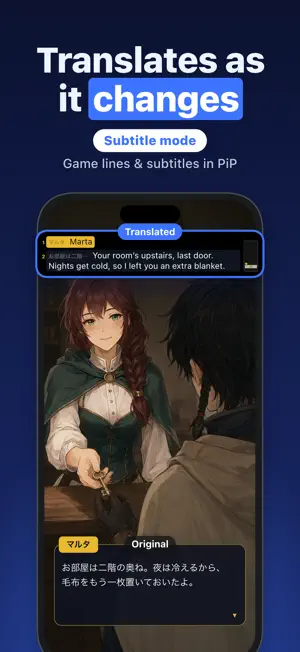
The translation, right where the original text was. Play a Japanese game, read a Chinese comic or browse an overseas shop, and OS Translator reads the text on your screen and translates it on the spot. While you use any other app, OS Translator reads your screen and shows the translation in a Picture in Picture window. When the screen changes, the translation follows within about a second. No screenshots, no copy and paste. TWO WAYS TO READ • Mirror mode — Place the PiP window at the top or bottom of the screen, and it mirrors the other half with the translation laid over the original text. Speech bubbles and product pages read just as they look. • Subtitles mode — Game dialogue, menus, chat and captions burned into videos appear as a list in the PiP window, starting with the paragraphs closest to what you're reading. • On iPad, put another app next to OS Translator in Split View or Stage Manager. The app mirrors it and lays the translation right over the original text. HOW IT WORKS • Pick the language to read and tap Start Translating. • Share your entire screen when iOS asks, then go to your game, comic or app. • Move and resize the translation window as you like. Stop anytime from the app or the screen recording indicator. GREAT FOR • Dialogue and quests in Japanese games • Manga, webtoons and web novels that haven't been translated yet • Product names, options and details in overseas shops • Social media and forums in other languages • Captions burned into videos ALSO • Reading direction for vertical manga • Choose whether to show the original text • Recent Translations keeps what you read so you can view and copy it again EVERY FEATURE FREE No limits on time or number of translations, and every feature is free. A short ad may play before you start translating. The only purchase is Remove Ads — buy once and it's yours for good. TRANSLATED ON YOUR DEVICE Reading the screen and translating both happen on your device with Apple's built-in text recognition and translation. What's on your screen is never sent anywhere or saved. Once a language is downloaded, translation works even in Airplane Mode. LANGUAGES Translate between 20 languages, including English, Japanese, Korean, Chinese (Simplified and Traditional), Spanish, French, German, Portuguese, Russian, Arabic, Hindi, Thai, Vietnamese and more.
What’s new
Version 1.1.0 · Updated October 24, 2026
iPhone Duo support Bug fixes
App privacy
The developer, Sunghyun Kim, reported these privacy practices to Apple.
Data Used to Track You
The following data may be used to track you across apps and websites owned by other companies:
- Identifiers: Device ID
Data Linked to You
The following data, which may be collected and linked to your identity, may be used for the following purposes:
- Location: Coarse Location
- Identifiers: Device ID
- Usage Data: Product Interaction, Advertising Data
Used for: Third-Party Advertising, Developer’s Advertising or Marketing, Analytics, App Functionality
Data Not Linked to You
The following data, which may be collected but is not linked to your identity, may be used for the following purposes:
- Diagnostics: Performance Data, Other Diagnostic Data, Crash Data
Used for: Third-Party Advertising, Developer’s Advertising or Marketing, Analytics, App Functionality
Alternatives to OS Translator: Live Screen
Looking for apps like OS Translator: Live Screen? Here are 6 similar apps on the App Store. The highest rated is Live Screen & Voice Translate (2.5/5), and all 6 are free to download.
-
 OverLens
-
 OmniRead AI
-
 Live Screen & Voice Translate
2.5
Live Screen & Voice Translate
2.5
-
 Loupe: Live Screen Translator
-
 logpocket
-
 Hanzi: Screen Translator
| App | Rating | Price | Last updated | Compare |
|---|---|---|---|---|
| OS Translator: Live Screen | 5.0 / 5 (1 rating) | Free | October 24, 2026 | |
| OverLens | – | Free | Sep 25, 2026 | Compare |
| OmniRead AI | – | Free | Aug 1, 2026 | Compare |
| Live Screen & Voice Translate | 2.5 / 5 (4) | Free | Oct 26, 2026 | Compare |
| Loupe: Live Screen Translator | – | Free | Oct 23, 2026 | Compare |
| logpocket | – | Free | Apr 13, 2026 | Compare |
| Hanzi: Screen Translator | – | Free | Oct 26, 2026 | Compare |