

SomTime: Island & PiP Clock
Seongpil Heo Utilities iPhoneiPadiPod touch
SomTime: Island & PiP Clock is a free Utilities app for iPhone and iPad by Seongpil Heo. Requires iOS 18.0. Updated November 2, 2026.
- Price
- Free
- on the App Store
- Size
- 17 MB
- Age 4+
- Updated
- Nov 2
- 2026 · v26.4.0
Screenshots


About SomTime: Island & PiP Clock
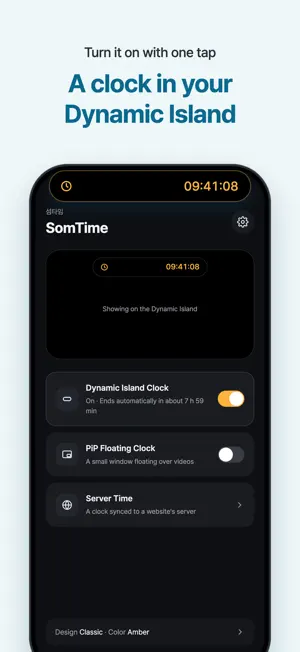
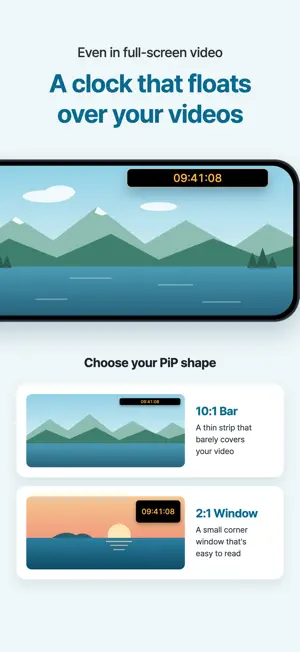
Ever had a video playing while you shower or get ready for work, and had to tap the screen every time just to check the time? On ticketing or class registration day, you might even turn on a computer or keep a separate browser window open just to watch the server time. SomTime shows a clock in the Dynamic Island and in a floating PiP window, so you can check the time while watching videos without touching the screen. It can show a clock synced to a website's server time and even let you practice the moment of booking, so you can get ready for ticket sales and class registration on a single phone screen. [Dynamic Island Clock] · Clock in the Island: See the current time down to the second in the Dynamic Island, whatever app you're using. · Landscape support: On iOS 27 or later, the clock stays in the Island even when you watch videos full screen in landscape. · Lock Screen: See the clock right on your Lock Screen. [PiP Clock Over Videos] · Floating clock: Show the clock in a small PiP window and check the time even over full-screen videos. · Aspect ratio: Choose between a thin bar (10:1) that barely covers your video and a small window (2:1). · No Dynamic Island? No problem: Use the PiP clock the same way on iPhone SE, notch models, and iPad. [Server Time for Ticket Sales and Class Registration] · Measure server time: Just enter a website address and SomTime syncs to that site's server clock. · Precise correction: It measures several times to correct for network delay and shows the margin of error. · Compare with your phone: See at a glance how many seconds your phone is ahead or behind. · Show it where you want: Put the synced server time in the Dynamic Island or the PiP clock and get ready on one phone screen, no computer needed. · Milliseconds: The PiP clock can show milliseconds so you never miss the exact moment. [Ticketing Practice] · On-Time Tap: Watch a practice clock run from 09:59:50 and tap Book right at 10:00:00 to see how far off you were. · Seat Pick: Find an open seat on the seat map and tap Book before time runs out. · Difficulty: Choose Easy, Normal, or Hard. Seats vanish one by one, as if others grabbed them first, just like the real thing. · Records: Track your best and latest results and watch yourself get faster. [Make the Clock Yours] · Clock design: Pick from Classic, Bold, Mono, and Dot. · Clock color: Choose from 6 colors: Amber, Coral, Lavender, Mint, Sky, and White. · Display options: Set 12- or 24-hour time, AM/PM, and whether to show seconds. [Comfortable to Use] · No sign-in: Use every feature right after installing, no account needed. · No sound interruptions: The PiP clock makes no sound, so it won't stop the video or music you're playing. · Stays on your device: Your settings and practice records are stored only on your device and never sent to the developer. Whether you're watching a video or getting ready for ticket sales, check the time at a glance with SomTime!
What’s new
Version 26.4.0 · Updated November 2, 2026
- You can now add a pacer to your PiP clock. It runs faster as the target time gets closer. - Check in every day or watch an ad to earn points and unlock new pacers. - Fixed an issue where the time was cut off in the 2:1 PiP window when AM/PM was shown.
App privacy
The developer, Seongpil Heo, reported these privacy practices to Apple.
Data Linked to You
The following data, which may be collected and linked to your identity, may be used for the following purposes:
- Diagnostics: Performance Data
Used for: Third-Party Advertising, Analytics
Data Not Linked to You
The following data, which may be collected but is not linked to your identity, may be used for the following purposes:
- Location: Coarse Location
- Identifiers: Device ID
- Usage Data: Product Interaction, Advertising Data
- Diagnostics: Crash Data
Used for: Third-Party Advertising, Analytics
Alternatives to SomTime: Island & PiP Clock
Looking for apps like SomTime: Island & PiP Clock? Here are 6 similar apps on the App Store.
-
 땡초
-
 Color Date Plus
-
 Off-Time - Gallery Companion.
-
 Atto — Ticket Drop Timer
-
 CUE! Time Signal Sync
-
 Nanotime: Server Time Clock
| App | Rating | Price | Last updated | Compare |
|---|---|---|---|---|
| SomTime: Island & PiP Clock | – | Free | November 2, 2026 | |
| 땡초 | – | Free | Sep 11, 2026 | Compare |
| Color Date Plus | – | 1.99 USD | Apr 8, 2026 | Compare |
| Off-Time - Gallery Companion. | – | Free | Oct 15, 2026 | Compare |
| Atto — Ticket Drop Timer | – | Free | Oct 16, 2026 | Compare |
| CUE! Time Signal Sync | – | Free | Sep 20, 2026 | Compare |
| Nanotime: Server Time Clock | – | Free | Oct 30, 2026 | Compare |