

Pole Plumb
Carson Webber Utilities iPhoneiPadiPod touch
Pole Plumb is a free Utilities app for iPhone and iPad by Carson Webber. Requires iOS 17.0. Updated October 28, 2026.
- Price
- Free
- on the App Store
- Size
- 11 MB
- Age 17+
- Updated
- Oct 28
- 2026 · v1.0
Screenshots

About Pole Plumb
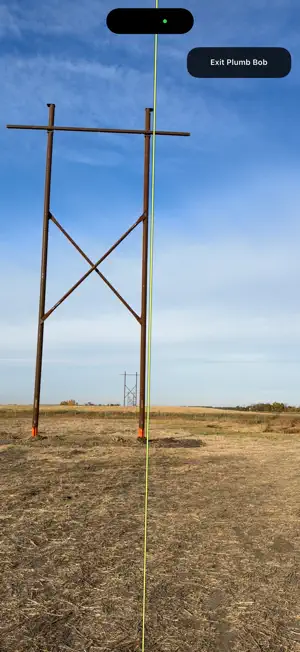
Pole Plumb helps field crews visually check pole alignment and capture clear, detailed inspection photos from an iPhone or iPad. Use the full-screen camera with a gravity-referenced grid or centre line to compare a pole or structure against a vertical reference. Add job details, notes, camera coordinates and timestamps to create a consistent record of each check. Features include: • Live alignment grid that responds to device tilt. • Adjustable grid spacing, viewing plane, colour and visibility. • Camera location coordinates, reported location accuracy and compass direction when available. • Date and time stamped onto captured photos. • Editable job or structure names, Along line and Across line labels, and inspection notes. • Freeze-frame viewing to hold an image before saving. • Full-resolution photo capture, with an optional viewfinder crop. • Save captures in the app, export to Photos or a selected Files folder, and share through your device’s sharing options. Designed for utility construction, maintenance and field inspections, Pole Plumb helps document conditions and keep photo records organised. Photos and inspection details are processed on your device. There are no accounts, advertisements or automatic uploads to a developer-operated server. Pole Plumb provides a visual alignment reference. Displayed roll and pitch describe the device’s orientation; the app does not calculate a pole’s lean angle or replace surveying equipment. Location availability and accuracy depend on your device, permissions and reception. Wi-Fi-only iPads rely on available network-based location information.
App privacy
The developer, Carson Webber, reported these privacy practices to Apple.
Data Not Collected
The developer does not collect any data from this app.