

PDF Tool Pro für iPhone & iPad
Rainer Duerr Productivity iPhoneiPadiPod touch
PDF Tool Pro für iPhone & iPad is a free Productivity app for iPhone and iPad by Rainer Duerr. Requires iOS 17.0. Updated October 11, 2026.
- Price
- Free
- on the App Store
- Size
- 2 MB
- Age 4+
- Updated
- Oct 11
- 2026 · v1.1
Screenshots



About PDF Tool Pro für iPhone & iPad
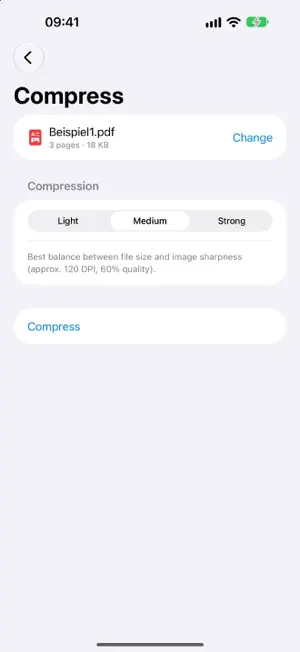
Most PDF tools on the web start by asking you to upload your file. With a contract, an invoice or a medical record, that is not a small thing. PDF Tool Pro works entirely on your iPhone and iPad. No upload, no account, no background service. A file leaves your device only if you save or share it yourself. SCANNING Capture documents with the camera: edges are detected automatically and the page is straightened. Several pages become one PDF. MERGE AND SPLIT Combine several PDFs into one document in the order you choose. Extract single pages – the page preview shows exactly what you are selecting. MAKE IT SMALLER Reduce file size at a level you pick. Useful for anything that has to go out by email or into an upload form. PUT PAGES IN ORDER Rotate, delete and reorder pages, with a preview of each one. IMAGES AND PDF Combine photos from your library or from Files into a PDF – or save individual pages as images. WATERMARKS Stamp text as a watermark on every page: colour, size, opacity and position are adjustable. PASSWORD PROTECTION Protect a document with a password. The app also opens protected PDFs: you are asked for the password and it is never stored. Encryption uses AES-128, the level iOS offers when writing PDFs. OPEN FROM OTHER APPS Tap a PDF in Mail, Files or Safari, choose “Share” and pick PDF Tool Pro. NO CLOUD, NO ACCOUNT No sign-in, no ads, no analytics, no subscription. The app collects no data and does not go online itself. The camera is used only for scanning. Trial and purchase are handled by Apple's App Store. TRY FREE, BUY ONCE All tools are free and unrestricted for 7 days. After that, unlock the full version with a one-time in-app purchase – no subscription, no running costs. REQUIREMENTS iOS 17 or later. iPhone and iPad.
What’s new
Version 1.1 · Updated October 11, 2026
New: built-in help in English and German, a short introduction and (iPhone/iPad) a settings screen. • Mac: In the “Help” menu, “PDF Tool Pro Help” opens a guide to all tools. • iPhone and iPad: The question mark at the top of the home screen opens the help, the gear opens Settings. • The introduction appears at launch and can be switched off with the “Show at launch” switch. The help explains each tool step by step, password protection, scanning, and trial and purchase.
App privacy
The developer, Rainer Duerr, reported these privacy practices to Apple.
Data Not Collected
The developer does not collect any data from this app.
Alternatives to PDF Tool Pro für iPhone & iPad
Looking for apps like PDF Tool Pro für iPhone & iPad? Here are 6 similar apps on the App Store. The highest rated is Spot price (Electricity price) (5.0/5), and all 6 are free to download.
-
 Matomo Mobile 2
4.8
-
 Xdo - die Todo App
4.5
-
 Spot price (Electricity price)
5.0
-
 OctoApp for OctoPrint/Klipper
4.9
-
 Zoll-Ident
1.0
-
 Widgets 27
4.6
| App | Rating | Price | Last updated | Compare |
|---|---|---|---|---|
| PDF Tool Pro für iPhone & iPad | – | Free | October 11, 2026 | |
| Matomo Mobile 2 | 4.8 / 5 (124) | Free | Apr 29, 2026 | Compare |
| Xdo - die Todo App | 4.5 / 5 (2) | Free | Sep 30, 2026 | Compare |
| Spot price (Electricity price) | 5.0 / 5 (1) | Free | Oct 26, 2026 | Compare |
| OctoApp for OctoPrint/Klipper | 4.9 / 5 (1,314) | Free | Oct 29, 2026 | Compare |
| Zoll-Ident | 1.0 / 5 (2) | Free | Jul 9, 2026 | Compare |
| Widgets 27 | 4.6 / 5 (1,281) | Free | Oct 6, 2026 | Compare |