

WattWave: Charging Speed Test
Yigit Can Polat Utilities iPhoneiPadiPod touch
WattWave: Charging Speed Test is a free Utilities app for iPhone and iPad by Yigit Can Polat. Requires iOS 17.0. Updated October 30, 2026.
- Price
- Free
- on the App Store
- Size
- 13 MB
- Age 4+
- Updated
- Oct 30
- 2026 · v1.0.4
Screenshots

About WattWave: Charging Speed Test
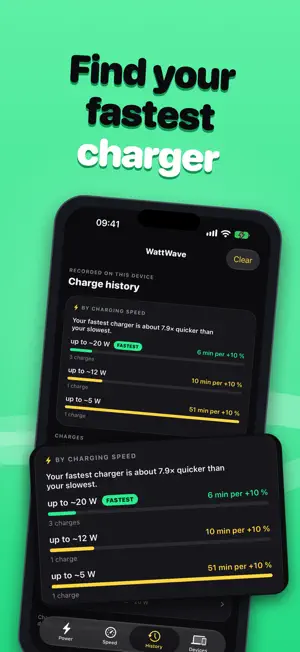
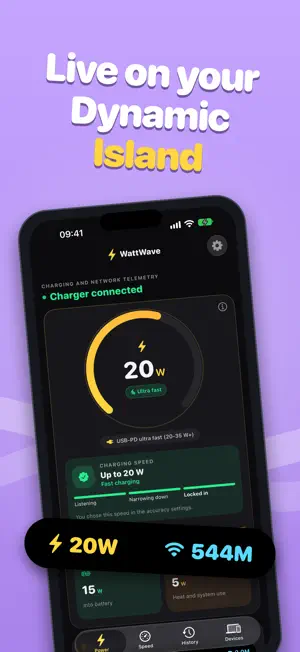
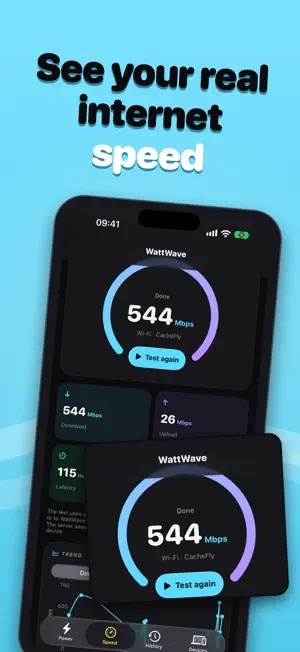
WattWave shows how fast your iPhone is charging and how fast your network really is. CHARGING POWER Plug in and the watts appear at once. WattWave works out how much power your phone draws from how quickly the battery rises and keeps refining the value while you charge. Pick your real charger or cable in Settings and it learns how efficient your setup is. The value is an estimate, because iOS gives apps no direct reading. DYNAMIC ISLAND AND LOCK SCREEN Keep power and network speed on the Dynamic Island and the Lock Screen. When you are not charging, it shows download and upload instead. Add your AirPods battery if you like. SPEED TEST Measure download, upload, delay and jitter, on Wi-Fi or cellular. Results are saved with a trend chart so you can compare networks and times of day. CHARGE HISTORY Every charge is recorded: how long, how much the battery gained and the charging speed it reached. DEVICES See devices on your Wi-Fi, Apple and others, and nearby Bluetooth devices including AirPods. Give devices names that stay on your iPhone. SIRI, SHORTCUTS AND WIDGET Ask for your charging power or run a speed test by voice. A Home Screen widget shows your last charge and last speed test. PRIVATE BY DESIGN No account, no ads, no analytics. Everything stays on your iPhone, and one tap in Settings deletes it. Try everything free for 3 days. Then unlock WattWave once, with no subscription.
What’s new
Version 1.0.4 · Updated October 30, 2026
• iPhone Duo support: WattWave now shows charging power on iPhone Duo. • Easier Live Activity setup: a new button on the Power screen walks you through the Shortcuts automation that starts the Dynamic Island when you plug in, and shows when it is working. • The charger measurement now picks up the time WattWave spent in the background. A slow charger it remembered no longer stays on screen after a faster charge. • The charge report now shows times only for the part of a charge WattWave saw. If the app was closed during a charge, the report shows the total time instead of guessing each step.
App privacy
The developer, Yigit Can Polat, reported these privacy practices to Apple.
Data Linked to You
The following data, which may be collected and linked to your identity, may be used for the following purposes:
- Purchases: Purchase History
- Identifiers: User ID
Used for: App Functionality
Alternatives to WattWave: Charging Speed Test
Looking for apps like WattWave: Charging Speed Test? Here are 6 similar apps on the App Store. The highest rated is ChargeWatt: Charging Speed (5.0/5), and 5 of the 6 are free to download.
-
 ChargeWatt: Charging Speed
5.0
-
 WattCheck: Cable Tester
1.0
-
 Hoardware - Device Collection
4.8
-
 Glassiu Browser: Video Sniffer
4.3
-
 WattCheck: Charger Power Meter
3.4
-
 Geekbench 7
3.9
| App | Rating | Price | Last updated | Compare |
|---|---|---|---|---|
| WattWave: Charging Speed Test | – | Free | October 30, 2026 | |
| ChargeWatt: Charging Speed | 5.0 / 5 (1) | Free | Oct 29, 2026 | Compare |
| WattCheck: Cable Tester | 1.0 / 5 (1) | Free | Sep 30, 2026 | Compare |
| Hoardware - Device Collection | 4.8 / 5 (14) | Free | Oct 26, 2026 | Compare |
| Glassiu Browser: Video Sniffer | 4.3 / 5 (3) | 0.99 USD | Sep 19, 2026 | Compare |
| WattCheck: Charger Power Meter | 3.4 / 5 (11) | Free | Oct 7, 2026 | Compare |
| Geekbench 7 | 3.9 / 5 (11) | Free | Sep 19, 2026 | Compare |