

APART: Flight Logbook
Dustoff Designs LLC Productivity iPhoneiPadiPod touchMac
APART: Flight Logbook is a paid Productivity app for iPhone and iPad by Dustoff Designs LLC. Requires iOS 17.0. Updated October 21, 2026.
- Price
- 14.99 USD
- on the App Store
- Size
- 8 MB
- Age 4+
- Updated
- Oct 21
- 2026 · v1.2
Screenshots



About APART: Flight Logbook
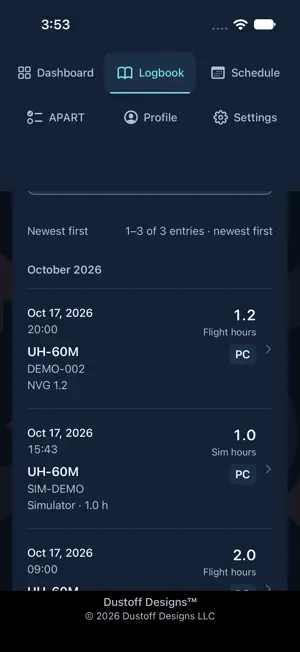
Your Army flight logbook on iPhone, iPad and Mac. Import your historical CAFRS flight data into APART, review aircraft and simulator records, and export selected flights to LogTen. Built for Army aircrew, including pilots who also fly for airlines or use LogTen to manage their flying history. Work on your phone, iPad or desktop. Mac support includes a resizable layout and native file import and export, with support for Apple silicon and Intel Macs running macOS 14 or later. See aircraft and simulator hours for each semiannual period or APART year. Track Day, Night unaided, NVG, Apache NS, Hood and Weather, with aircraft filters and lifetime totals. Review evaluations, academics and currency alongside upcoming deadlines. Start with your birth month, aircraft and assigned duties. Import CAFRS FlightData XLSX or enter starting hours without rebuilding every past flight. Import review shows additions, matches and records needing attention before you save. Browse your logbook by year and month, search records, and correct entries when needed. Review editable hour targets and unit requirements for your aircraft, FAC and readiness. Day/Night, NVG and Apache NS readiness are separate. Add custom evaluations, academics and tasks requiring currency. Scheduled flights and evaluation completions do not add flown hours. Plan upcoming flights in the two-week calendar. Enter a date and departure time, or review name-matched assignments from a schedule document or image. Import runs on your device; check the proposed dates and times before saving. Optional reminders prompt you to check the latest schedule. Export a flight-log CSV, selected flights to LogTen, or an APART closeout form filled with your saved information. Official signatures and unknown fields remain blank. LogTen is optional and its import remains subject to your review. Keep records on your device and use optional iCloud backup with your own Apple Account and storage. Backup is not live synchronization between devices. A full APART backup includes logbook years, profile, requirements, completion results, currency history and settings; schedules and reminders are excluded. Restore shows a preview before replacing saved data. Weekly backups are recommended. APART is an independent personal tracking aid by Dustoff Designs LLC. Verify requirements, currency and credit against your assigned unit plan and official records. It is not an official Army record or certification of qualification. No app account, advertising, subscription or in-app purchase is required.
What’s new
Version 1.2 · Updated October 21, 2026
CAFRS import fixes • Fixed import failures caused by incomplete personal-flight rows and differences between personal hours and aircraft totals. • Added support for larger unit extracts with clear review of records needing your confirmation. • A malformed row no longer blocks valid flights. Save reviewed flights and keep unresolved records in Import history for later correction. • Improved duplicate review, including reimporting corrected files without duplicating saved flights. Separate aircraft CTLs • Track each aircraft family’s hours, requirements, FAC, readiness and currency independently across H-60, UH-72, AH-64, C-12 and CH-47. • Alternate variants within the same family share APART hour totals while keeping separate aircraft currency. • Review earlier CAFRS aircraft mappings without losing flight notes, tasks or source information. Setup and import history • Select all assigned duties in one screen, then tap Done. • Clearer setup separates similar aircraft using one CTL from independently tracked dual CTLs. • View saved CAFRS import summaries showing added, updated, skipped, excluded and deferred records. Clearer screens and help • Shorter help and clearer hour, backup and export labels. • Requirement Add buttons open the correct form type. • Correct APART-year counts when multiple aircraft CTLs share one year. • C-12 no longer asks for an NVG target when NVG duties are not assigned. Currency and wording • Redesigned currency cards with consistent sizing, aligned dates and clear status labels. • Made C-12 refresher course tracking easier to find from the dashboard. • Simplified labels in setup, imports, requirements, backups and schedule entry. App updates • Optional notices let you know when a newer APART version is available. • A brief What’s New screen explains each update. Mac refinements • Matched the sizes of the semiannual dashboard cards. • Improved separate-CTL setup and cancellation on Mac.
App privacy
The developer, Dustoff Designs LLC, reported these privacy practices to Apple.
Data Not Collected
The developer does not collect any data from this app.
Alternatives to APART: Flight Logbook
Looking for apps like APART: Flight Logbook? Here are 6 similar apps on the App Store. The highest rated is SDS Manager (4.8/5), and 5 of the 6 are free to download.
-
 ACES FLIGHT LOG
3.8
-
 Mil Fuel Check
4.3
-
 WhenAvailable
4.3
-
 SDS Manager
4.8
-
 MilDrills
4.7
-
 Visual Pre Plans
3.8
| App | Rating | Price | Last updated | Compare |
|---|---|---|---|---|
| APART: Flight Logbook | – | 14.99 USD | October 21, 2026 | |
| ACES FLIGHT LOG | 3.8 / 5 (9) | Free | Jul 11, 2026 | Compare |
| Mil Fuel Check | 4.3 / 5 (21) | 4.99 USD | Apr 25, 2026 | Compare |
| WhenAvailable | 4.3 / 5 (7) | Free | Sep 28, 2026 | Compare |
| SDS Manager | 4.8 / 5 (16) | Free | Oct 21, 2026 | Compare |
| MilDrills | 4.7 / 5 (32) | Free | Oct 5, 2026 | Compare |
| Visual Pre Plans | 3.8 / 5 (21) | Free | Oct 23, 2026 | Compare |