

StudyNotes: Notebook & PDF
VELI KECECI Education iPhoneiPadiPod touch
StudyNotes: Notebook & PDF is a free Education app for iPhone and iPad by VELI KECECI. Requires iOS 18.0. Updated October 26, 2026.
- Price
- Free
- on the App Store
- Size
- 5 MB
- Age 4+
- Updated
- Oct 26
- 2026 · v2.0.0
Screenshots

About StudyNotes: Notebook & PDF
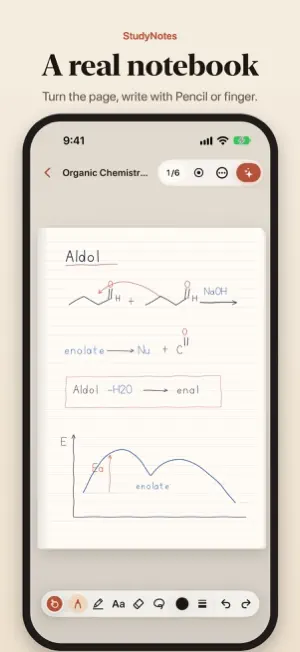
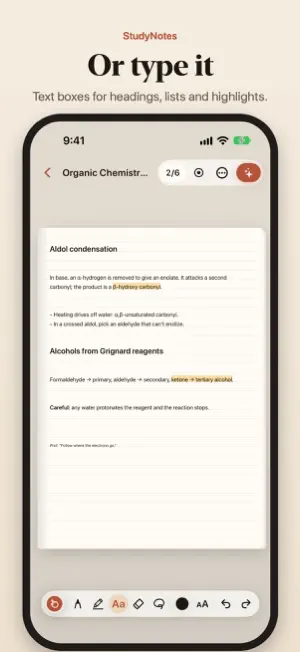
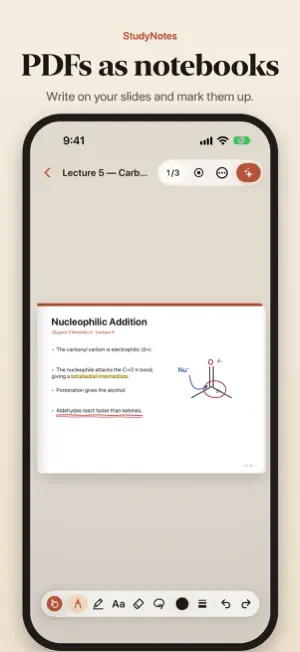
StudyNotes works like a real notebook. Open a notebook, write with Apple Pencil or your finger, type text anywhere on the page and turn pages just like paper. Start right away without an account; your notebooks are stored on your device. WRITE • Pencil mode with Apple Pencil: the pencil writes, your finger turns pages • Finger mode: one finger writes, two fingers turn pages, so you get the whole notebook even without a pencil • Text boxes anywhere on the page: bold, italic, underline, highlight, bullets and three text sizes; on lined paper the text sits on the lines • Pen, highlighter, eraser, lasso and colors; every page has its own undo history TURN THE PAGE • Pages that curl as they turn, like paper; on iPad in landscape the notebook lies open with two pages side by side • In the page grid, jump to a page, drag to reorder, add, duplicate or delete pages • Blank, lined, grid and dotted paper; A5, B5 and A4 pages • Export a notebook as PDF any time; text boxes become selectable text in the PDF IPHONE DUO • Closed, you get a single page; open, the fold becomes the notebook's spine with two pages side by side • Half folded, the page sits on top with tools and keyboard below; open or close it and your writing stays in place STUDY WITH PRO • Unlimited notebooks and pages • PDFs as notebooks: open lecture notes or a book and write on its pages • AI summaries: every point shows the page you wrote it on, and a tap turns to that page • Question cards with spaced repetition, quizzes with instant feedback, and a mistakes list that collects what you got wrong • Turn your handwriting into text and search your notebook • Record a lecture: on playback, the notebook turns to the page you were writing on at that moment • Sync and cloud backup across iPhone, iPad and iPhone Duo FREE AND PRO The free plan includes 1 notebook with 10 pages, all writing tools, text boxes, PDF export and 3 AI trial runs. The AI trial requires signing in with Apple or Google; runs do not renew. Pro is offered monthly and yearly with the same features. If your subscription ends, none of your notebooks are deleted; you can read and export them all and keep writing in one notebook you choose. SUBSCRIPTION INFORMATION StudyNotes Pro is offered as monthly and yearly auto-renewing subscriptions. The yearly plan may include a free trial; if it does, the purchase screen shows it with its length. Payment is charged to your Apple Account when you confirm the purchase. The subscription renews automatically at the same price unless it is cancelled at least 24 hours before the end of the current period. You can manage and cancel your subscription in your App Store account settings. Any unused part of a free trial ends when you buy a subscription. Privacy policy: https://studynotes.velikececi.com/privacy Terms of use (EULA): https://www.apple.com/legal/internet-services/itunes/dev/stdeula/ Support: https://studynotes.velikececi.com/support
What’s new
Version 2.0.0 · Updated October 26, 2026
StudyNotes 2.0 is rebuilt to work like a real notebook. • Write with Apple Pencil or your finger, and type text boxes anywhere on the page • Pages that curl as they turn; on iPad in landscape, two pages side by side • Blank, lined, grid and dotted paper; A5, B5 and A4 pages • iPhone Duo support: unfold it and the fold becomes the notebook's spine • With Pro: PDFs as notebooks, AI summaries, question cards and quizzes, lecture recording • The app is now available in English • Text follows your Dynamic Type size, with easier-to-read colors Your earlier notes stay read-only in the "Old notes" archive; export them or add them to a notebook as pages.
App privacy
The developer, VELI KECECI, reported these privacy practices to Apple.
Data Linked to You
The following data, which may be collected and linked to your identity, may be used for the following purposes:
- Purchases: Purchase History
- Contact Info: Email Address
- User Content: Audio Data, Other User Content
- Identifiers: Device ID
Used for: App Functionality
Alternatives to StudyNotes: Notebook & PDF
Looking for apps like StudyNotes: Notebook & PDF? Here are 6 similar apps on the App Store. The highest rated is JustEnglishMobile (5.0/5), and all 6 are free to download.
-
 LetEval
-
 Middle Earth Explorer
4.5
Middle Earth Explorer
4.5
-
 JustEnglishMobile
5.0
JustEnglishMobile
5.0
-
 Veli İletişim Üçgeni
2.5
Veli İletişim Üçgeni
2.5
-
 ÜçDörtBeş Mobil Kütüphane
5.0
ÜçDörtBeş Mobil Kütüphane
5.0
-
 Tip Akademisi
| App | Rating | Price | Last updated | Compare |
|---|---|---|---|---|
| StudyNotes: Notebook & PDF | – | Free | October 26, 2026 | |
| LetEval | – | Free | Apr 13, 2026 | Compare |
| Middle Earth Explorer | 4.5 / 5 (18) | Free | Oct 27, 2026 | Compare |
| JustEnglishMobile | 5.0 / 5 (6) | Free | Sep 17, 2026 | Compare |
| Veli İletişim Üçgeni | 2.5 / 5 (8) | Free | Oct 26, 2026 | Compare |
| ÜçDörtBeş Mobil Kütüphane | 5.0 / 5 (5) | Free | Jan 30, 2025 | Compare |
| Tip Akademisi | – | Free | Oct 10, 2026 | Compare |