

Breezecut: Video Toolkit
文杰 饶 Photo & Video iPhoneiPadiPod touch
Breezecut: Video Toolkit is a free Photo & Video app for iPhone and iPad by 文杰 饶. Requires iOS 18.0. Updated October 9, 2026.
- Price
- Free
- on the App Store
- Size
- 21 MB
- Age 4+
- Updated
- Oct 9
- 2026 · v1.0.1
Screenshots
Save to Pinterest


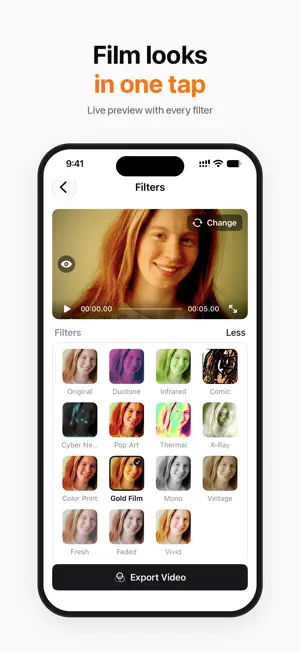
About Breezecut: Video Toolkit
Shrink a video to send it, protect your work with a watermark, add subtitles to a talking clip, or turn a landscape video into a vertical one — without opening a complicated editor. EVERYTHING STAYS ON YOUR IPHONE Videos, photos and audio are never uploaded. Speech recognition and enhancement run on device. No app watermark, no ads. EDIT • Compress: HEVC / H.264 presets, with before and after sizes • Merge: join clips with dissolve, dip to black or slide transitions • Trim: drag the handles, frame accurate • Resize canvas: 9:16, 1:1, 16:9 and more, with a blurred background fill • Split Screen: two videos side by side or stacked • Speed: 0.25× to 4×, audio keeps its pitch • Rotate & flip, reverse, fade in and out • Slideshow: turn photos into a video with music • Convert: MP4 / MOV, re-encode to H.264 or HEVC PICTURE & SUBTITLES • Enhance: remove noise and sharpen in one tap • Filters: 15 looks including film, comic and neon, plus brightness, contrast and warmth • Text & Stickers: add text, images and stickers, or blur faces and license plates • Face Blur: finds faces automatically and keeps them pixelated as people move • Device Mockup: put your video in a phone, tablet or laptop frame • Watermark: text or logo, including a tiled pattern • Auto Subtitles: speech to subtitles, editable line by line, burned in or exported as SRT • GIF maker, Live Photo maker, frame grab, media info AUDIO • Add Music: background music with separate volume for the original audio • Extract audio, mute • Ringtone maker: up to 30 seconds, ready for iPhone PRO Burning subtitles into video, Face Blur, Device Mockup, Split Screen, Text & Stickers, Live Photo and Photo Slideshow are Pro tools. Each can be tried once for free. Recognizing, editing and exporting subtitles as SRT is free, and so is every other tool. Monthly and Yearly are auto-renewable subscriptions; Lifetime is a one-time purchase. Payment is charged to your Apple Account at confirmation of purchase. A subscription renews automatically unless auto-renew is turned off at least 24 hours before the end of the current period. Manage or cancel in Settings → Apple Account → Subscriptions. Terms of Use: https://www.apple.com/legal/internet-services/itunes/dev/stdeula/ Privacy Policy: https://jackyrwj.github.io/vidbox-support/en/privacy.html
What’s new
Version 1.0.1 · Updated October 9, 2026
• A gentle rating prompt after you save a few results – thanks for your support! • Small fixes and improvements.
App privacy
The developer, 文杰 饶, reported these privacy practices to Apple.
Data Not Collected
The developer does not collect any data from this app.
Alternatives to Breezecut: Video Toolkit
Looking for apps like Breezecut: Video Toolkit? Here are 6 similar apps on the App Store. The highest rated is Bygone: Restore Old Photos (5.0/5), and all 6 are free to download.
-
 Kickcut - Music Video Maker
-
 随手打码 - 视频马赛克
-
 Video Merger Expert
-
 Mayax: Video Editor & Captions
2.0
-
 Shrinkly: Compress Video
-
 Bygone: Restore Old Photos
5.0
| App | Rating | Price | Last updated | Compare |
|---|---|---|---|---|
| Breezecut: Video Toolkit | – | Free | October 9, 2026 | |
| Kickcut - Music Video Maker | – | Free | Sep 29, 2026 | Compare |
| 随手打码 - 视频马赛克 | – | Free | Sep 8, 2026 | Compare |
| Video Merger Expert | – | Free | Jul 13, 2026 | Compare |
| Mayax: Video Editor & Captions | 2.0 / 5 (1) | Free | Oct 31, 2026 | Compare |
| Shrinkly: Compress Video | – | Free | Sep 27, 2026 | Compare |
| Bygone: Restore Old Photos | 5.0 / 5 (1) | Free | Oct 1, 2026 | Compare |