

Blockbird: Ad Blocker
MediaHub Limited Utilities iPhoneiPadiPod touch
Blockbird: Ad Blocker is a free Utilities app for iPhone and iPad by MediaHub Limited. Requires iOS 17.0. Updated November 21, 2026.
- Price
- Free
- on the App Store
- Size
- 60 MB
- Age 4+
- Updated
- Nov 21
- 2026 · v1.3
Screenshots
Save to Pinterest


About Blockbird: Ad Blocker
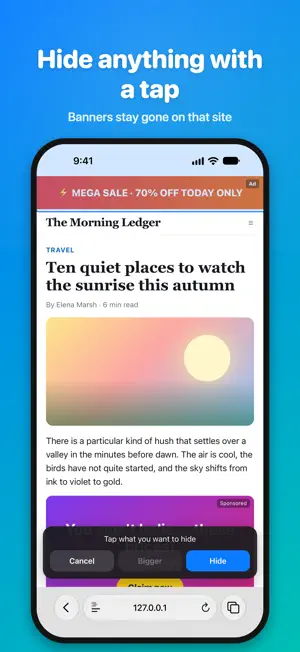
Blockbird blocks ads, trackers and cookie pop-ups in Safari — and in Chrome and other browsers on your iPhone. Pages load faster, look cleaner and use less data. WORKS IN SAFARI AND CHROME • Safari: Blockbird's content blockers give Safari the rules, so they never see the pages you visit. • Chrome and other browsers have no extensions on iPhone, so Blockbird adds a DNS filter that runs on your iPhone. Ad and tracker servers simply don't load. POP-UPS, REDIRECTS AND VIDEO ADS • An optional Safari extension stops pop-up and pop-under ads, ad tabs that open by themselves and redirects to ad sites. • The same extension removes ad breaks from videos on the most popular video site before they load: no waiting to skip, and no data spent on ads. HIDE ANYTHING WITH A TAP • In Safari, open the page menu, tap Blockbird, then Hide an Element, and tap a banner or box. It stays hidden on that site; undo it any time in the app. SPAM TEXT FILTER • Texts from numbers that aren't in your contacts are sorted into Spam, Promotions and Transactions in Messages. • Spam: prizes and lotteries, gambling, instant loans, guaranteed investment returns, and texts with a link about a locked account or a parcel fee. • Transactions: one-time codes, bank notices, orders and appointments, so they're never hidden. • Promotions: discounts, coupons and texts with an opt-out line. • Texts are checked on your iPhone and never sent anywhere. SEE WHAT WAS BLOCKED • A weekly summary of ads, trackers and pop-ups stopped, with an estimate of the data saved • A widget for the Home Screen and Lock Screen, and an optional weekly report FILTERS FOR YOUR LANGUAGES, ALWAYS UP TO DATE • Regional filter lists for 25 languages, matched to the languages on your iPhone • EasyList, EasyPrivacy and 30 more community lists, all credited in the app • Lists update automatically, without waiting for an app update YOU STAY IN CONTROL • Something looks broken? Turn blocking off for one site from Safari's Share menu. • Turn each kind of filter on or off. YOUR BROWSING STAYS PRIVATE • Filtering happens on your iPhone. We don't run servers that see your traffic. • Only DNS lookups go through the local VPN, sent to Cloudflare over encrypted DNS. All other traffic goes directly. GOOD TO KNOW Ads inside other apps, such as video and social apps or games, come from the same servers as their content, so they can't be blocked. In Chrome, some pages may show empty spaces where ads were. SUBSCRIPTION Blocking requires an auto-renewable subscription; plans and free trial details are shown in the app before you subscribe. Payment is charged to your Apple Account when you confirm the purchase or when the free trial ends. The subscription renews automatically unless you cancel at least 24 hours before the end of the current period. Manage or cancel it in Settings → your name → Subscriptions. Terms of Use: https://blockbird.app/terms/ Privacy Policy: https://blockbird.app/privacy/
What’s new
Version 1.3 · Updated November 21, 2026
Blockbird 1.3 brings more protection: • Pop-ups and redirects: an optional Safari extension stops ad tabs that open by themselves and redirects to ad sites. • Videos without ads: the same extension removes ad breaks from videos on the most popular video site before they load, so you don't wait to skip and don't spend data on ads. • Hide anything with a tap: in Safari, open the page menu, tap Blockbird, then Hide an Element. • Spam text filter: texts from numbers that aren't in your contacts are sorted into Spam, Promotions and Transactions in Messages, right on your iPhone. • See what was blocked and how much data you saved: a weekly summary, widgets for the Home Screen and Lock Screen, and an optional weekly report. • Filter lists now update automatically, without waiting for an app update. • Fixes and improvements.
App privacy
The developer, MediaHub Limited, reported these privacy practices to Apple.
Data Used to Track You
The following data may be used to track you across apps and websites owned by other companies:
- Purchases: Purchase History
- Identifiers: Device ID
- Usage Data: Product Interaction
Data Linked to You
The following data, which may be collected and linked to your identity, may be used for the following purposes:
- Purchases: Purchase History
- Identifiers: Device ID
- Usage Data: Product Interaction
Used for: Third-Party Advertising, Developer’s Advertising or Marketing, Analytics, App Functionality
Data Not Linked to You
The following data, which may be collected but is not linked to your identity, may be used for the following purposes:
- Location: Coarse Location
- Other Data: Other Data Types
- Diagnostics: Crash Data
Used for: Analytics, App Functionality
Alternatives to Blockbird: Ad Blocker
Looking for apps like Blockbird: Ad Blocker? Here are 6 similar apps on the App Store. The highest rated is Cloak - Private Browser (4.2/5), and all 6 are free to download.
-
 Safi: Ad Blocker for Safari
-
 Cloak - Private Browser
4.2
-
 Hush: Adblock Browser
-
 Fusegi - 広告ブロックブラウザ
-
 Phone Guardian - Ad Blocker
-
 Clearpage: Safari Ad Blocker
| App | Rating | Price | Last updated | Compare |
|---|---|---|---|---|
| Blockbird: Ad Blocker | – | Free | November 21, 2026 | |
| Safi: Ad Blocker for Safari | – | Free | Oct 25, 2026 | Compare |
| Cloak - Private Browser | 4.2 / 5 (5) | Free | Nov 15, 2026 | Compare |
| Hush: Adblock Browser | – | Free | Nov 23, 2026 | Compare |
| Fusegi - 広告ブロックブラウザ | – | Free | Nov 18, 2026 | Compare |
| Phone Guardian - Ad Blocker | – | Free | Nov 23, 2026 | Compare |
| Clearpage: Safari Ad Blocker | – | Free | Oct 16, 2026 | Compare |