

Clones: Clone Yourself Video
JOSE ARTURO LUNAGOMEZ MUNOZ Photo & Video iPhoneiPadiPod touch
Clones: Clone Yourself Video is a free Photo & Video app for iPhone and iPad by JOSE ARTURO LUNAGOMEZ MUNOZ. Requires iOS 26.0. Updated October 13, 2026.
- Price
- Free
- on the App Store
- Size
- 4 MB
- Age 4+
- Updated
- Oct 13
- 2026 · v1.1
Screenshots
Save to Pinterest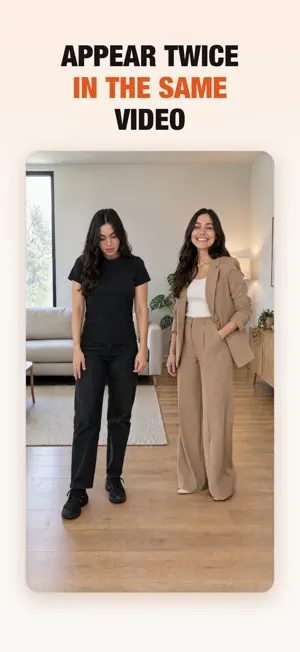


About Clones: Clone Yourself Video
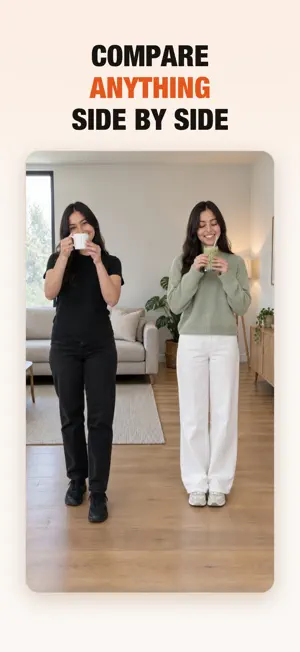
Make videos where you appear twice: you on one side of the screen and your clone on the other. No green screen, no computer: just your iPhone. HOW IT WORKS 1. Set your phone on a tripod or lean it on something steady. 2. Record your first clone on one side. Then record the second on the other side, watching the first one so you can answer back. 3. Clones splits the screen in two and puts you together in one video. Already have a video where you switch sides? Pick it from your library and mark the moment you switch. IDEAS • This vs. that: two outfits, two opinions. • Talk to yourself: you ask and you answer. • Comparison: two products side by side. SIMPLE EDITOR • Timeline with a fixed playhead in the middle, like the editors you already know. • Move and trim each clone, cut it anywhere and delete what you don't need. • Put photos over the video: move, rotate, crop them and fade them in. • Record your voiceover with a countdown. • Undo and redo. MADE FOR CREATORS • 9:16, 1:1 and 16:9 formats. • Export in 720p, 1080p or 4K, at 24, 30 or 60 fps, in HEVC or H.264. • Exposure, focus and color lock so both sides match. YOUR PRIVACY Everything is processed on your iPhone. No accounts, no servers and no tracking. Your videos are never uploaded. FREE AND CLONES PRO Free: 5 videos a month, no watermark, up to 1080p at 60 fps. Clones Pro: unlimited videos, 4K export and clones that appear and disappear. Clones Pro is available as a monthly subscription, a yearly subscription or a one-time lifetime purchase. Subscriptions renew automatically unless canceled in Settings › your name › Subscriptions at least 24 hours before the end of the period. Terms of use (Apple standard EULA): https://www.apple.com/legal/internet-services/itunes/dev/stdeula/ Clones terms: https://diauraagency.com/clones/terminos/ Privacy policy: https://diauraagency.com/clones/privacidad/
What’s new
Version 1.1 · Updated October 13, 2026
Clones now splits the screen in two: you on one side and your clone on the other. • Record a clone on each side, watching the first one while you record the second. • Or use a video from your library where you switch sides. • Add photos over the video and record your voiceover with a countdown. • Cut, delete, undo and redo in the editor. • Examples on the home screen to inspire you.
App privacy
The developer, JOSE ARTURO LUNAGOMEZ MUNOZ, reported these privacy practices to Apple.
Data Not Collected
The developer does not collect any data from this app.
Alternatives to Clones: Clone Yourself Video
Looking for apps like Clones: Clone Yourself Video? Here are 6 similar apps on the App Store. The highest rated is DoubleVoix (5.0/5), and all 6 are free to download.
-
 CloneCam: Clone Photo&Video
-
 DoubleVoix
5.0
-
 Clipset: Clips to Reels & Ads
-
 AI Korean Baseball Trend
-
 Criss Cross: Video Merger
5.0
-
 SayLessAI
5.0
| App | Rating | Price | Last updated | Compare |
|---|---|---|---|---|
| Clones: Clone Yourself Video | – | Free | October 13, 2026 | |
| CloneCam: Clone Photo&Video | – | Free | Nov 29, 2026 | Compare |
| DoubleVoix | 5.0 / 5 (2) | Free | Nov 23, 2026 | Compare |
| Clipset: Clips to Reels & Ads | – | Free | Nov 23, 2026 | Compare |
| AI Korean Baseball Trend | – | Free | Jun 1, 2026 | Compare |
| Criss Cross: Video Merger | 5.0 / 5 (1) | Free | Nov 18, 2026 | Compare |
| SayLessAI | 5.0 / 5 (4) | Free | Nov 26, 2026 | Compare |