

AlbumSplit: Old Photo Albums
Osamu Nagata Photo & Video iPhoneiPadiPod touch
AlbumSplit: Old Photo Albums is a free Photo & Video app for iPhone and iPad by Osamu Nagata. Requires iOS 16.4. Updated October 27, 2026.
- Price
- Free
- on the App Store
- Size
- 5 MB
- Age 4+
- Updated
- Oct 27
- 2026 · v1.1.2
Screenshots


About AlbumSplit: Old Photo Albums
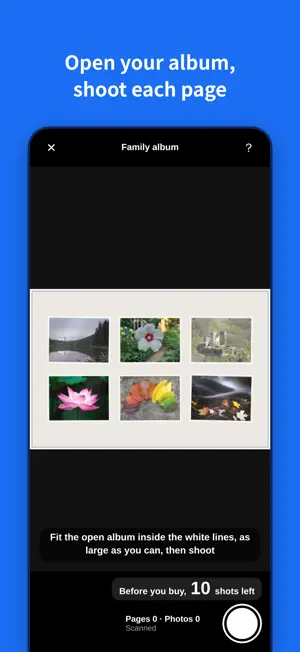
Open your album and photograph each page. AlbumSplit cuts the photos on the page into separate pictures and saves them on your iPhone. No account needed. ■ Just three steps 1. Open your album and lay it flat 2. In a bright spot without glare from lights, fit the whole page on screen and take one shot per page 3. Turn the page and repeat ■ One shot per page, however many photos are on it Four or six photos on a page — one shot splits them into separate pictures. Photos taken at an angle are straightened. No need to peel photos off the page. ■ Fix things afterwards • Adjust the crop by dragging the corner circles (pinch to zoom) • Add a frame yourself for any photo that wasn't found • Fix fading and yellowing on the photos you choose, all at once • Rotate photos • Add vague dates and notes like "around 1985" or "summer of '85" Widening a crop and "Add frame" work only while the original page photo is kept. If you delete the original page photos to free up space, you can only tighten crops. ■ Save to Photos, neatly grouped Save your photos to the Photos app in an album with your album's name, instead of scattering thousands of pictures in your library. Saving to Photos and elsewhere is available after purchase. Photos you took before buying can be saved too. ■ About payment • Take up to 10 shots before you buy and check the results in the app • Saving to Photos and elsewhere is available after purchase • You pay only once. It is not a subscription, so there are no monthly or yearly charges and nothing to cancel • After that, shoot and save as many times as you like • Your saved photos never carry the app’s name or logo (what’s called a watermark). The cut-out photos are saved just as they are • No account needed. Your photos stay on this iPhone and are never uploaded ■ Who this app may not be for A flatbed scanner gives better image quality. If you have a scanner, only a few photos, and time to scan them one by one, a scanner is the surer choice. AlbumSplit is for people who • don't have a scanner • have albums too big to fit on a scanner • have so many photos that doing them one by one isn't realistic
What’s new
Version 1.1.2 · Updated October 27, 2026
• Usability improvements • Fixed layout issues and other minor bugs
App privacy
The developer, Osamu Nagata, reported these privacy practices to Apple.
Data Not Collected
The developer does not collect any data from this app.
Alternatives to AlbumSplit: Old Photo Albums
Looking for apps like AlbumSplit: Old Photo Albums? Here are 5 similar apps on the App Store. The highest rated is Accsoon SEE (3.4/5), and all 5 are free to download.


| App | Rating | Price | Last updated | Compare |
|---|---|---|---|---|
| AlbumSplit: Old Photo Albums | – | Free | October 27, 2026 | |
| Albumbox: Photo Scanner | – | Free | Oct 26, 2026 | Compare |
| FocalFrame - 画角計算・ロケハン | – | Free | Nov 1, 2026 | Compare |
| Instamic Remote | 3.0 / 5 (1) | Free | Nov 7, 2025 | Compare |
| XTU GO | – | Free | Oct 12, 2026 | Compare |
| Accsoon SEE | 3.4 / 5 (49) | Free | Oct 26, 2026 | Compare |