

Cronlet – Shortcut Scheduler
Christopher Koch Productivity iPhoneiPadiPod touch
Cronlet – Shortcut Scheduler is a free Productivity app for iPhone and iPad by Christopher Koch. Requires iOS 18.0. Updated October 27, 2026.
- Price
- Free
- on the App Store
- Size
- 3 MB
- Age 4+
- Updated
- Oct 27
- 2026 · v1.1
Screenshots


About Cronlet – Shortcut Scheduler
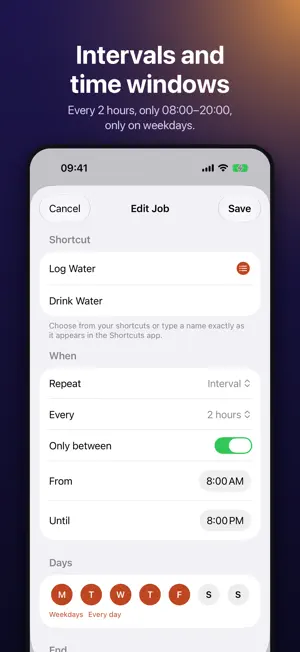
Run your Shortcuts on a schedule — in 45 minutes, every hour, weekdays at 17:00 or on the last Friday of the month. Shortcuts can already run things at a fixed time of day. Cronlet adds what's missing: intervals, one-off delays, time windows and monthly schedules, with a clear list of what runs next. SCHEDULE • Once: “in 15 / 30 / 45 / 60 minutes” or at any date and time • Daily: one or more times, on the weekdays you choose • Interval: every 5 minutes up to every 12 hours, optionally only between e.g. 08:00 and 18:00 on weekdays • Monthly: on chosen days, on the last day, or e.g. on the first Monday • Every few days or weeks • Stop automatically after a number of runs or on a date STAY IN CONTROL • Next run for every job at a glance • Pause and resume, Run Now • Upcoming runs and a local run history • Pick shortcuts from a searchable list — or type their names • A warning if your automation missed a run WIDGETS, CONTROL CENTER AND SIRI • Next Runs widget for the Home Screen and Lock Screen • A Control Center button that runs a job's shortcut once in a few minutes • Ask Siri to run, pause or resume a job; find your jobs in Spotlight ONE AUTOMATION FOR ALL JOBS Cronlet sends a notification when a job is due. A single Shortcuts automation reacts to it and runs the right shortcut. The in-app guide walks you through it once — after that, you only add jobs in Cronlet. SHORTCUTS ACTIONS • Get Due Shortcut — used by the automation • Schedule Shortcut — “run this in 30 minutes” from inside any shortcut • Run Job Later, Run Cronlet Job Now, Pause and Resume a job • Pause All Cronlet Jobs BACKUP Export your jobs to a file and import them again. No account needed. PRIVATE BY DESIGN No account, no server, no tracking. Everything stays on your iPhone. FREE AND PRO Free: up to 3 active jobs — once, daily and hourly. Cronlet Pro (one-time purchase, no subscription): unlimited jobs, any interval, time windows, several times per day, monthly and every-few-days schedules, automatic end, input text for your shortcuts and full history. Requires iOS 27 or later for notification-triggered automations. Without the automation, tap a Cronlet notification to run the shortcut.
What’s new
Version 1.1 · Updated October 27, 2026
• Monthly and every-few-days schedules (Pro) • End jobs after a number of runs or on a date (Pro) • Next Runs widget and a Control Center button • Siri and Spotlight: run, pause and resume jobs by name • Choose shortcuts from a list instead of typing their names • A warning when your automation misses a run • Export and import your jobs • Now in German, French and Spanish • A cleaner, simpler design
App privacy
The developer, Christopher Koch, reported these privacy practices to Apple.
Data Not Collected
The developer does not collect any data from this app.
Alternatives to Cronlet – Shortcut Scheduler
Looking for apps like Cronlet – Shortcut Scheduler? Here are 6 similar apps on the App Store. The highest rated is Cute Alarm: Loud Alarm Clock (5.0/5), and 5 of the 6 are free to download.
-
 Quotra: Daily Quote Widget
-
 Kuma : Status
-
 WiFi Widget - NetState
-
 HABly
HABly
-
 DeArrow for YouTube
4.4
DeArrow for YouTube
4.4
-
 Cute Alarm: Loud Alarm Clock
5.0
Cute Alarm: Loud Alarm Clock
5.0
| App | Rating | Price | Last updated | Compare |
|---|---|---|---|---|
| Cronlet – Shortcut Scheduler | – | Free | October 27, 2026 | |
| Quotra: Daily Quote Widget | – | Free | Sep 10, 2026 | Compare |
| Kuma : Status | – | Free | Oct 28, 2026 | Compare |
| WiFi Widget - NetState | – | Free | Oct 15, 2026 | Compare |
| HABly | – | Free | Dec 23, 2024 | Compare |
| DeArrow for YouTube | 4.4 / 5 (18) | 1.99 USD | Jun 10, 2026 | Compare |
| Cute Alarm: Loud Alarm Clock | 5.0 / 5 (2) | Free | Oct 18, 2026 | Compare |